Godwin Shaibu

  • Convert Tether (USDT) to Nigerian Naira (NGN) at Best Rates | Instant Conversion

    Convert Tether (USDT) to Nigerian Naira (NGN) at Best Rates | Instant Conversion

    Convert Tether (USDT) to Nigerian Naira (NGN) with real-time rates. Quick and easy crypto conversion with secure transactions.

    Rate calculator by Dtunes

    In cryptocurrency, stability is often hard to find, but that’s exactly what Tether (USDT) offers. Tether is a popular stablecoin designed to maintain a 1:1 value with the US dollar, making it a reliable option for traders and everyday users who want to avoid the extreme price fluctuations common in cryptocurrencies like Bitcoin.

    USDT has emerged as one of the most popular digital currencies in Nigeria, particularly in transactions, savings, and international payments. The use of USDT is favored by many Nigerians since it assists in maintaining value in a fluctuating economic system and facilitated easier access to international financial systems.

    The need to convert the USDT to Nigerian Naira (NGN) has been experienced with increased demands to use crypto. It is important to know how to exchange USDT in a very short time and at the most favorable terms be it cashing out profits or buying goods and services or to manage your money.

    Start Converting Now. Make fast, secure USDT to Naira transactions today!

    How to Convert USDT to Naira

    Converting USDT to Naira is simple when you follow the right steps. Here’s a quick guide to help you get started:

    1. Choose a Reliable Platform
      Select a trusted crypto exchange or platform such as Binance, Bybit, or local platforms like Swapto(Formerly Dtunes).
    2. Create and/or Log Into Your Account
      Sign up and complete any required verification (KYC) process to enable transactions.
    3. Deposit or Transfer Your USDT
      Send your USDT from your wallet to the platform’s wallet address.
    4. Sell or Convert USDT to NGN
      Use the platform’s “Sell” or “Convert” feature to exchange your USDT for Naira. Many Nigerian users prefer peer-to-peer (P2P) trading for better rates.
    5. Withdraw to Your Bank Account
      Once the transaction is complete, withdraw your Naira directly into your local bank account.

    Follow the processes above and you are good to go. Always check transaction fees and exchange rates before confirming any trade to ensure you’re getting the best value.

    Check Today’s Rates and start converting with confidence.

    Prefer speed and simplicity? Use Swapto(Formerly Dtunes) for fast and convenient transfers. 

    Best Platforms to Convert USDT to Naira in Nigeria

    When changing Tether to Naira, the appropriate platform can significantly affect the speed, charges, and the overall experience. Nigerian users prefer several platforms that are reliable, and the rates are competitive.

    International exchanges such as Binance and Bybit provide peer-to-peer (P2P) platforms where customers can sell USDT to buyers directly through the exchange and get Naira. These sites are highly reputed and offer escrow services in order to make transactions safe.

    On the local side, platforms like Swapto(Formerly Dtunes) have gained popularity for their simplicity and faster transaction processing tailored specifically for Nigerian users. They often eliminate the complexity of trading interfaces and provide a straightforward “convert and withdraw” experience.

    In choosing a platform, make sure to consider factors like speed of transactions, transaction fees, user interface, and customer service. Security is also important and be sure that the platforms have high reputations and verified users.

    Start Converting Now and enjoy fast, secure USDT to Naira transactions today!

    Benefits of Using Local Crypto Platforms in Nigeria

    Local crypto platforms are becoming increasingly popular for converting Tether to Naira due to their tailored services for Nigerian users.

    Platforms like Swapto(Formerly Dtunes) offer faster payouts, often completing transactions within minutes. Unlike global exchanges, they are designed with local banking systems in mind, making withdrawals smoother and more efficient.

    Another advantage is customer support. Local platforms typically provide support that understands the Nigerian financial environment, helping users resolve issues quickly.

    They also simplify the conversion process, making it ideal for beginners who may find international exchanges too complex. With fewer steps and a user-friendly interface, users can convert USDT to Naira without stress.

    Start Converting Now with a platform built for speed, simplicity, and reliability.

    Why Convert Tether (USDT) to Naira?

    It offers fast access to funds to meet the daily financial needs like bills, shopping and business payments. Cryptocurrency transactions can be more flexible and quicker than conventional banking systems.

    Cost efficiency is another benefit. The conversion of USDT by using peer-to-peer systems can assist users in avoiding high bank or international transfer charges. Also, users are able to exploit favorable exchange rates particularly when the demand is high.

    Cryptocurrencies are typically volatile, but USDT is notable for its stability. Being pegged to the US dollar, it minimizes the chances of unexpected decreases in value, thus being a more secure choice of storing and converting money.

    Learn More About USDT and how it helps you stay financially stable in the crypto market.

    USDT to Naira Conversion Fees Explained

    To maximize your returns, it is important to understand the fees that are incurred when converting USDT to Naira. Although Tether is stable, the price of conversion may differ depending on the platform you use.

    The majority of exchanges impose a trading fee, most of which is often a minor percentage of the exchange. On P2P exchanges such as Binance, the fee can be low or even nonexistent, although the offered exchange rate by buyers can have implicit margins.

    There are also withdrawal fees which might be charged at transferring Naira to your bank account. There are also network fees imposed by some platforms to transfer USDT between wallets on certain networks, particularly on networks such as Ethereum (ERC-20), which can be quite costly.

    To save money, it is possible to consider the use of networks that offer cheaper transaction costs, like TRC-20 (Tron network) and compare the pricing of several platforms before making a purchase.

    Check Today’s Rates and fees before converting to get the best value.

    USDT Networks and Their Impact on Conversion Speed

    Not all USDT transactions are the same. Speed and cost can be greatly influenced by the type of network you select. Tether is based on various blockchain platforms, such as Ethereum (ERC-20), Tron (TRC-20), and Binance Smart Chain (BEP-20).

    ERC-20 is the most popular network that is usually associated with higher transaction fees and processing time particularly when the network is busy. However, the TRC-20 network is more popular among the Nigerian users due to the faster transactions, and much lower fees.

    The selection of the appropriate network may save you money and take less time to make transactions. The majority of platforms, such as Binance, give you the option of choosing the network of your choice when depositing or withdrawing USDT.

    Always ensure that the sender and the recipient use the same network before transferring money, this will avoid you losing funds.

    Learn More About USDT networks and choose the best option for your transactions.

    Safety Tips When Converting USDT to Naira

    When exchanging USDT to Naira, security should be of the utmost priority. The transactions made with cryptocurrency are irreversible, so precautionary measures can ensure that you do not lose your money.

    To begin with, it is always wise to use trusted sites such as Binance or Swapto(Formerly Dtunes). One should not engage with people whom they do not know on platforms that are not verified because there is a high possibility of fraud.

    Turn on two-factor authentication (2FA) on your account to increase the level of protection. This makes sure that in the situation that your password is compromised your account is not compromised.

    Trade only with people that are verified when using P2P platforms with high ratings and a record of successful transactions. Never release your USDT until you are sure that you have received the money in your bank account.

    Lastly, do not share your private keys and login information. Do not disclose any sensitive information.

    Start Converting Now with secure and trusted platforms for peace of mind.

    Real-time USDT to Naira Exchange Rate

    A chart showing the trends of tether (usdt) over a period of time.

    The exchange rate between USDT and the Nigerian Naira changes frequently based on market conditions. Unlike fixed bank rates, crypto rates are influenced by supply and demand on trading platforms.

    To get the best value, always monitor live rates on platforms like Binance or CoinMarketCap. Look out for competitive offers, especially on P2P marketplaces where users set their own rates.

    It’s also important to compare multiple platforms before converting, as rates can vary slightly from one service to another.

    Check Today’s Rates before making any transaction to maximize your returns.

    Common Mistakes to Avoid When Converting USDT to Naira

    Simple mistakes and errors by many users when converting USDT into Naira can cause delays or loss of money. Among the most frequent ones is typing in the wrong address of the wallets or picking the wrong network. This can lead to the loss of money permanently since crypto transactions are irrevocable.

    Failure to take into account exchange rates is another mistake. Other users will hurry in making transactions without checking the rates of different platforms and therefore have fewer returns. Always spare some few minutes and compare various offers before making a purchase.

    Falling for scams is also a major risk. Avoid deals that seem too good to be true, especially outside trusted platforms like Binance or Swapto(Formerly Dtunes).

    Also, the risk of losing money by not verifying payment prior to issuing USDT in P2P trades can lead to losses. It is important to confirm that money has been deposited in your bank account.

    By having these in mind, you can have a successful and safe conversion process.

    Check Today’s Rates and trade smartly to avoid costly errors.

    Factors Influencing Exchange Rates

    Several factors affect the USDT to NGN exchange rate. One major factor is supply and demand, when more people want to buy USDT, the price in Naira increases, and vice versa.

    Economic conditions in Nigeria also play a key role. Inflation, foreign exchange scarcity, and government policies can impact how the Naira performs against the US dollar and, by extension, USDT.

    International markets and investor behavior can be affected by global events like geopolitical tensions like the US-India tensions. Such changes can have a secondary impact on prices of cryptocurrencies and domestic currencies.

    The best conversion value is achieved by keeping an eye on the market trends and converting the USDT at the right time when the rates are at an advantage. It can pay to time your transaction correctly, or you will not get the best out of your conversion and you may lose a lot.

    Stay updated and check Today’s Rates regularly for smarter conversions.

    Conclusion

    Converting Tether to Naira is fast, simple, and highly beneficial for Nigerians looking to access their funds quickly. With the right platform and timing, you can maximize your value and enjoy seamless transactions.

    Start Converting Now. Make fast, secure USDT to Naira transactions today!
  • P2P vs Exchange-Based Trading Methods: 4 Things to Consider When Selling Bitcoin in Nigeria

    P2P vs Exchange-Based Trading Methods: 4 Things to Consider When Selling Bitcoin in Nigeria

    Understanding the difference between P2P vs exchange-based trading methods is important when selling Bitcoin in Nigeria. Both options have their own advantages and disadvantages.

    Peer-to-peer (P2P) trading can offer higher rates than you would get from crypto-exchange platforms, but it comes with risks such as ghost buyers on WhatsApp or fake payment screenshots.

    On the other hand, crypto exchanges might not give rates as high as P2P traders, but you are assured of instant payout and more transparency. That said, issues like withdrawal delays or locked wallets still occur.

    Our articles on Bitcoin scams in Nigeria and how to get the best price for BTC are helpful guides to help you master safe trading practices, whether buying or selling.

    This article will break down the key differences between P2P and exchange-based methods and share 4 important tips to consider before selling your Bitcoin.

    What’s the Difference Between P2P and Exchange-Based Bitcoin Selling?

    P2P (peer-to-peer) trading means selling your Bitcoin directly to another individual. You both agree on the price, the person sends you money, and you release the Bitcoin manually. Binance P2P, Paxful, and even Telegram/WhatsApp groups are common platforms that offer P2P trading.

    Exchange-based methods use a centralized platform where you sell your Bitcoin directly to the platform. They handle the transaction, and you get paid. The speed of the transaction differs among crypto exchanges.

    Here are four key things to think about before choosing between P2P and exchange-based methods when selling Bitcoin in Nigeria.

    1. Security and scam risk
    2. Transaction speed and convenience
    3. Fees and True Value
    4. Accountability and Customer support

    1. Security & Scam Risk

    With peer-to-peer trading, you are responsible for verifying the buyer, confirming payment, and ensuring you don’t get scammed. Personal verification of buyers is getting increasingly hard, as you might not be privy to recent scam methods.

    Even on platforms like Binance P2P, you’re still open to scam attacks. One mistake and your Bitcoin is gone. Although resolution teams try to rectify the situation, they don’t work as fast as you’d expect them to.

    In contrast, exchange-based methods remove that risk entirely, with you selling directly to the platform, reducing risks of fake receipts or ghost buyers.

    2. Transaction Speed & Convenience

    P2P deals can take anywhere from 20 minutes to 2 hours, depending on how responsive the buyer is. Some buyers ghost mid-deal. Others ask unnecessary questions. Some delay payment intentionally to watch BTC prices fluctuate.

    Meanwhile, exchange platforms are built for speed. You send BTC, it confirms on the blockchain, and your naira hits your bank.

    3. Fees & True Value

    P2P platforms often lure you with high rates, but you won’t be told about the:

    • Withdrawal fees
    • Payment method limitations or
    • Rate volatility

    Exchange-based methods are transparent. What you see is what you get. There’s no hidden spread, and you know exactly how much naira will land in your account. Even with slightly lower rates, you might end up earning more with trusted exchanges.

    4. Accountability & Customer Support

    Most P2P platforms have dispute centers, but cases can drag on for days, and they may not always favoUr you. When you’re dealing with random buyers on WhatsApp or Telegram, there’s no customer support.

    Exchange platforms come with real human support, live chat, WhatsApp response, and Telegram agents. That means if you ever need help or clarification, someone’s got your back.

    In summary, P2P offers hopeful help, while exchange-based platforms are more guaranteed.

    Best Exchange Platform to sell Bitcoin in Nigeria

    At Swapto(Formerly Dtunes), we favor exchange platforms over P2P exchange mainly because of the ease, safety, and security it affords you.

    The best exchange platform to sell Bitcoin in Nigeria is Swapto(Formerly Dtunes). Are we just tooting our horn? Swapto(Formerly Dtunes) rids your trading experience of

    • Waiting on unreliable P2P buyers
    • Falling for screenshots
    • Getting ghosted mid-trade
    • Or being afraid to trade at all

    Here’s what makes Swapto(Formerly Dtunes) different:

    • You sell directly to Swapto(Formerly Dtunes).
    • Instant payout.
    • No hidden fees.
    • Built for Nigerians by Nigerians.
    • Available 24/7 on WhatsApp and Telegram.

    Swapto(Formerly Dtunes) is everything P2P wished they could offer you.

    How to Sell Bitcoin for Naira with Swapto(Formerly Dtunes)

    Swapto(Formerly Dtunes) homepage

    Here’s how to sell Bitcoin for Naira in minutes with Swapto(Formerly Dtunes):

    1. Download the Swapto(Formerly Dtunes) mobile app on Google Play Store or Apple App Store.
    2. Sign in or register using your details.
    3. Tap “Sell Crypto” from the homepage.
    4. Choose Bitcoin or any crypto you want to convert.
    5. Input the amount you want to sell. You’ll see the naira equivalent instantly.
    6. Click “Sell.”
    7. Before you begin, set up biometrics (fingerprint or face unlock) and Bank account connection
    8. Your funds should land in your bank within 5–10 minutes. That’s it. Fast, secure, and all from your phone.

    How to Deposit Crypto to Swapto(Formerly Dtunes) Wallet

    Before you can sell Bitcoin for Naira, you need to send crypto to your Swapto(Formerly Dtunes) wallet:

    1. Log into the Swapto(Formerly Dtunes) app
    2. Tap “Deposit.”
    3. Choose your preferred coin (e.g., BTC)
    4. Copy the wallet address
    5. Paste it in the external wallet you’re sending from (like Binance or Trust Wallet)
    6. Send the crypto

    Once confirmed on the blockchain, your balance on Swapto(Formerly Dtunes) will update.

    Now you can easily sell crypto in Nigeria and get paid directly to your bank account.

    P2P vs Exchange?

    FactorP2PExchange (e.g. Swapto(Formerly Dtunes))
    Scam RiskHighLow
    SpeedSlow to mediumFast (instant payout)
    TransparencyVariesHigh (clear rates, no spread)
    SupportWeak (buyer-dependent)Strong (dedicated human support)
    Best forExperienced risk-takersEveryone who values safety

    Final Thoughts

    Don’t rush your decisions in the crypto world. P2P might seem convenient or offer a sweeter deal upfront, but one mistake can cost you everything. Exchange-based platforms offer you peace of mind, transparency, and speed.

    We’ve already written in-depth about how to avoid scams, the best times to sell Bitcoin in Nigeria, and market trends affecting Bitcoin-to-Naira, but this article ties it all together

    Frequently Asked Questions (FAQs)

    1. Is P2P safer than exchange-based selling?

    Exchange-based methods are safer because you’re selling directly to a verified platform, not a random buyer.

    2. Why do people still use P2P?

    Mainly for slightly better rates, but the risk of scams and delays is high — especially in Nigeria.

    3. What is the fastest way to sell Bitcoin for Naira?

    Using a direct exchange like Swapto(Formerly Dtunes) gives you instant bank payout after BTC confirmation.

    4. Can I lose money on P2P platforms?

    Common scams include fake alerts, ghosting, and reversed payments. Always verify payment before releasing Bitcoin.

    5. Are there hidden charges on Bitcoin exchanges?

    Some have spread fees or withdrawal charges. Swapto(Formerly Dtunes) shows transparent rates with no hidden deductions.

    More Crypto-Related Posts, See

  • How To Pay Your Bills With Crypto

    How To Pay Your Bills With Crypto

    The financial world has gotten incredibly easier. You don’t have to keep cryptocurrency in your crypto wallet and suffer from unpaid bills. You can use Bitcoin, USDT, or Ethereum to settle your bills.

    This article is a straightforward guide on how to easily pay your bills with cryptocurrency.

    Crypto in Nigeria has moved from just “buy low, sell high” to real-world spending. Chainalysis ranks Nigeria second globally in crypto usage in peer-to-peer transactions. That growth has driven innovation and facilitated bill payments with crypto.

    Whether you’re trying to pay for electricity, internet, cable TV, airtime, or data, this article breaks down how to pay your bills with cryptocurrency, or crypto. On the plus side, Swapto(Formerly Dtunes) makes it 10x easier for you.

    By the end of this piece, you’ll know exactly how to pay your bills with cryptocurrency and how it will save you stress, time, and even money.

    Key Takeaways

    • Yes, you can pay your bills directly using cryptocurrency in Nigeria.
    • Platforms like Swapto(Formerly Dtunes) make bill payments seamless, even without converting to naira.
    • You can use crypto to pay for electricity (NEPA/PHCN), airtime, data, cable TV, internet subscriptions, and even school fees or online services.
    • Always use trusted platforms to avoid scams. Confirm the service allows instant confirmations or low fees.
    • Crypto usage for bill payments is growing fast in Nigeria, thanks to its convenience and lower remittance costs.
    • A step-by-step guide is included in this article on how to do it directly using Swapto(Formerly Dtunes).

    How To Pay Your Bills With Cryptocurrency or Crypto

    The following are some of the ways to pay your bills using crypto;

    1. Use Swapto(Formerly Dtunes) for Direct Crypto-to-Bill Payment
    2. Use Crypto Bill Payment Platforms
    3. Use Gift Card-to-Bill Services
    4. Convert Crypto to Naira and Use Bill Payment Apps
    5. Peer-to-Peer Crypto Bill Exchanges

    1. Use Swapto(Formerly Dtunes) for Direct Crypto-to-Bill Payment

    Swapto(Formerly Dtunes) is the safest, fastest, and most reliable method to pay your bills with crypto. Their service is tailored to Nigerian needs, and you don’t need to convert your funds to pay your bills with crypto.

    Paying bills with crypto on Swapto(Formerly Dtunes) starts by first converting your digital assets to naira.

    • Simply log in or sign up at Swapto(Formerly Dtunes),
    • Go to the “Sell Crypto” section, and choose the coin you want to sell—BTC, USDT, or ETH.
    • Once you send the crypto to the provided wallet address or scan the QR code, Swapto(Formerly Dtunes) instantly credits your wallet with the naira equivalent after blockchain confirmation.

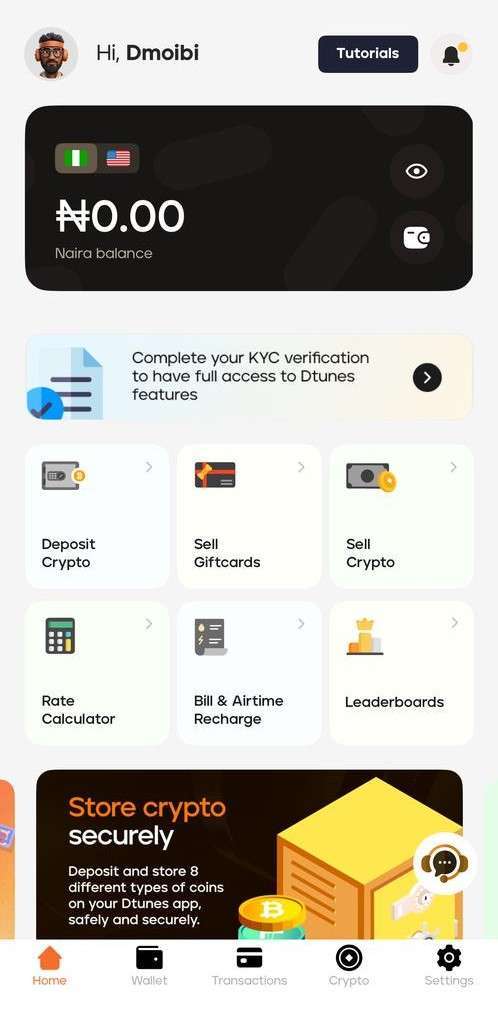
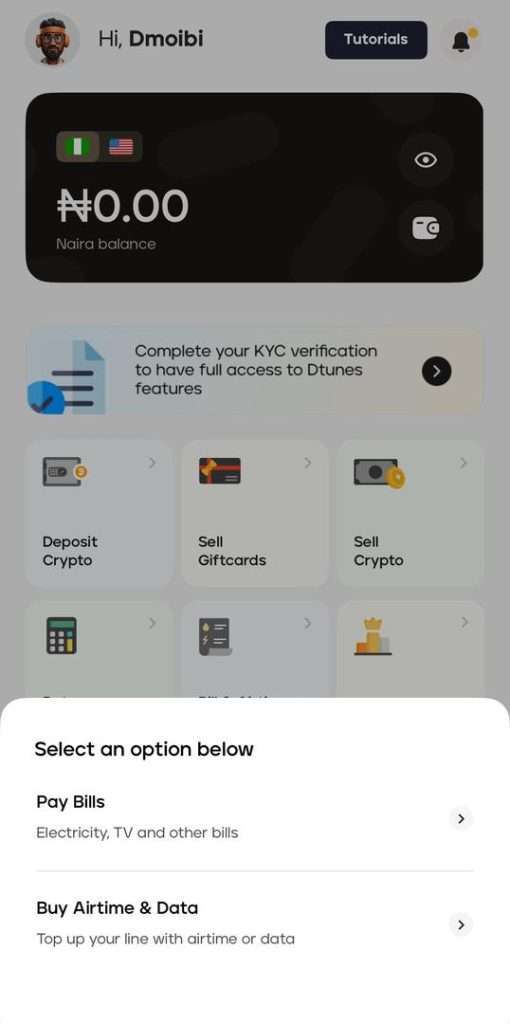
    With your Swapto(Formerly Dtunes) wallet funded, you can now head to the “Bills & Airtime Recharge” tab on your dashboard.

    There will be a pop-up with two options: Pay Bills (electricity, TV, and other bills) and Buy Airtime and Data. Just select the service you want, enter the amount, and pay directly from your balance.

    Your payment is processed in seconds, and a receipt is generated instantly. It’s fast, reliable, and perfect for anyone looking to use crypto in everyday life.

    2. Use Crypto Bill Payment Platforms

    There are dedicated platforms built for this purpose, such as Swapto(Formerly Dtunes), Paychant, Bitrefill, and Coinsbee, which let you settle bills using Bitcoin or USDT. These platforms are integrated with local service providers, enabling you to pay for DSTV, MTN data, Spectranet, or even school fees.

    For example, Swapto(Formerly Dtunes) supports Nigerian services and lets you use your crypto to top up airtime or data. The process is usually

    • Pick your service (e.g., MTN, GOtv)
    • Choose amount
    • Select a crypto wallet to pay
    • Receive confirmation instantly

    3. Use Gift Card-to-Bill Services

    This is a hack used by many crypto users. You first convert crypto to gift cards (like Apple, Amazon, and Steam), then redeem those gift cards on platforms like Swapto(Formerly Dtunes), which allow you to pay bills directly from the value.

    This method is especially helpful for:

    • Buying WAEC/NECO scratch cards
    • Paying tuition or online courses
    • Paying for software services (like Canva, Netflix, Grammarly, etc.)

    If you want proper value for your gift cards, you need verified services like Swapto(Formerly Dtunes), which can instantly convert gift cards and link your balance to bill payments.

    4. Convert Crypto to Naira and Use Bill Payment Apps

    This is one of the popular options you can use.

    1. Sell your crypto on Swapto(Formerly Dtunes).
    2. Receive Naira in your wallet or bank
    3. Use bill payment services like Palmpay, Opay, Flutterwave, or Quickteller to pay bills

    This method is useful when your crypto is in lesser-known coins that aren’t supported for direct payments, like Shiba Inu or Chainlink.

    This system makes you rely on traditional payment infrastructure, which makes it a bit longer.

    5. Peer-to-Peer Crypto Bill Exchanges

    You find someone who wants crypto and is willing to pay your bills in return. Usually done on platforms like

    • WhatsApp P2P communities
    • Binance P2P + separate agreement
    • Telegram crypto forums

    This is a risky option, though, if the person isn’t trusted. You might lose your crypto and never see the payment done. Use this only if you trust the person or escrow is involved.

    How to sell Bitcoin in Nigeria on Swapto(Formerly Dtunes)

    Swapto(Formerly Dtunes) homepage
    1. Download the Swapto(Formerly Dtunes) mobile app on Google Play Store or Apple App Store.
    2. Sign in or register using your details.
    3. Tap “Sell Crypto” from the homepage.
    4. Choose Bitcoin or any crypto you want to convert.
    5. Input the amount you want to sell. You’ll see the Naira equivalent instantly.
    6. Click “Sell.”
    7. Before you begin, set up: Biometrics (fingerprint or face unlock) and Bank account connection

    Your fund should land in your bank within 5–10 minutes. That’s it. Fast, secure, and all from your phone.

    Conclusion: Crypto As Digital Utility

    The rise of crypto bill payments in Nigeria shows we’re adapting to global trends without waiting for government permission. Thanks to platforms like Swapto(Formerly Dtunes), you no longer have to stress about paying your bills.

    Knowing how to pay your bills with cryptocurrency unlocks a smarter lifestyle. The power is at your fingertips.

    Frequently Asked Questions (FAQs)

    1. Can I use Bitcoin to pay bills in Nigeria?

    Yes, platforms like Swapto(Formerly Dtunes) allow you to pay bills directly with Bitcoin, from PHCN to DSTV and mobile airtime.

    2. What bills can I pay with crypto in Nigeria?

    You can pay for electricity (NEPA), internet (Spectranet, Smile), TV subscriptions (DSTV, GOtv), mobile airtime/data on Swapto(Formerly Dtunes)

    3. Is it legal to pay bills with cryptocurrency in Nigeria?

    While the CBN restricts banks from handling crypto, peer-to-peer and crypto utility platforms are not illegal. Users are free to use services like Swapto(Formerly Dtunes).

    4. What is the best platform to use crypto for bill payments in Nigeria?

    Swapto(Formerly Dtunes).ng is one of the most reliable, user-friendly platforms for crypto-to-naira transactions and bill payments.

    5. Do I need to convert to Naira before paying bills with crypto?

    Not necessarily. Some platforms allow you to use your crypto directly for payments without converting first.

  • How to check Airtel airtime balance

    How to check Airtel airtime balance

    Are you still using *123# to check your airtime balance on Airtel? That’s in the past. All network providers in Nigeria have changed the codes to check airtime balance.

    For uniformity’s sake, you can now use the same USSD code to check for your airtime balance across all networks.

    Airtel users can check their airtime balance with the USSD code *310# or download the My Airtel app, It’s easier and faster.

    Below is a detailed breakdown on how to check Airtel airtime balance with FAQS to answer further questions you might have.

    How To Check Airtime Balance on Airtel

    To check your Airtel airtime balance, dial *310# on your phone. Your balance will be displayed on the screen immediately. Alternatively, you can use the Airtel app to view your balance.​

    How to check Airtel airtime balance with USSD

    Airtel users can use the code *310# to check their airtime balance on Airtel using USSD. Formerly, you’d use *123#, which might be the one you remember, but things have changed.

    Once you dial the code correctly, you should receive a pop-up message of your airtime balance.

    How to check Airtel airtime balance with Mobile App

    If you’re using the app for the first time, make sure your Airtel SIM has network service so the OTP can be delivered. Once you’re logged in, checking your balance anytime becomes super easy.

    To check your Airtel airtime balance using the mobile app, just follow these quick steps:

    1. Download the MyAirtel App on Google Play Store or App Store
    2. Open the app and enter your Airtel number. You’ll get a one-time password (OTP) via SMS. Type it in to log in.
    3. Check your dashboard
      As soon as you’re in, your airtime balance will be right there on the home screen, no need to click anything else. You’ll also see your data balance, bonus airtime, and more.

    Now you can check your airtime balance on Airtel easily.

    These will help too…

    Frequently Asked Questions(FAQs)

    1. What’s the easiest way to check my Airtel airtime balance?

    Just dial *310# and your balance will pop up right away. No stress, no long process.

    2. Is there a specific Airtel code for checking the main balance vs bonus?

    Yes. For your main airtime, dial *310#.
    For bonus balances (like promo airtime or bonus data), dial *323#. Airtel usually displays both your main and bonus if you check with the right code.

    3. Can I use the MyAirtel app to check my airtime?

    Absolutely. Once you install the MyAirtel app, log in using your phone number, and your airtime, data, and everything else show right there on the dashboard.

    4. I dialed *310# but nothing happened—why?

    Sometimes the network gets shaky. If the code doesn’t respond, turn your phone to airplane mode for 10 seconds and switch it off again. If this doesn’t work, you can use the MyAirtel app or contact Airtel support on X.

    Conclusion

    If you follow the steps listed in this article, you should have no issue getting your airtime balance on Airtel.

    For more posts on Network provider updates and crypto, Visit Swapto(Formerly Dtunes).

  • How to Check MTN Airtime Balance

    How to Check MTN Airtime Balance

    To check your MTN airtime balance, dial *310# on your phone. Your balance will be displayed on the screen immediately.

    Although these codes change occasionally, especially since the USSD harmonization directive given by the National Communications Commission (NCC), this article discusses the easiest ways to check your MTN airtime balance in 2025.

    Quick Way to Check MTN Airtime Balance

    Here is the fastest way to check MTN airtime balance:

    • Airtime balance check: *310#
    • Data balance check: *323#
    • Recharge airtime: *311* Voucher PIN #
    • Borrow airtime: *303#
    • Buy data: *312#
    • Share airtime and data: *321#
    • Value-added services: *305#
    • Link your NIN to your MTN line: *996#
    • Check your mobile phone number: *123*1*1#

    2 Ways to check your MTN airtime balance in 2025.

    The following are the ways to check your MTN airtime balance today:

    How to check MTN airtime balance

    1. Use USSD Code
    2. Use the MTN app

    How to check MTN Airtime Balance using USSD

    The most popular way to check your MTN airtime balance is through the USSD route. It is quick and straightforward.

    To check your MTN airtime balance using USSD, dial *310#.

    If you do this correctly and your network quality is excellent, you should see your airtime balance in real time.

    The second option is …

    How to check MTN Airtime Balance through the MTN Mobile App

    Apart from using USSD to check your MTN airtime balance, you can use the MTN Mobile App. Its faster and easier.

    How to check MTN Airtime Balance through the MTN Mobile App

    1. Download and Install the MTN Mobile App on the Google Play Store or Apple App Store
    2. Register with your MTN phone number for first-time users.
    3. Enter the OTP (One Time Password) sent to your phone to verify.
    4. Once logged in, you’ll see your airtime balance displayed right on the home screen.
    5. If not, tap on “Airtime Balance” or check under the “Account” section.
    6. That’s it!

    You can also view data balance, bonus offers, and other services in the app. Now you can check your MTN airtime balance using USSD or the mobile app.

    Conclusion

    Checking your airtime balance on MTN is easy. Follow the outlined steps in this guide, and you are good to go.

    If this helped you, these will

    Frequently Asked Questions (FAQs)

    1. What is the new code to check MTN airtime balance in 2025?

    The updated USSD code to check your MTN airtime balance is *310#, following the NCC’s unified code system.

    2. Why is 556# not working to check my MTN balance?

    The old code *556# has been replaced due to USSD harmonisation. Use *310# instead to check your airtime balance.

    3. Can I check my MTN airtime balance without using USSD?

    Yes, you can use the MTN Mobile App. Simply download the app, register with your MTN number, and your airtime balance will show on the home screen.

    4. Is it free to check my airtime balance on MTN?

    Yes, checking your MTN airtime balance via *USSD (310#) or the MTN Mobile App is completely free of charge.

    5. How do I check both airtime and data balance at once on MTN?

    You can dial *310# for airtime and *323# for data, or use the MTN Mobile App to see all balances in one place.

    What is the code to check MTN airtime balance?

    Dial *131#*310# ⁣on your MTN line to check your airtime balance.

    How do I check my MTN balance?

    To check your MTN airtime balance, simply dial ⁣,*310# and your balance will be displayed on your screen.

    How do they check airtime balance?

    Airtime balance is usually checked by dialing a USSD code provided by the network. For MTN, dial *310# to see your current airtime balance.

    What are the codes for MTN?

    Here are some useful MTN codes:

    • Airtime balance: *310#
    • Buy airtime/data: *312#
    • Check data balance: *323#
    • Share airtime (MTN Share): *321#
    • Access MTN services (old code): *123#
    • Borrow airtime/data: *303#
  • How to Withdraw Bitcoin on Cash App

    How to Withdraw Bitcoin on Cash App

    So in this guide, I’ll walk you through everything you need to know about withdrawing Bitcoin on Cash App—from the simple step-by-step process to fees, limits, security tips, tax talk, and even what to do if something goes wrong.

    By the end, you’ll not only know how to withdraw confidently, but you’ll also see when Cash App makes sense and when it’s smarter to use Swapto(Formerly Dtunes) (a platform that works seamlessly for Nigerians).

    Can You Withdraw Bitcoin on Cash App?

    Yes, you can. Cash App allows you to withdraw Bitcoin in two ways:

    1. On-chain Bitcoin withdrawal—where your BTC moves to another Bitcoin wallet on the blockchain.
    2. Lightning Network withdrawal — a faster, cheaper method for small amounts (often instant).

    This means if you want to move your BTC into a personal wallet like Trust Wallet or Ledger or even send it to an exchange like Binance for trading, you can. But before you rush, there are some things you must know, especially fees, limits, and safety issues.

    How to Withdraw Bitcoin on Cash App

    Here’s the easiest way to do it on your phone:

    1. Open Cash App and tap the Money tab (₦ sign icon).
    2. Select the Bitcoin tile.
    3. Tap Send Bitcoin.
    4. Paste or scan the Bitcoin address of your destination wallet (e.g., your Binance or Trust Wallet address).
    5. Choose a withdrawal speed: Standard, Rush, or Priority (more on these below).
    6. Confirm the details carefully (double-check the address!), then hit Send.
    7. Save the Transaction ID (TXID) so you can track it on a blockchain explorer like mempool.space.

    That’s it. Your BTC will now move out of Cash App.

    Pro tip: Always do a test withdrawal first (like ₦5k worth of BTC) before sending a large amount.

    Cash APP Withdrawal Speeds and Fees

    Cash App gives you three speed options:

    • Standard – Free, but can take up to 24 hours. Minimum withdrawal ≈ 0.001 BTC.
    • Rush – Faster, about 1–2 hours. Minimum ≈ 0.00005 BTC.
    • Priority – Fastest (often ≲10 minutes). Also, the minimum is ≈ 0.00005 BTC.

    Now let’s talk fees:

    • Cash App service fee: shows up on the confirmation screen (can be fixed or percentage-based).
    • Bitcoin miner fee: this goes directly to the blockchain miners. Recently, the average BTC network fee has been about $0.80–$1.00 per transaction. But in times of congestion (e.g., meme coin hype, Ordinals, etc.), it can shoot up to $10 or even more.

    If you’re just moving ₦20k worth of BTC, paying $10 in fees is painful. That’s where Lightning withdrawals save you — they’re almost free and instant.

    What Are the Withdrawal Limits on Cash App?

    Here’s where many Nigerians get surprised. Cash App has rolling limits (they reset every 24 hours / 7 days).

    • Typical limit: about $2,000 per day and $5,000 per week for Bitcoin withdrawals.
    • To increase your limit, you’ll need to verify your identity (with full name, date of birth, ID, and SSN if you’re using a U.S. account).

    If you’re trying to move a big bag of BTC at once, Cash App might frustrate you.

    That’s why platforms like Swapto(Formerly Dtunes) make more sense — their withdrawal system is designed for African traders, with higher caps and fewer restrictions compared to Cash App’s U.S.-centric model.

    Security: How to Avoid Costly Mistakes

    Bitcoin withdrawals are irreversible. Once you hit send, nobody—not even Cash App support, can pull it back if you typed the wrong address. Here’s how to protect yourself:

    • Always copy-paste or scan QR codes—never type wallet addresses by hand.
    • Double-check the first and last 4 characters of the address.
    • Start with a small test transaction before sending large amounts.
    • Enable 2FA and PIN lock on Cash App for extra protection.
    • If holding long-term, move BTC into a self-custody wallet (hardware wallets like Ledger, Trezor, or a mobile wallet where you hold the keys).

    Remember: “Not your keys, not your coins.” Cash App holds custody until you withdraw.

    Tracking Your Withdrawal

    After sending, you’ll see the transaction in Cash App’s Activity tab. Copy the TXID and paste it into a block explorer like mempool.space.

    This will show:

    • If the transaction is still unconfirmed (waiting for miners).
    • How many confirmations it has.
    • The current fee rate.

    For small transfers, 1–3 confirmations are usually enough. For larger ones, wait for 6.

    Selling vs Withdrawing: Which is Better?

    Here’s the dilemma: should you sell your BTC inside Cash App for USD and cash out to your bank, or withdraw it to another platform?

    • Selling inside Cash App: Easy if you just want cash. You’ll pay a service fee, and it’s a taxable event. Withdrawal to bank can take 1–3 days.
    • Withdrawing BTC to another exchange/wallet: Better if you want to trade at Nigerian-friendly rates or use your BTC elsewhere. Yes, you’ll pay miner fees, but you’ll often save overall if you’re sending to a platform like Swapto(Formerly Dtunes), which gives you better conversion rates than Cash App’s dollar-based pricing.

    Taxes: What You Should Know

    Selling Bitcoin on Cash App is a taxable event. In the U.S., Cash App issues forms like 1099-B/1099-DA. In Nigeria, tax enforcement on crypto is still evolving, but the Finance Act 2023 introduced rules around taxing digital assets.

    Practical advice:

    • Keep records of how much you bought BTC for (cost basis).
    • Save withdrawal TXIDs and receipts.
    • If you trade actively, use a platform like Swapto(Formerly Dtunes), which makes it easier to track your trades locally.

    Why Swapto(Formerly Dtunes) is a Smarter Alternative for Nigerians

    Let’s be honest: Cash App is built for Americans. The verification, SSN requirement, and bank integration aren’t really designed with Nigerians in mind.

    That’s where Swapto(Formerly Dtunes) comes in. Unlike Cash App, Swapto(Formerly Dtunes) is tailored for African traders. Here’s why it’s a better fit:

    • Higher withdrawal limits without unnecessary KYC blocks.
    • Instant transactions designed to work seamlessly with Nigerian banks.
    • Lower fees compared to Cash App’s dollar-based miner and service fees.
    • No VPN stress—fully accessible in Nigeria.
    • Better liquidity in Naira and other African currencies, so you don’t lose value on exchange rates.

    So while Cash App works, if you’re serious about trading Bitcoin regularly in Nigeria, it makes more sense to use a platform built for you.

    Final Thoughts

    If you’re in Nigeria, Cash App might be fine for testing, but long-term, Swapto(Formerly Dtunes) is the better option. It’s built for us, it removes the unnecessary hurdles, and it helps you save on fees and time.

    At the end of the day, your Bitcoin should work for you, not the other way around. So if Cash App feels like too much wahala, you already know the smarter move.

  • How MFA Protects Your DTunes Account

    How MFA Protects Your DTunes Account

    In crypto, your account is gold. And trust me, people are trying every trick in the book to get their hands on it: stolen passwords, phishing links, and even random guessing.

    Here’s the problem: once your coins are gone, they’re gone. No refund, no customer care reversal, nothing.

    That’s why DTunes adds something stronger than a password: Multi-Factor Authentication (MFA). It’s one small extra step that makes sure only you can open your account, no matter how smart the hacker thinks they are.

    What is MFA?

    MFA means your account won’t open with just one thing. You need more than one proof that it’s really you.

    Those proofs can be:

    • Something you know → like a password or PIN.
    • Something you have → like your phone, an authenticator app, or a device key.
    • Something you are → like your fingerprint or face scan.

    Different platforms mix it differently:

    • Some send codes by SMS or email.
    • Some ask you to approve a login with a push notification.
    • Some use biometrics like Face ID.
    • And then there are authenticator apps. Apps that generate a 6-digit code on your phone every 30 seconds.

    That’s the one DTunes uses. Why? Because it’s offline, it’s faster, and scammers can’t intercept it the way they do with SMS.

    How to Set Up MFA

    Here’s how to lock your account in minutes:

    1. Download Google Authenticator from the Play Store (Android) or App Store (iPhone).
    2. Open DTunes → go to your security settings. You’ll see a QR code and a manual key.
    3. Link DTunes to Authenticator → open the Authenticator app, tap the “+” button, and either scan the QR code or type in the key.
    4. Get your code → you’ll now see DTunes in your Authenticator with a 6-digit code.
    5. Confirm → enter that code in DTunes.

    That’s it. Locked and loaded.

    When Will DTunes Ask for MFA?

    Not every login needs it. MFA shows up when it matters most:

    • When you log in from a new phone, tablet, or laptop.
    • When you reset your password.

    Think of it as a checkpoint. Quick for you, but a dead end for anyone else.

    Can I withdraw funds directly from my USD wallet?

    Lost Your Phone? Don’t Panic

    Phones get stolen, spoiled, or swapped all the time. Your crypto doesn’t have to go with it.

    Here’s what to do:

    1. Download Google Authenticator again on your new phone.
    2. Re-link it to your DTunes account.
    3. Enter your new 6-digit code and you’re back in.

    Pro tip: if your phone allows backup for Authenticator, turn it on. That way, moving to a new device won’t stress you.

    MFA isn’t stress. It’s protection. Your password is the first lock. Your code is the second. Together, they make your account untouchable.

    Don’t wait. Open your DTunes app and turn on MFA today. Because in crypto, safety doesn’t come after. It starts now.

  • Best Crypto Exchanges in Nigeria

    Best Crypto Exchanges in Nigeria

    With the rise of peer-to-peer (P2P) platforms, cryptocurrency trading in Nigeria has seen significant growth. Let’s look at the top 5 P2P trading platforms in Nigeria in 2025.

    Peer-to-peer (P2P) platforms allow direct transactions between buyers and sellers, offering a decentralized approach to crypto trading.

    In this guide, we’ll explore the top P2P crypto exchanges in Nigeria and the criteria for selecting a reliable P2P platform in Nigeria.

    What is a crypto exchange platform?

    A crypto exchange platform is an online marketplace that allows people to trade directly with one another without the need for banks or centralized exchanges.

    Instead of a company acting as an intermediary, the platform simply connects buyers and sellers, enabling them to negotiate prices and choose their preferred payment methods.

    One of the key security features of P2P platforms is the escrow system. When a trade is initiated, the asset is temporarily held by the platform in escrow. This prevents fraud by ensuring that the seller cannot take back the asset after receiving payment.

    Once the buyer confirms that payment has been made, the escrow releases the asset to them. If there’s a dispute, the platform provides a resolution process to protect both parties.

    Unlike traditional exchanges that process trades instantly through an order book system, P2P platforms give users more control. Buyers can browse available listings, compare prices, and choose sellers with good reputations.

    Many platforms also have a rating and review system where users can leave feedback based on their trading experience. This helps build trust and reduces the risk of scams.

    Another advantage of P2P trading is the variety of payment methods. Unlike centralized exchanges that mainly support bank transfers or credit cards, P2P platforms allow users to pay through various options, including mobile money, PayPal, cash deposits, and even gift cards.

    This flexibility makes it easier for people in different countries to trade without restrictions.

    How to Select a Reliable crypto exchange platform

    When choosing a P2P crypto exchange, it’s essential to evaluate key factors that ensure security, ease of use, and efficiency. Here are the most important aspects to consider:

    1. Strong Security Measures

    Choose a platform that prioritizes user safety with two-factor authentication (2FA), encryption, and an escrow system to protect funds and prevent fraud.

    2. User-Friendly Interface

    A well-designed, intuitive platform enhances the trading experience, making it easy for both beginners and experienced traders to navigate and complete transactions smoothly.

    3. Transparent Fees

    Look for platforms with clear, reasonable, and competitive transaction fees to ensure you’re not losing a significant portion of your profits to hidden charges.

    4. Diverse Payment Methods

    A reliable P2P exchange should support multiple payment options, including bank transfers, mobile money, PayPal, and region-specific alternatives, to provide flexibility for global users.

    5. Efficient Customer Support

    Go for platforms with 24/7 support, live chat, or dedicated help centers to resolve disputes and technical issues promptly.

    6. Proven Reputation & User Reviews

    Before committing to a platform, research its track record. Check user reviews, community feedback, and independent ratings to ensure it has a solid reputation for reliability, security, and fair trading practices.

    Selecting the right P2P platform ensures a safe and seamless trading experience.

    Top Crypto Exchanges in Nigeria

    Based on the above criteria, here are some of the leading P2P crypto exchanges in Nigeria:

    1. Swapto(Formerly Dtunes)

    Swapto(Formerly Dtunes) homepage

    Swapto(Formerly Dtunes) has emerged as the best P2P platform for selling Bitcoin and other cryptocurrencies in Nigeria. It has a user-friendly interface designed for both beginners and experienced traders, the platform simplifies the trading process.

    Users can quickly convert Bitcoin,Tether, Ethereum, BNB, Litecoin,Tron and more to Naira, with funds reflecting promptly in their accounts. Swapto(Formerly Dtunes) offers some of the best exchange rates in the market, ensuring users get value for their assets.

    It also has a robust security setup employing advanced security measures, ensuring that user funds and data are well-protected. You can download the DTunes App on Google Play or App store.

    2. Paxful

    Paxful is a globally recognized P2P platform that has gained popularity in Nigeria. It offers a wide range of payment options and supports various cryptocurrencies. The platform’s escrow service ensures that transactions are secure, protecting both buyers and sellers.

    3. Remitano

    Remitano provides a seamless P2P trading experience with an emphasis on security and user support. The platform offers an escrow service and supports multiple cryptocurrencies, making it a versatile choice for traders.

    4. Cryptolocally

    Cryptolocally stands out as the first P2P exchange with decentralized governance, giving users a role in decision-making. The platform supports multiple cryptocurrencies, including BTC, ETH, USDT, and DOGE, and offers over 50 payment methods, making transactions flexible and accessible.

    5. Binance P2P

    Binance, one of the world’s largest cryptocurrency exchanges, offers a P2P platform that connects buyers and sellers directly. Users benefit from Binance’s robust security measures and a wide selection of cryptocurrencies.

    Conclusion

    P2P platforms have made Crypto trading in Nigeria easier. You can now buy and sell crypto without relying on traditional banks. Whether you’re after fast transactions, better rates, or more payment options, choosing the right platform makes all the difference.

    At the end of the day, it all comes down to what works best for you, so always check reviews, compare fees, and make sure security is tight before trading.

    With the right P2P exchange, you’re not just trading, you’re setting yourself up for smarter, safer, and more profitable crypto deals.

    Frequently Asked Questions (FAQs)

    1. Which is the best P2P crypto exchange in Nigeria?

    The best P2P crypto exchange in Nigeria depends on security, fees, and payment options. Swapto(Formerly Dtunes) offers fast transactions and great exchange rates, Binance P2P provides strong security, and Paxful, Remitano, and Cryptolocally support multiple payment methods.

    2. How does a crypto exchange work?

    A P2P crypto exchange allows buyers and sellers to trade directly. The platform uses an escrow system to hold funds until payment is confirmed, ensuring a secure and fraud-free transaction.

    3. Is crypto trading safe in Nigeria?

    P2P crypto trading is safe if done on secure platforms like Swapto(Formerly Dtunes), Binance P2P, and Paxful, which offer escrow protection, two-factor authentication (2FA), and user ratings to minimize fraud.

    4. Which crypto exchange has the lowest fees in Nigeria?

    Swapto(Formerly Dtunes) and Binance P2P are among the cheapest P2P exchanges in Nigeria, offering low or zero trading fees. Other platforms may charge a percentage per transaction, so always check the fee structure.

    5. What are the best payment methods for P2P crypto trading in Nigeria?

    The best payment methods for P2P crypto trading in Nigeria include bank transfers, mobile money, PayPal, cash deposits, and gift cards. Choosing the right method depends on transaction speed, availability, and fees.

  • Updated List of New USSD Codes for Mobile Operators in Nigeria

    Updated List of New USSD Codes for Mobile Operators in Nigeria

    The way you access mobile services in Nigeria has changed. Dialing *556# to check your MTN balance or *123# for Glo might no longer respond as expected.

    This change came after the NCC decided to scrap network-specific codes and introduce one simplified set that works no matter the SIM you’re using. To buy airtime, check data, or borrow, you’ll now need one code either on MTN, Airtel, Glo, or 9mobile. 

    In Lagos traffic, you’ll see people dialing *310# with one hand while flagging down a bus with the other; that’s how essential USSD is.

    But using outdated shortcuts can lead to failed attempts. This updated list of new USSD codes saves you time and confusion by showing the exact codes that now work.

    Why USSD Codes Changed 

    The first goal was to make mobile services easier for everyone to use.

    The Nigerian Communications Commission (NCC) replaced the disparate shortcuts used by several networks with one system back in March 2023, though the implementation commenced on May 17th 2023. Back then, checking your balance meant memorizing a different code for every SIM you owned. 

    However, as more individuals depended on mobile services for daily necessities and used several lines, the NCC realized it was time to simplify the process.

    Besides simplifying things, these new codes now work the same way on every network.

    And for millions of users who rely on their phones daily, it’s a big relief that adds ease and better experience.

    Updated USSD Codes for All Mobile Operators in Nigeria

    ussd codes

    Here’s the most recent list of USSD codes as introduced by the NCC, now structured by each network for easier reference:

    MTN Nigeria

    mtn network
    • To Recharge Airtime dial *311* Pin#
    • Buy Data: *312#
    • Check your Airtime Balance: *310#
    • Borrow airtime or Data the new code is *303#
    • For Airtime and data transfer: *321#
    • Check data balance: *323#
    •  Linking your NIN to your sim dial *996#
    • Access value added services: *305#
    • Customer care number dial 300 on your phone.
    • To check your NIN dial *346#  

    Read: How to Buy Data And Airtime With BTC In Nigeria

    Glo Nigeria

    glo network
    • To Recharge Airtime on glo dial *311* Pin#
    • Buy Data: *312#
    • Check your Airtime Balance: *310#
    • Borrow airtime or Data the new code is *303#
    • For Airtime and data transfer: *321#
    • Check data balance: *323#
    • To link your NIN to your sim: *996#
    • Access value added services: *305#
    • Customer care number dial 300 on your phone.
    • To check your NIN dial *346#  

    Airtel Line

    Airtel network
    •  Recharge Airtime dial *311* Pin#
    • Buy Data: *312#
    • Check your Airtime Balance: *310#
    • Borrow airtime or Data the new code is *303#
    • For Airtime and data transfer: *321#
    • Check data balance: *323#
    • To link your NIN to your sim: *996#
    • Access value added services: *305#
    • Customer care number dial 300 on your phone.
    • To check your NIN dial *346#  

    New codes for 9mobile

    9mobile
    •  Recharge Airtime dial *311* Pin#
    • Buy Data: *312#
    • Check your Airtime Balance: *310#
    • Borrow airtime or Data the new code is *303#
    • For Airtime and data transfer: *321#
    • Check data balance: *323#
    • To link your NIN to your sim: *996#
    • Access value added services: *305#
    • Customer care number dial 300 on your phone.
    • To check your NIN dial *346#  

    Frequently Asked Questions About USSD codes in Nigeria

    How do I check my Glo airtime balance?

    1. Just dial *310# on your phone. It works for Glo and other networks too.

      What is the new code to borrow airtime?

      2. Use *303# on any SIM-MTN,GLO,Airtel, or 9mobile. That’s the universal code for data purchases across all mobile operators.

        What code do I use to link NIN to my SIM?

        3. Use *996# and select linking options. It works for MTN, Glo, Airtel, and 9mobile.

          What if the USSD code doesn’t work on my phone?

          4. Check for network signals, make sure your SIM is active, and try again. If it still fails, contact your network provider through 300

            Conclusion

            Staying on top of mobile services in Nigeria just got easier, all thanks to the unified USSD system. Instead of memorizing different codes for every network, you now have a consistent set that works across the board for checking airtime, buying data, or linking your NIN.

            This update isn’t just a policy shift; it’s a real improvement in how we use mobile services no matter the device or provider.

            Save the ones that matter, share with others who need it, and stay ready for whatever updates come next. The new codes are here to make things easier.

            Related Articles

            USSD Recharge Code To Recharge Airtel Card In Nigeria

            How to Share Data on Airtel with Your Loved Ones in Nigeria (2025)

             How to link NIN to Airtel line

          1. Wema USSD Codes Updated (2026): Check Balance, Transfers, Airtime, and More

            Wema USSD Codes Updated (2026): Check Balance, Transfers, Airtime, and More

            The Wema USSD code is *945#.

            Most people learn the Wema Bank USSD code the same way I did. By accident. On a Tuesday afternoon last year, my data ran out at the worst possible moment. I needed to send ₦15,000 to my brother for his rent before close of business, and the ALAT app sat on my screen doing nothing. No internet, no app, no luck.

            That was when I remembered the SMS Wema had sent me months earlier. The one with the bold *945# in it that I had swiped away every time.

            I dialed it. Two minutes later, my brother got his alert.

            Since that day, the Wema USSD code has saved me more times than I can count. Failed app updates, network downtime in Yaba, that one time I traveled to a village with no signal but somehow could still dial USSD. It just works.

            This guide covers every Wema Bank USSD code worth knowing in 2026. The verified codes (some pages on the internet have errors), the steps to register if you’re starting fresh, what to do when transactions fail, and the small habits that keep your account safe. By the end, you’ll have everything you need on one page. No fluff.

            The Quick Answer: Wema Bank’s USSD Code is *945#

            If you’re in a rush, here it is. The Wema Bank USSD code is *945#. Dial it from the phone number linked to your Wema account and follow the menu prompts. You’ll be asked for your 4-digit USSD PIN to confirm any transaction.

            It works on every Nigerian network (MTN, Airtel, Glo, 9mobile) and on every type of phone, from a basic Nokia to the latest iPhone. No internet needed.

            Below is the full breakdown of what each shortcut does.

            Complete List of Wema Bank USSD Codes in 2026

            These are the codes I’ve personally tested or verified against Wema Bank’s official channels. Bookmark this section.

            Account Management Codes

            ActionUSSD Code
            Open the main menu*945#
            Open a new Wema account*945*1#
            Register / activate USSD*945*5#
            Check your account balance*945*0#
            Get your account number*945*000#
            View last 5 transactions*945*4#
            Change USSD PIN*945*00#
            Block account (lost phone)*945*911#
            Manage BVN*945*4#

            Transfer Codes

            ActionUSSD Code
            Send to another Wema account*945*AccountNumber*Amount#
            Send to other banks*945*AccountNumber*Amount#
            Quick send to a phone number*945*6*Amount#

            Airtime and Data Codes

            ActionUSSD Code
            Buy airtime for yourself*945*Amount#
            Buy airtime for another number*945*PhoneNumber*Amount#
            Buy data*945*9#

            Bills and Subscription Codes

            ActionUSSD Code
            Cable TV menu*945*10#
            DSTV subscription*945*11*SmartcardNumber#
            GOtv subscription*945*12*SmartcardNumber#
            Electricity bill*945*24#
            Internet service menu*945*15#
            WAEC result checking*945*70#
            JAMB result checking*945*71#

            Loan and Special Codes

            ActionUSSD Code
            Apply for a quick loan*945*65#
            Cardless withdrawal*945*57*MerchantCodeAmount#
            Lagos State bills*945*40#

            How to Register Your Wema USSD Code (First-Time Users)

            If this is your first time using *945#, you have to activate it. The process takes under three minutes and only needs your account details. You don’t need to visit a branch.

            1. Make sure you’re using the phone number registered with your Wema Bank account.
            2. Dial *945*5# on your phone.
            3. Follow the prompts. You’ll be asked for your account number and your date of birth.
            4. Create a 4-digit PIN. Choose something you’ll remember, but avoid obvious choices like your birth year or 1234.
            5. Confirm the PIN by entering it again.

            That’s it. You’ll get a confirmation message, and *945# is now active on your number. You can immediately start using it for transfers, bill payments, and everything else.

            One important note: Wema does not assign a default PIN. The PIN you create during registration is yours alone. If anyone ever asks you for it, including someone claiming to be from the bank, do not share it. Wema customer support will never ask for your USSD PIN.

            How to Check Your Wema Account Balance with USSD

            The fastest way to know exactly what’s in your account.

            1. Dial *945*0# on your registered phone number.
            2. Enter your 4-digit USSD PIN when prompted.
            3. Your balance shows on the screen immediately and is also sent to you as an SMS.

            Each balance check costs the standard network charge (currently around ₦6.98). No internet required. No bank visit needed.

            How to Transfer Money with the Wema USSD Code

            This is the function most people use *945# for. You can send money to other Wema customers and to any Nigerian bank (GTBank, Access, UBA, Zenith, Opay, PalmPay, Moniepoint, all of them).

            Sending to Another Wema Account

            1. Dial *945*AccountNumber*Amount# on your phone.
            2. Confirm the recipient’s name when it shows on the screen. Always check this before continuing. A wrong digit means your money goes to a stranger.
            3. Enter your USSD PIN.
            4. You and the recipient both get instant SMS notifications.

            Example: To send ₦5,000 to a Wema account 0123456789, dial *945*0123456789*5000# and confirm.

            Sending to Other Banks

            The same format works for transfers to any Nigerian bank.

            1. Dial *945*AccountNumber*Amount#.
            2. Confirm the recipient’s name (this is the moment to catch any mistake).
            3. If prompted to select a bank, choose from the list or type the first three letters of the bank name (e.g., “Acc” for Access Bank, “Opa” for Opay).
            4. Enter your PIN.

            Transfer limit: Wema sets a default daily USSD transfer limit of ₦100,000. If you need to send more, you’ll have to use the ALAT app or visit a branch to raise your limit.

            How to Buy Airtime and Data with Wema USSD

            Buying Airtime for Yourself

            Dial *945*Amount#. So *945*500# tops up your own line with ₦500. Enter your PIN. Done.

            Buying Airtime for Someone Else

            Dial *945*PhoneNumberAmount#. To send ₦1,000 to 08012345678, dial *945*08012345678*1000#. Confirm with your PIN.

            Buying Data

            Dial *945*9#, select the network (MTN, Airtel, Glo, or 9mobile), pick the data plan, enter the phone number to receive the data, and confirm with your PIN. The data is activated immediately.

            Guess how you can pay bills and earn rewards instead of using your bank app?

            Use the Swapto(Formerly Dtunes) app for bill payments and earn lots of rewards. Download Swapto(Formerly Dtunes) app now

            How to Pay Bills with Wema USSD

            You don’t need to log into anything to pay your DSTV, GOtv, or electricity bill. Just dial.

            • DSTV: *945*11*SmartcardNumber# then follow prompts to choose a package.
            • GOtv: *945*12*SmartcardNumber#.
            • Electricity: *945*24# and follow the menu to pick your DISCO (EKEDC, IKEDC, AEDC, etc.) and enter your meter number.
            • WAEC result checking PIN: *945*70#.
            • JAMB result checking PIN: *945*71#.

            For most bills, the receipt is sent to you by SMS within seconds. Keep that SMS until the service reflects on your end.

            Cardless Withdrawal Using Wema USSD

            You can withdraw cash at participating ATMs without your debit card.

            1. Dial *945*57MerchantCode*Amount# to generate a one-time withdrawal code.
            2. Go to the ATM and select “Cardless Withdrawal” from the main menu.
            3. Enter the one-time code you received.
            4. Collect your cash.

            The one-time code expires within a few hours, so don’t generate it too early. Cardless withdrawal is useful when you’ve forgotten your card at home or when your card is being processed.

            How to Open a New Wema Account with USSD

            If you don’t have a Wema account yet, you can open one without visiting a branch.

            1. Dial *945*1# from any phone.
            2. Enter your first and last name as they appear on your ID.
            3. Provide your date of birth.
            4. Set a 4-digit USSD PIN.
            5. Confirm your details.
            6. Wema will send your new account number by SMS within seconds.

            The account starts as a Tier 1 account with limits on transaction size and total balance. To upgrade and unlock higher limits, you’ll need to visit a branch or upload your BVN and ID through the ALAT app.

            How to Get a Quick Loan with Wema USSD

            Wema offers small loans you can request directly from your phone, no paperwork.

            1. Dial *945*65#.
            2. The menu shows available loan amounts based on your account history and salary inflow.
            3. Pick the amount you want and review the repayment terms.
            4. Confirm with your USSD PIN.
            5. The loan reflects in your account within minutes.

            The eligibility depends on how active your Wema account is and whether your salary is paid into it. New accounts won’t see large offers; existing accounts with steady inflow get higher limits.

            What to Do When Wema USSD Isn’t Working

            Even the best banking systems have off-days. Here are the most common issues and how to fix them.

            “Service Temporarily Unavailable” or no response

            This is usually a network issue, not your bank. Try these in order:

            1. Wait 5 minutes and try again. Many USSD failures are sorted in minutes.
            2. Switch networks if you have a dual-SIM phone.
            3. Move to an area with better network signal.
            4. Restart your phone, then dial again.

            If the message persists for over an hour, call Wema customer care on +234-803-900-3700 or send an email to purpleconnect@wemabank.com.

            “Invalid PIN” Even Though It’s Correct

            Three wrong PIN attempts will lock your USSD service. If this happened, dial 94500# from your registered line to reset, or call customer care. Avoid entering the same wrong PIN multiple times. Take a breath, double-check, and try once.

            Money Sent But Not Reflecting on the Recipient’s End

            This happens more than people realize, and the fix is usually patience. Most “stuck” USSD transfers reverse or complete within 24 hours. If it’s been longer:

            1. Take a screenshot of the SMS confirmation Wema sent you.
            2. Note the transaction reference number from the SMS.
            3. Email purpleconnect@wemabank.com or visit a branch with that reference number.
            4. The dispute is usually resolved within 5–7 working days.

            Never trust anyone who calls you offering to “help reverse” the transaction. That’s a common scam.

            You’ve Lost Your Phone (or SIM)

            Move quickly. Dial *945*911# from any phone to block your USSD service immediately. This prevents anyone with your SIM from making transactions. Then call Wema customer care to formally block your account.

            Wema USSD Code vs ALAT App: Which Should You Use?

            Both are Wema Bank products, but they serve different needs.

            FeatureWema USSD (*945#)ALAT App
            Internet requiredNoYes
            Works on basic phonesYesNo
            Daily transfer limit₦100,000Higher (varies)
            Bill paymentsYesYes, more options
            Card managementLimitedFull control
            Investment productsNoYes (savings, fixed deposits)
            Customer support chatNoYes
            SpeedInstantInstant

            The honest verdict: use the ALAT app for most of your banking. Use *945# as your backup. The day your data runs out, your phone updates fail, or you’re somewhere with weak network, you’ll be glad you know *945# by heart.

            Staying Safe While Using Wema USSD

            Three rules that protect your money.

            1. Never share your USSD PIN with anyone. Not your spouse, not your friend, not the person calling claiming to be from Wema. Wema staff will never ask you for it.
            2. Always confirm the recipient’s name before transferring. Wema shows you the account holder’s name on screen before you enter your PIN. One missed glance is a wrong transfer.
            3. Use only your registered phone number. USSD is tied to the SIM linked to your account. If someone steals or swaps your SIM, dial *945*911# immediately from any phone to block USSD access.

            Beyond USSD: Smarter Ways to Manage Your Money

            USSD is great for emergencies and quick transactions. But for bigger financial moves, like converting crypto to naira, paying for international subscriptions, or buying gift cards at the best rates, you need a different tool.

            That’s where Swapto(Formerly Dtunes) comes in. Sell BTC, USDT, or Ethereum directly to naira in your Wema account in under 10 minutes. No P2P stress. No waiting for a stranger to confirm payment. The rate is shown upfront before you confirm.

            Download the Swapto(Formerly Dtunes) app on Play Store or App Store

            Frequently Asked Questions

            What is the Wema Bank transfer code?

            The Wema Bank transfer code is *945#. To send money, dial *945*AccountNumber*Amount# from your registered phone, confirm the recipient’s name, and enter your 4-digit USSD PIN. The transfer is instant for both Wema accounts and accounts at other Nigerian banks.

            How do I check my Wema Bank account balance with USSD?

            Dial *945*0# from your registered phone number, enter your USSD PIN, and your balance appears on screen and is also sent to you as an SMS. Each balance check costs around ₦6.98 in network charges.

            How do I activate Wema USSD if I’m a new user?

            Dial *945*5# on the phone number linked to your Wema account. Enter your account number and date of birth, then create a 4-digit PIN of your choice. You’ll get a confirmation message once activation is complete. The whole process takes under three minutes.

            What is Wema Bank’s default USSD PIN?

            Wema Bank does not assign a default PIN. You create your own 4-digit PIN during USSD registration. If you’ve forgotten it, dial *945*00# from your registered line and follow the reset prompts.

            Can I use Wema USSD to send money to Opay or PalmPay?

            Yes. Dial *945*AccountNumber*Amount# and when prompted to select a bank, type the first three letters of the recipient bank (Opa for Opay, Pal for PalmPay). Confirm the recipient’s name and enter your PIN. The transfer is instant.

            What is the daily transfer limit on Wema USSD?

            The default daily USSD transfer limit is ₦100,000. To send larger amounts, use the ALAT mobile app or visit a Wema branch to request a higher limit.

            What do I do if my Wema USSD transaction fails but I was still debited?

            Don’t panic. Most failed transfers reverse automatically within 24 hours. Keep the SMS confirmation Wema sent you, note the transaction reference number, and if the reversal doesn’t happen, email purpleconnect@wemabank.com or call +234-803-900-3700 with that reference. Disputes are usually resolved within 5–7 working days.

            How do I block my Wema USSD if I lose my phone?

            Dial *945*911# from any phone. This blocks your USSD service immediately and prevents anyone with your SIM from making transactions. Then call Wema customer care to formally block your account.

            The Bottom Line

            The Wema USSD code is one of those small things that quietly makes life easier. You don’t need it every day. But the day you need it, no app or internet connection comes close.

            Swapto(Formerly Dtunes) is now a full-service crypto platform. Beyond gift cards, you can now sell BTC, USDT, and Ethereum directly through our app with 24/7 support and the best market rates. Join the crypto revolution with Swapto(Formerly Dtunes) today!

            More Articles to Read

            How to Share Data on Airtel with Your Loved Ones in Nigeria (2025)

            OPay USSD Codes Updated (2025): Check Balance, Transfers, Airtime, and More

            How to Check MTN Airtime Balance