Stablecoins like USDC are quickly becoming a fan favorite in Nigeria. This guide will show you exactly how to sell USD Coin (USDC) in Nigeria with Swapto(Formerly Dtunes).
Why Are More Nigerians Holding USDC?
Nigerians are tired of unstable exchange rates, unreliable banks, and dollar restrictions. With USDC, you don’t have to guess the price; USDC is pegged 1:1 with the US dollar, no surprise drops like Bitcoin.
Sign up using your email and create a strong password.
Add your bank details and set up a secure PIN.
Tap “Trade Crypto” from the app dashboard.
Select USDC as the coin to sell.
Enter the amount you want to convert.
Copy the wallet address and send your USDC.
Wait for confirmation.
Receive Naira in your Swapto(Formerly Dtunes) wallet.
Withdraw naira straight to your bank account.
These are the top 10 steps to easily sell USDC in Nigeria for naira. If you are new to the Swapto(Formerly Dtunes) app, here is a detailed breakdown on how to sell USDC in Nigeria and why Swapto(Formerly Dtunes) is your preferred option.
How to Sell USDC for Cash in Nigeria on Swapto(Formerly Dtunes)
Here’s how to sell USDC in Nigeria using the Swapto(Formerly Dtunes) app:
Use your email to register. Choose a secure password (a mix of letters, numbers, and symbols is best).
You’ll receive a verification email or code to confirm your account.
Step 3: Login and Complete Your Profile
Once you’re in, set up your 4-digit security PIN. Then, add your bank account details. This is where your Naira will go after selling your USDC.
Step 4: Go to the “Trade Crypto” Section
Tap “Trade Crypto” and you’ll see a list of supported coins, including USDC.
Step 5: Select USDC from the List
Choose USD Coin (USDC) and tap it. Enter how much you want to sell (in USDC or USD).
Step 6: Copy the Wallet Address
Swapto(Formerly Dtunes) will generate a wallet address based on the USDC network. Make sure you know which network your USDC is on, usually Ethereum (ERC-20) or Solana (SPL).
Copy the address and paste it into your wallet (like Trust Wallet, Binance, or Coinbase).
Step 7: Send Your USDC
Send the USDC to the wallet address. Be sure you’re sending on the correct blockchain network (ERC-20 for Ethereum, SPL for Solana, etc.)
Step 8: Wait for Confirmation
This usually takes a few minutes, depending on network congestion.
Once it’s confirmed, your Swapto(Formerly Dtunes) wallet will reflect your new Naira balance.
Step 9: Withdraw to Your Bank
Now that your wallet is funded, go to the “Withdraw” section:
Select Naira (NGN)
Enter how much you want to withdraw
Confirm the bank account and approve the transaction
You’ll receive the Naira in your bank account — usually within minutes.
If you follow these steps correctly, you should be smiling right now.
Best Platform to Sell USDC in Nigeria
Not all crypto platforms are made with Nigerians in mind. Some are too slow, some don’t support stablecoins properly, and some have hidden charges.
Here’s a list of trusted platforms to sell USDC in Nigeria s
1. Swapto(Formerly Dtunes) (Best for Nigerians)
Swapto(Formerly Dtunes) is specifically built for Nigerians and it shows. They offer:
Local bank withdrawals
Fast trade confirmation
Clean mobile interface
Support for USDC, Solana, Bitcoin, and more
Transparent pricing
Whether you’re selling $10 or $1,000, you get fast, reliable access to your money without the stress.
other platforms include:
Platform
Type
Supports USDC?
Withdrawal Method
Pros
Binance P2P
Exchange
✅
Bank Transfer
High liquidity, great rates, secure escrow.
Pursa
P2P Platform
✅
Bank Transfer
Flexible offers, beginner-friendly.
Paxful
P2P Platform
✅
Bank / Wallet
Custom trades, global reputation.
Remitano
P2P Exchange
✅
Bank Transfer
Simple UI, reliable transaction system.
What is USD Coin (USDC)?
USD Coin, or USDC, is a stablecoin backed by the US Dollar. Every USDC you own equals $1 in real value and is held in regulated financial institutions.
It is the digital version of the dollar and one of the most trusted stablecoins globally. USDC is built on popular blockchains like:
Ethereum (ERC-20)
Solana (SPL)
Polygon (MATIC)
Avalanche (AVAX)
Why Do Nigerians Love USDC?
Here’s why you (and millions of others) are increasingly choosing USDC over other coins:
Stability: 1 USDC = 1 USD.
Safer Savings
Global Acceptance
Fast Transfers
Low Fees
Easier Conversion
You Have Other Coins to Sell? Swapto(Formerly Dtunes) is here for you
You don’t have to leave your money stuck in crypto. USDC is powerful, but it’s even more useful when you know how to cash it out confidently and safely.
Swapto(Formerly Dtunes) closes the gap between your crypto and your real-life needs, helping you turn your digital dollars into Naira in just a few taps.
Frequently Asked Questions(FAQs)
1. What is the current exchange rate of USDC to Naira in Nigeria?
As of May 16, 2025, 1 USDC is approximately ₦1,602.02. However, exchange rates can fluctuate based on market conditions and the platform used.
2. What is the best site to sell USDC in Nigeria?
Swapto(Formerly Dtunes) is the best platform to sell your usdc for naira in Nigeria.
3. Is it safe to sell USDC on peer-to-peer (P2P) platforms in Nigeria?
It’s crucial to ensure the credibility of the buyer, use platforms with escrow services, and follow best practices to safeguard your assets.
Most reminders to link NIN to GLO line come with zero explanation. In this guide, I’m going to walk you through exactly how to link your NIN to your Glo SIM card using your phone, a web browser, or an app.
Why Do You Need to Link Your NIN to Your SIM?
“Link your NIN to your SIM.” It’s probably not the first time you’ve heard that. If you use a Glo line, this message has popped up more times than you can count.
The Nigerian Communications Commission (NCC) made it mandatory for every phone user in Nigeria to link their SIM cards to their NIN, not for fun. It’s to:
Why Do You Need to Link Your NIN to Your SIM?
Stop fraud and identity theft
Track criminal activity
Create a central digital identity system
If you don’t link your NIN, your Glo line could get barred, and you won’t be able to make calls, browse, or even send texts.
How to Link Your NIN to Your Glo Line?
There are different ways to do it. You can choose the one that’s easiest for you. Whether you like codes, text messages, websites, or mobile apps.
How to Link Your NIN to Your GLO Line Using USSD
USSD works instantly and doesn’t need internet.
How to Link Your NIN to Your GLO Line Using USSD
Open your phone’s dialer.
Dial this code: *109#
Follow the on-screen instructions.
When asked, type in your 11-digit NIN.
Submit and wait for confirmation.
Shortcut to Link Your NIN to Your GLO Line Using USSD
If you already know your NIN, you can go straight to the point. Just dial *109*NINumber#
You should get a success message shortly after. If it says “failed” or “invalid NIN,” don’t panic. Try again after a few minutes, or try another method.
How to Link Your NIN to Your GLO Line via SMS
If you trust SMS, that’s fine.
How to Link Your NIN via SMS
Go to your SMS or Messages app.
Type this message: “UPDATENIN NIN FirstName and LastName,” e.g., “UPDATENIN 124356879 DAMILARE MOIBI.”
Send that message to 109
Give it a moment, and you’ll get a text confirming whether your linking was successful or not. Always type your name exactly as it appears on your NIN slip.
How to Link Your NIN to Your Glo Line Through the NIMC Mobile App
To manage your NIN across multiple numbers or need an extra layer of confirmation, this is a preferred method
How to Link Your NIN to Your Glo Line Through the NIMC Mobile App
To start your NIN modification process, visit the NIMC Self-Service Portal on Google Play or the App Store. This is the official platform where all updates to your NIN can be made.
2. How do I update my NIN on Glo Line?
Dial *109# or *109*your NIN# directly. You can also call 109 to update your NIN via voice call. ” If you do not have NIN, dial *346# to retrieve the number if you have already registered with the National Identity Management Commission (NIMC).
3. How do I know if my Glo NIN is linked?
To check if your NIN is linked to your Glo line, dial *996#, select option 1, “Check NIN Status,” and Glo will send you an SMS telling you whether or not your NIN is linked to your number.
Ensure you dial this from the phone number you registered with GTBank
Follow the prompts on your screen
Proceed with the transfer with your 737 PIN created
Success.
If you don’t have your GT Bank 737 pin, you can learn how to create one below.
How to Generate your 737 PIN for Funds Transfer
These are the following steps to create your transaction PIN for GT Bank,
Dial *737*5#
Input the last 6 digits of your Debit Card
Input your 4-digit PIN
Success!
How To Transfer Money From GT Bank To All Banks through GT World Mobile Banking
The GT world mobile banking allows you to perform a number of functions apart from transferring money. You can fund your account, buy airtime, buy data, link other accounts and more.
Follow these steps to transfer money from GT Bank to all banks with GT World mobile banking;
How to Transfer Money from GTBank to Other Banks Using the GTWorld App
You can use USSD or the GTWorld app to transfer money from GTBank to any Nigerian bank. Under the best network, it’s quick, secure, and available 24/7.
Follow the steps, confirm your details, and you’re done in seconds.
Frequently Asked Questions(FAQs)
1. How do I transfer money from GTBank to other banks using the GTWorld app?
Open the GTWorld app, log in, tap “Transfers,” select “To Other Banks,” enter account details, confirm recipient’s name, then authorise with your PIN or token.
2. What is the USSD code to transfer money from GTBank to other banks?
Dial *737*2*Amount*AccountNumber# (e.g “737*2*5000*0123456789#) from your registered number and follow the prompts.
3. How can I create my GTBank 737 PIN?
Dial *737*#, enter the last 6 digits of your GTBank debit card, choose a 4-digit PIN, and confirm.
4. Why is my GTWorld app transfer not going through?
Check your internet connection, ensure account details are correct, and retry. If it fails, contact GTBank support or visit a nearby branch.
The steps on how to check Glo airtime balance are easier than ever since all network providers now use the same USSD codes to check for airtime balance.
Another viable option is Glo’s mobile application, the “Glo café app.” It’s easier to check your airtime balance on your app’s dashboard, whether you’re a first-time user or not.
This article simply explains the two easiest steps to check your airtime balance on Glo, with a few FAQs to answer more questions you might have.
How To Check Airtime Balance on GLO
To check your Glo airtime balance, dial *310# on your phone. Your balance will be displayed on the screen immediately. Alternatively, you can use the Glo Cafe app to view your balance.
These two steps are easy, user-friendly, and easy to remember.
How to Check GLO Airtime Balance using USSD
Globacom users can use the code *310# to check their airtime balance on Glo using USSD. Formerly, you’d use *121#, which might be the one you remember, but things have changed.
Once you dial the code correctly, you should receive a pop-up message of your airtime balance.
How to Check GLO Airtime Balance using the Glo café app
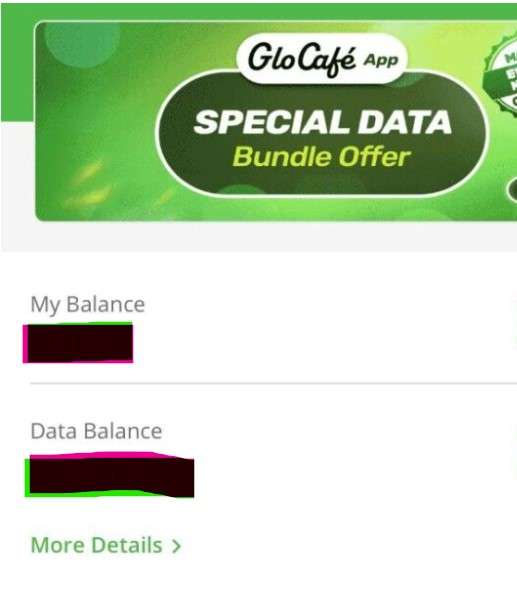
To check your GLO airtime balance using the Glo Café app, download the app, log in with your GLO number, and your airtime balance will be displayed on the home screen or under the ‘My Balance’ section.
You can also recharge, buy data, or transfer airtime from the same app. The app is free, user-friendly, and saves you from memorizing USSD codes.
Step-by-Step Guide to Check Airtime Balance on GLO Using the Glo Café App
To check your GLO airtime balance using the Glo Café app:
Download and install the app on the Google Play Store or App Store.
Launch the app and log in using your GLO phone number. An OTP (One-Time Password) will be sent to your number for quick verification.
Once you’re logged in, your airtime balance is usually displayed on the home screen.
If it’s not on the homepage, tap the “Account” or “My Balance” section for a detailed breakdown of your airtime, data, and other services.
Now you can check your airtime balance on Glo easily. Another option is to use the Glo self-care portal. You’ll be asked to download the Glo mobile app there, though, so just use option 2.
To check your airtime balance on Glo, Dial *310# or use the Glo café app.
Frequently Asked Questions(FAQs)
1. How do I check my Glo airtime balance in Nigeria?
Just dial *310# on your Glo line and hit the call button. You’ll see your airtime balance pop up on your screen within seconds. It’s free and works on all Glo SIMs.
2. Is there another way to check Glo balance apart from *310#?
Yes, you can also use the Glo Café app. Download it from the Google Play Store or Apple App Store, log in with your Glo number, and you’ll see your airtime, data balance, and more on the dashboard.
3. Why is my Glo balance not showing after dialing *310#?
If it doesn’t show, your network might be unstable. Try switching your phone to airplane mode for a few seconds and turn it back on. Still not working? Restart your phone or try checking through the Glo Café app.
4. How can I check my Glo bonus balance?
To check bonus airtime or data balance, dial *323#. It shows your available bonus data and sometimes other bonuses you’ve received from Glo promos or recharges.
5. How do I check my Glo airtime balance from another phone?
You can’t directly check your balance from another phone, but you can link your Glo line to the Glo Café app on another device. Just download the app, log in with your Glo number, and use the OTP sent to your line to gain access.
Are you struggling to remember how to transfer airtime on Airtel in 2025? That’s normal; you’ve probably forgotten again and need a little nudge.
What’s the use of transferring airtime when you could just buy? You may overload airtime on Airtel. This “share data plan” update can help you share with others and get paid in return, or…
You could just be feeling generous, and transferring airtime from Airtel to Airtel can be a good gift or compensation.
Save or bookmark this article for a continuous reminder on the top 2 ways to share airtime on Airtel in 2025 (you could forget again).
How To Transfer Airtime on Airtel
Here are quick steps to transfer airtime on Airtel:
Dial *321# on your Airtel phone.
Choose option 1 for “Airtel to Airtel”.
Select the airtime transfer option.
Enter the recipient’s Airtel number and the amount to transfer.
Confirm the transaction by entering your PIN.
2 Ways to Share Airtime on Airtel in 2025.
You can transfer airtime from Airtel to Airtel line through:
USSD
the MyAirtel app.
The processes are user-friendly. Here is a step-by-step guide on how to transfer airtime on Airtel in 2025.
How To Transfer Airtime on Airtel with USSD
Here are the steps to transfer airtime on Airtel through USSD
Dial *321# on your Airtel line and select option 1, “Airtel to Airtel”.
Enter the recipient’s Airtel number.
Enter the Amount You wish to transfer
Enter PIN or Default PIN to confirm the transaction
1. Dial *321# on your Airtel Line
Once you dial *321# on your Airtel line, you will receive a pop-up message with different possible actions.
If you want to transfer airtime on Airtel, Press 1.
2. Enter the Recipient’s Airtel Number
Now, you should enter the number of the person you wish to transfer airtime to. After typing the number, ensure to re-check to ensure you don’t transfer to another lucky person.
3. Enter the Amount You wish to transfer
As you wish…
4. Enter PIN or Default PIN to confirm the transaction
To confirm your action to transfer airtime on Airtel, you need to input your PIN. If this is the first time you are performing this action, you can use the default PIN provided by Airtel (1234).
For security and privacy reasons, it’s best to change your PIN to your Unique 4-digit number that only you can use.
To change your PIN on Airtel,
Dial *321#
Choose option 3, “PIN management”
Choosethe Change PIN option
Enter Old or Default PIN
Enter New PIN
Success.
This is the last step to successfully transfer airtime on Airtel in 2025. On a side note, there’s a limit to how much you can send. Any amount below 50 naira and you’ll receive a message like this…
Now, let’s discuss the second option.
How To Transfer Airtime on Airtel through MyAirtel App
These applications of Network providers are central areas where you can perform many functions from one place.
The MyAirtel app is no different. You can recharge airtime, buy data bundles and even get specific in-app promos.
To send airtime to another Airtel number using the MyAirtel App, follow the following steps;
How to Share Airtime Using the MyAirtel App
First, download and install the MyAirtel app from your device’s app store.
Open the app and log in with your Airtel number. If you’re new, just follow the steps to create an account.
On the home screen, go to the “Quick Actions” section and tap “View All” to see more features.
Scroll down and select “ME2U – Share Airtime.”
Enter the Airtel number of the person you want to send airtime to, along with the amount you want to share.
Double-check the details, then enter your PIN to confirm and complete the transfer.
1. How can I transfer airtime from Airtel to Airtel without using the internet?
You can transfer airtime from one Airtel number to another without needing internet access by using the USSD code. Simply dial *321# on your Airtel line and follow the prompts:
Select Option 1: “Airtel to Airtel”
Enter the recipient’s Airtel number
Enter the amount you want to send
Enter your PIN (or the default PIN: 1234)
This method works on any type of phone, even if it’s not a smartphone, and does not require any mobile data.
2. What is the default PIN for Airtel airtime transfer and how do I change it?
The default PIN for transferring airtime on Airtel is 1234. You can change this PIN for security reasons. Here’s how:
Dial *321#
Select Option 3: “PIN Management”
Choose “Change PIN”
Enter the default PIN (1234)
Enter your new 4-digit PIN
Make sure to choose a PIN that’s easy for you to remember but hard for others to guess.
3. Why is my Airtel airtime transfer not working and how do I fix it in 2025?
If your Airtel airtime transfer isn’t working, here are some common reasons and how to fix them:
Incorrect PIN: Make sure you’re using the correct 4-digit PIN. If it’s your first time, try 1234 or reset it.
Wrong number: Double-check the recipient’s Airtel number. Transfers only work to other Airtel lines.
Low balance: Ensure you have enough airtime plus a small extra amount for service charges.
Transfer limit exceeded: You may have hit the daily transfer limit. Try again the next day.
USSD error: If USSD isn’t working, switch to the MyAirtel app or check your network connection.
4. How much airtime can I send on Airtel per day using USSD or the MyAirtel app?
Airtel usually allows users to transfer up to ₦5,000 per day, spread across multiple transactions. However, individual transactions must be ₦50 or above. Any amount below ₦50 will not go through, and you’ll receive an error message.
5. Can I transfer airtime from Airtel to another network in Nigeria?
No, Airtel airtime transfers only work within the Airtel network. You cannot transfer airtime from Airtel to MTN, Glo, 9mobile, or any other network.
If you’re looking to help someone on a different network, consider:
Sending money through bank app or mobile wallet
Buying airtime directly for them using bank USSD codes or mobile banking platforms
So, you’ve got some Bitcoin (BTC), and you’re looking to convert it for cash? Maybe you want to use the Naira (NGN) for everyday expenses, or perhaps you’re just looking to exit the volatile world of cryptocurrency and secure your profits. Whatever the reason, you’re not alone! Many Nigerians are turning to digital currencies like Bitcoin for a variety of reasons, and with that comes the question: Where can I convert my Bitcoin for cash in Nigeria?
In this post, we’re going to guide you through everything you need to know to convert your Bitcoin safely and easily. Whether you’re a newbie or a seasoned crypto trader, we’ve got you covered with the best platforms, security tips, and a step-by-step guide to cashing out your Bitcoin for Naira.
Why Would You Want to Convert Bitcoin for Cash?
First off, let’s talk about why you might want to convert your Bitcoin. If you’ve been holding onto Bitcoin for a while, you’re probably aware of how volatile the market can be. While cryptocurrencies like BTC can skyrocket in value, they can also drop just as quickly. This is why many people choose to convert Bitcoin into cash, especially if they want to lock in profits, pay bills, or make a purchase in traditional currency.
You may be thinking, “But Bitcoin has huge potential!” That’s true! But when the market gets shaky or when you need to access cash for personal use, knowing how and where to convert Bitcoin for cash is key.
Legal Considerations for converting Bitcoin in Nigeria
Now, let’s get a bit serious for a moment. converting Bitcoin and other cryptocurrencies in Nigeria has faced some regulatory hurdles. The Central Bank of Nigeria (CBN) placed restrictions on cryptocurrency transactions in 2021, but that hasn’t stopped Nigerians from using peer-to-peer (P2P) platforms to buy and convert Bitcoin. These platforms allow people to convert their Bitcoin directly to others without needing to go through banks.
Despite all this, it’s important to stay informed about the latest regulations and always follow local laws. Just as you would with any financial transaction, make sure you understand the legal implications when converting Bitcoin and always use secure methods to protect yourself.
The Best Platforms to convert Bitcoin for Cash in Nigeria
Alright, enough about regulations! Let’s dive into the fun part: where to actually convert your Bitcoin for cash. Even if you’re new to crypto or have been around the block, choosing the right platform is crucial. Here are the best platforms that Nigerians use to convert Bitcoin for cash:
Swapto(Formerly Dtunes) is the best and most reliable platform for selling Bitcoin in Nigeria because of its high exchange rates, instant payments, and secure transactions. This makes it a favorite among freelancers, traders, and investors.
The Swapto(Formerly Dtunes) App is built for speed, security, and convenience. Some of the key features of the Swapto(Formerly Dtunes) App include:
Instant Transactions: You can sell BTC and receive Naira in minutes.
Transparent Pricing: There are no hidden fees or surprise deductions.
Strong Security: End-to-end encryption and fraud prevention tools.
User-Friendly App: Simple, clean, and easy to navigate.
If you’ve ever had a delayed payout on other platforms, you’ll love how Swapto(Formerly Dtunes) processes payments within minutes.
Paxful connects you directly with buyers and allows you to convert Bitcoin securely.
Payment Methods: From bank transfers to gift cards and mobile wallets, you’ve got over 400 payment options to choose from.
Competitive Rates: Paxful allows you to compare offers and pick the best rates when converting Bitcoin.
Escrow Protection: One of the best features of Paxful is its escrow service. This means that once you agree to a trade, your Bitcoin is held safely in escrow until the buyer confirms they’ve sent the payment. This provides you with extra protection.
To get started, simply create an account, choose a payment method, and start listing your Bitcoin for sale. If you’re new to crypto, don’t worry—Paxful makes it super easy to navigate.
2. Binance P2P
Binance is also has an excellent P2P platform that makes converting Bitcoin super simple.
Payment Methods: You can use bank transfers or mobile wallets, making it a flexible choice for converting Bitcoin in Nigeria.
Security: Binance provides escrow services, ensuring that both you and the buyer are protected during the transaction.
Low Fees: Binance’s low transaction fees make it one of the most affordable platforms to convert Bitcoin on.
If you’re looking for a platform with competitive exchange rates and a large user base, Binance P2P is a solid option.
3. Luno
If you’re not a fan of peer-to-peer trading, Luno might be more your speed. It’s a centralized cryptocurrency exchange where you can convert Bitcoin directly for Naira.
Payment Methods: The main payment method is bank transfer, which makes withdrawing your NGN easy.
Security: Luno is known for its strong security features, so your crypto transaction will be safe and protected.
Competitive Rates: While it’s not a P2P platform, Luno still offers competitive conversion rates for BTC to NGN.
How to convert Bitcoin for Cash with Swapto(Formerly Dtunes)
Here’s a simple step-by-step guide to get you started with Swapto(Formerly Dtunes):
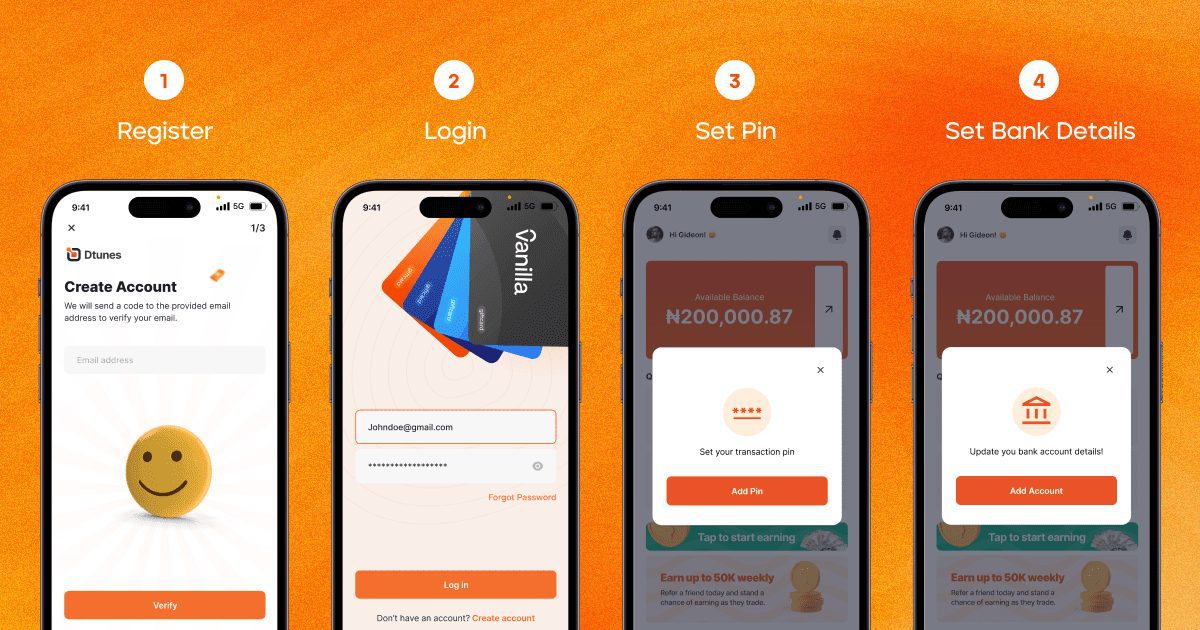
Verify Your Account: To comply with regulatory requirements and ensure the safety of the platform, Swapto(Formerly Dtunes) require you to verify your account. This typically involves clicking a link that would be sent to the registered email address after registration. Follow the instructions provided by Swapto(Formerly Dtunes) in the email to complete the verification process.
Log in, set PIN and bank details: Immediately after you log in after the account verification, the app will prompt you to set a PIN and bank details. The PIN is your transaction PIN for all transactions, and the bank details are your withdrawal bank account.
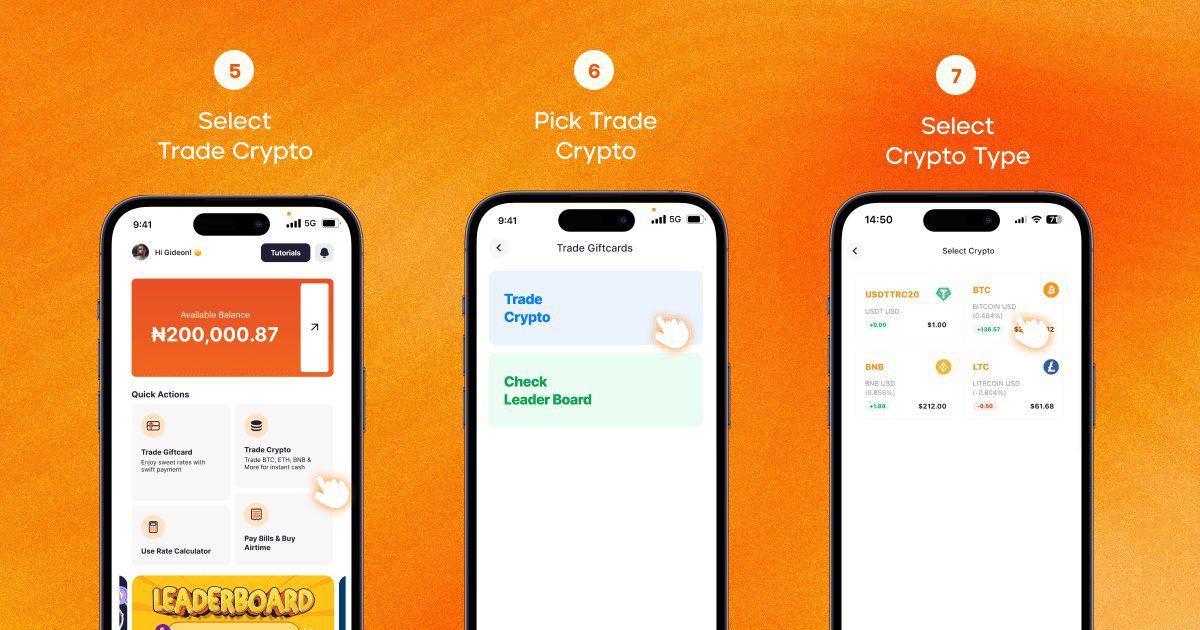
Sell Bitcoin: Select “Trade Crypto” on the dashboard and choose Bitcoin as the type you want to sell. Specify the amount of Bitcoin you wish to sell and choose the desired payment method. Swapto(Formerly Dtunes) will provide you with the current exchange rate and the amount of Naira you will receive. Confirm the transaction and proceed.
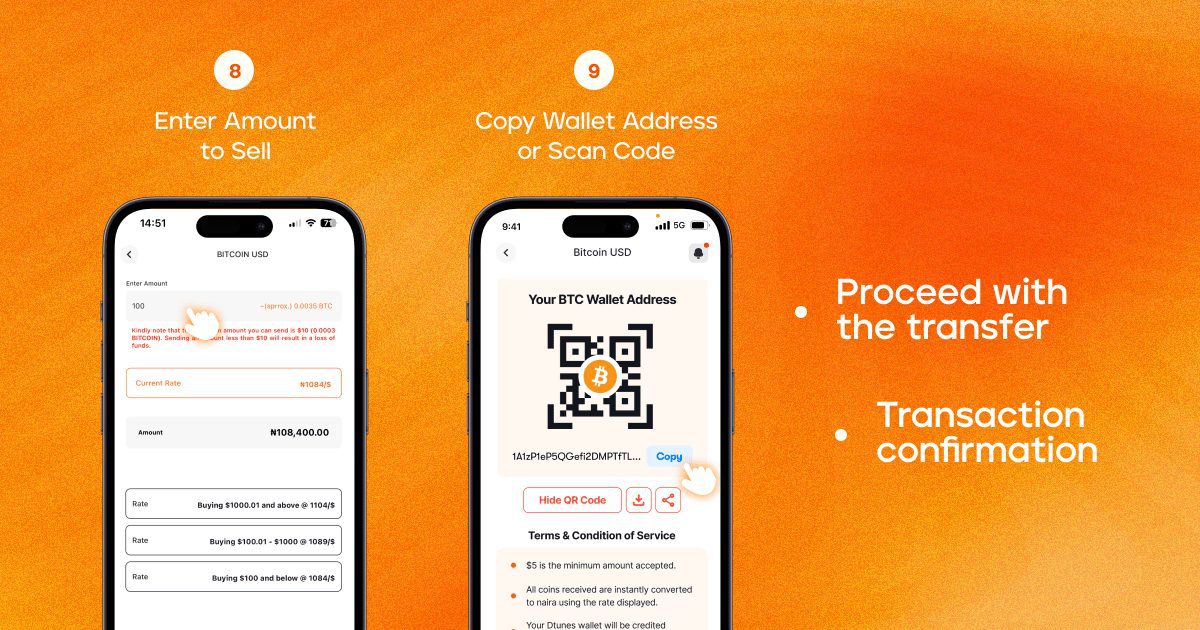
Send Bitcoin: Copy the wallet address or scan the code to initiate the transaction. Payment will be reflected in your App Wallet after two (2) confirmations.
Receive Naira: Once the transaction is completed, initiate withdrawal from the arrow beside the wallet balance, and Swapto(Formerly Dtunes) will transfer the agreed-upon amount of Naira to your designated bank account or the preferred payment method. The funds will be available in your account within minutes, allowing you to access your money quickly and conveniently.
Converting Bitcoin for Cash Made Simple
Converting Bitcoin for cash in Nigeria has never been easier, thanks to a platform like Swapto(Formerly Dtunes).
Have questions or want to share your experience with converting Bitcoin? Drop a comment below. We’d love to hear from you!
Selling Bitcoin to Naira in Nigeria : If you’re in Nigeria and looking for the best site to sell Bitcoin in Nigeria, you’re not alone. With more people trading cryptocurrency, finding a secure and high-paying platform is key.
Nigeria has emerged as a global leader in cryptocurrency adoption, ranking second on the Global Adoption Index by Chainalysis. This is no sudden boost; Nigeria’s economic situation has led many to adopt Bitcoin as an inflation hedge.
With this growth comes the need for secure and reliable platforms for Bitcoin transactions, especially with scams and potential regulatory measures.
Whether you’re after instant cash, a reliable Bitcoin-to-Naira app, or a trusted peer-to-peer (P2P) platform, this guide will help you make the best choice.
In this guide, I’ll show you exactly where to sell Bitcoin in Nigeria, the best apps to sell BTC, and how to avoid scams while cashing out at the best rates.
Top 10 Best Sites and Apps to Sell Bitcoin in Nigeria
Here’s a quick list of the best sites and apps you can sell BTC easily and get your Naira instantly;
Swapto(Formerly Dtunes) App
Paxful
Remitano
Busha
NairaEx App
Luno
Quidax
Binance P2P
Presmit
Yellow Card
What is the Best App to Sell Bitcoin in Nigeria?
Here are the top 10 apps for selling Bitcoin in Nigeria:
1. Swapto(Formerly Dtunes)
The number one app on our list is Swapto(Formerly Dtunes). Swapto(Formerly Dtunes) is the best and most reliable platform for selling Bitcoin in Nigeria because of its high exchange rates, instant payments, and secure transactions. This makes it a favorite among freelancers, traders, and investors.
The Swapto(Formerly Dtunes) App is built for speed, security, and convenience. Some of the key features of the Swapto(Formerly Dtunes) App include
Instant Transactions: You can sell BTC and receive Naira in minutes.
Transparent Pricing: There are no hidden fees or surprise deductions.
Strong Security: End-to-end encryption and fraud prevention tools.
User-Friendly App: Simple, clean, and easy to navigate.
If you’ve ever had a delayed payout on other platforms, you’ll love how Swapto(Formerly Dtunes) processes payments within minutes.
Paxful is a global P2P marketplace where you sell Bitcoin directly to buyers. It supports over 350 payment methods, including bank transfers, mobile money, and gift cards.
Paxful has a secure escrow system that protects your funds until the buyer confirms payment. They also feature a variety of payment methods, so you can get paid in any form you prefer.
3. Remitano
Remitano is another strong P2P platform with its built-in wallet and secure escrow service. It’s like Paxful but with extra security.
They are highly secure, offer competitive rates and minimal trading charges with a 24/7 customer service for quick issue resolution.
4. Busha
Busha is a Nigerian crypto exchange that makes selling Bitcoin effortless. It’s built for speed, reliability and highly competitive exchange rates.
They offer a simple and efficient way to sell BTC. They have a user-friendly interface that beginners can navigate easily.
5. NairaEx App
NairaEx is one of Nigeria’s first Bitcoin exchanges, and its longevity and reliability keep it among the best.
They offer a zero deposit fee feature. Unlike some exchanges, you don’t lose money when you fund your account on the NairaEx App. You can directly transfer to banks, no third-party delays.
NairaEx is a solid option if you’re looking for a trusted platform with stable rates,
6. Luno
Luno is ideal if you want a safe, structured trading experience when trading. They are a global exchange that supports Naira withdrawals. It’s regulated and has high-security standards.
They offer competitive BTC-to-Naira prices and you can do that on their mobile and beginner-friendly app.
7. Quidax
Quidax is a homegrown Nigerian crypto exchange that offers fast BTC sales, high security, and direct Naira withdrawals. It is designed specifically for African traders, meaning you get a smoother experience tailored to the Nigerian market.
They are highly secure with their bank-grade security measures, including two-factor authentication (2FA) and encrypted transactions, making it one of the safest Nigerian crypto exchanges.
If you want a safe, Nigerian-focused exchange with fast BTC-to-Naira withdrawals, Quidax is a great option.
8. Binance P2P
Binance P2P is one of the best places to sell Bitcoin in Nigeria if you’re looking for high liquidity, competitive prices, and low fees. They connect you directly with buyers and sellers, allowing for custom pricing and flexible payment methods.
Binance has one of the largest trading volumes in the world, ensuring you never struggle to find buyers. You can set your own BTC price and sell at the rate that suits you best.
The new launched version of Presmit mobile app is fast and easy to use. You can use it for your Bitcoin at great rates. Prestmit app is available on Google Play Store and the Apple iOS store.
10. Yellow Card
Yellow Card is a fast-growing cryptocurrency exchange in Africa, designed specifically for quick BTC-to-cash transactions. It is set apart by its easy cash deposit and withdrawal system, allowing users to sell Bitcoin and withdraw their money almost instantly.
Yellow Card is one of the best platforms for selling Bitcoin in Nigeria if you want speed and ease of use.
Best sites and apps to sell bitcoin in Nigeria:
Platform
Best For
Exchange Rate
Payment Methods
Speed
Swapto(Formerly Dtunes) App
P2P trading & security
Competitive
Bank Transfer, USDT
Instant
Paxful
Peer-to-peer marketplace
Varies
Bank, Gift Cards, PayPal
Fast
Remitano
Escrow protection
Fair rates
Bank Transfer, Mobile Money
Secure
Busha
Simple & easy BTC sales
Competitive
Bank Transfer
Quick
NairaEx App
Direct BTC to Naira
Fixed rates
Bank Transfer
Reliable
Luno
Established exchange
Market rate
Bank Transfer
Smooth
Quidax
NGN-to-crypto trading
Market rate
Bank Transfer
Instant
Binance P2P
High liquidity and custom pricing
Flexible
Multiple payment options
Varies
Presmit
Simple and fast BTC sales
Competitive
Bank transfers, gift cards
Fast
Yellow Card
Quick BTC-to-cash transactions
Competitive
Bank transfers, cash deposits
Minutes
If you’re looking for the best Bitcoin trading app in Nigeria, these platforms offer secure transactions, fast withdrawals, and the ability to trade confidently.
Selling Bitcoin in Nigeria
Remember when I said, the economic situation in Nigeria has led many to adopt Bitcoin as an inflation hedge?
Nigerians do this by waiting for the right time to sell Bitcoin and at the best rates. Surely, there’ll be an attempt to fraud you of your coin or even give you hidden or undisclosed charges. This is why you need a reliable and secure app to sell Bitcoin in Nigeria like Swapto(Formerly Dtunes).
How to Sell Bitcoin in Nigeria with Swapto(Formerly Dtunes)
Verify Your Account: To comply with regulatory requirements and ensure the safety of the platform, Swapto(Formerly Dtunes) require you to verify your account. This typically involves clicking a link that would be sent to the registered email address after registration. Follow the instructions provided by Swapto(Formerly Dtunes) in the email to complete the verification process.
Log in, set PIN and Bank Details: Immediately you log in after the account verification, the App will prompt you to set PIN and Bank Details. The Pin is your transaction pin for all transactions and the Bank Details is your Withdrawal Bank account.
Sell Bitcoin: Select “Trade Crypto” on the Dashboard and choose Bitcoin as the type you want to sell. Specify the amount of Bitcoin you wish to sell and choose the desired payment method. Swapto(Formerly Dtunes) will provide you with the current exchange rate and the amount of Naira you will receive. Confirm the transaction and proceed.
Send Bitcoin: Copy the wallet address or scan the code to initiate the transaction. Payment will be reflected in your App Wallet after two (2) confirmations.
Receive Naira: Once the transaction is completed, initiate withdrawal from the arrow beside the wallet balance and Swapto(Formerly Dtunes) will transfer the agreed-upon amount of Naira to your designated bank account or the preferred payment method. The funds will be available in your account within minutes, allowing you to access your money quickly and conveniently.
Best Payment Methods for Cashing Out BTC in Nigeria
Not all platforms offer the same payment options. Here are the most common methods for converting Bitcoin to Naira:
Bank Transfers – Most exchanges send funds directly to your bank.
Mobile Money – Apps like PalmPay, OPay, and Paga allow easy withdrawals.
USDT (Tether) Swaps – If you want to keep your funds in crypto, this is a safe alternative.
Gift Cards & PayPal – Some platforms allow BTC-to-gift card or PayPal swaps.
For the best experience, choose platforms with instant payments and low fees to sell bitcoin in Nigeria.
Common Mistakes to Avoid When Selling Bitcoin in Nigeria
Even experienced traders make costly mistakes when selling Bitcoin. Here’s how to avoid them;
Not Checking Exchange Rates: Some platforms offer better BTC-to-Naira rates than others. You can use the Swapto(Formerly Dtunes) rates calculator to check for rates.
Falling for Scammers: Always use escrow services when trading P2P.
Ignoring Transaction Fees: Some exchanges have hidden fees that reduce your earnings.
Selling at the Wrong Time: BTC prices fluctuate, so sell at peak rates.
Not Using a Secure Wallet: Ensure your Bitcoin wallet is safe from hacks.
Swapto(Formerly Dtunes) – Best site to sell Bitcoin to naira fast
Swapto(Formerly Dtunes) is Africa’s leading crypto exchanger where the top crypto traders enjoy massive profits from every transaction. Swapto(Formerly Dtunes) is a platform that is customer-centric and result-driven. As a new trader in the crypto industry, you might want to look around for the best site to sell bitcoin to naira. Fortunately for you, here are some of the reasons why Swapto(Formerly Dtunes) stand out amidst other Apps and sites.
Why Choose Swapto(Formerly Dtunes)?
Fast and Efficient Transactions: When it comes to selling Bitcoin, time is of the essence. Swapto(Formerly Dtunes) understands this and ensures that your transactions are processed swiftly, allowing you to convert your Bitcoin to Naira without any delays. With our advanced technology and streamlined processes, you can expect a seamless experience.
Secure and Reliable: Security is a top priority when dealing with cryptocurrencies. Swapto(Formerly Dtunes) employs robust security measures to protect your funds and personal information. Our platform utilizes encryption protocols and multi-factor authentication to ensure that your transactions are safe and secure.
Competitive Exchange Rates: Getting the best value for your Bitcoin is essential. Swapto(Formerly Dtunes) offers competitive exchange rates, allowing you to maximize your profits when selling Bitcoin. Our rates are updated in real-time, ensuring that you get the most accurate and favourable rates for your transactions. Click here to check out current crypto rates on our rate calculator.
User-Friendly Interface: Swapto(Formerly Dtunes) is designed with user experience in mind. Whether you’re a seasoned trader or new to the world of cryptocurrencies, our intuitive interface makes it easy to navigate and execute transactions. You don’t need to be a tech expert to sell Bitcoin on Swapto(Formerly Dtunes).
Multiple Payment Options: Swapto(Formerly Dtunes) understands the importance of convenience. They offer a variety of payment options to cater to your preferences. Whether you prefer bank transfers, mobile money, or other payment methods, Swapto(Formerly Dtunes) has you covered. You can sell your Bitcoin and receive payment directly to your preferred bank account in Nigeria.
Sell Your Bitcoin Safely and Get the Best Rates on Swapto(Formerly Dtunes)
Now that you know the best crypto app in Nigeria for selling Bitcoin, you can trade with confidence. Swapto(Formerly Dtunes) offer the most trustworthy platform for convenience, security and ease.
With its growing influence in Nigeria, start trading today with Swapto(Formerly Dtunes) and enjoy seamless Bitcoin transactions?
Start trading today with Swapto(Formerly Dtunes) for secure transactions and competitive rates.
Frequently Asked Questions (FAQs) About Selling Bitcoin in Nigeria
1. What is the best site to sell Bitcoin in Nigeria?
The best site to sell Bitcoin in Nigeria is Swapto(Formerly Dtunes). The Swapto(Formerly Dtunes) App is built for speed and convenience. They offer instant transactions, transparent pricing, strong security with a user-friendly app.
2. Which Bitcoin-to-Naira app has the best rates?
Swapto(Formerly Dtunes) offers the best Bitcoin to Naira rates on their app. They are reliable, secure and fast with no hidden charges.
3. Is Swapto(Formerly Dtunes) P2P safe for Nigerians?
Yes! Swapto(Formerly Dtunes) protects both buyers and sellers from fraud.
4. How long does it take to receive payment after selling Bitcoin?
On Swapto(Formerly Dtunes), you will receive your payment after selling Bitcoin instantly.
5. Which apps allow me to sell BTC instantly in Nigeria?
Swapto(Formerly Dtunes) App
Paxful
Remitano
6. What do I consider before choosing an app to sell Bitcoin in Nigeria
When choosing the best app to sell Bitcoin in Nigeria, there are some key factors you must consider;
The exchange rate: This helps you get the best value when you convert Bitcoin to Naira.
Payment Methods – Bank transfers, mobile money, or USDT?
Transaction Fees – Lower fees mean more money in your pocket.
Speed & Security – You want a platform that pays quickly and keeps your funds safe.
Lost access to your Bitcoin wallet? If you’ve forgotten your password, misplaced your recovery phrase, or experienced a device failure, this step-by-step guide will help you regain control of your crypto funds.
Losing access to your Bitcoin wallet can be a tiring experience, especially if you’re new to cryptocurrency. However, with the right guidance, you can regain control of your assets.
This comprehensive guide will walk you through the process of recovering access to your Bitcoin wallet, ensuring you leave with a clear solution.
Understanding Bitcoin Wallets
HOW TO RECOVER BITCOIN WALLET ACCESS
A Bitcoin wallet is a digital tool that allows you to store, send, and receive Bitcoin. There are several types of wallets, each with its own method of access and security features:
Software Wallets: Applications installed on computers or smartphones.
Hardware Wallets: Physical devices that store private keys offline.
Paper Wallets: Physical documents containing your private and public keys.
Understanding the type of wallet you have is crucial for the recovery process.
Common Reasons for Losing Bitcoin Wallet Access
There could be several reasons behind you losing your Bitcoin wallet access. Before diving into recovery methods, it’s essential to identify the cause of the lost access:
Forgotten Passwords: Misplacing or forgetting the password to your wallet.
Lost Recovery Phrases: Losing the seed phrase required to restore the wallet.
Device Malfunctions: Hardware failures or loss of the device where the wallet is stored.
Software Issues: corrupted wallet files or software glitches.
Identifying the specific issue will guide you towards the appropriate recovery method.
What do I do If I Lose my Bitcoin Wallet Access?
When you realize you’ve lost your Bitcoin access, do the following:
Stay Calm: Panicking can lead to hasty decisions that might worsen the situation.
Avoid Repeated Access Attempts: Multiple failed attempts can lock you out permanently.
Gather Information: Collect any related data, such as wallet type, associated email addresses, and any backups you might have.
All hope is not lost; the following are steps you can take to recover your Bitcoin wallet access.
How to Recover Bitcoin Wallet Access: A Step-by-Step Guide
Whether you’re using a software wallet, hardware wallet, or paper wallet, this guide will help you recover your funds securely.
Follow these proven methods to regain control of your crypto wallet and avoid permanent loss.
1. How to Recover a Software Wallet (Trust Wallet, Electrum, Exodus, etc.)
If you use a Bitcoin software wallet, follow these steps to restore access:
1. Use Your Recovery Phrase (12-24 Words)
Most wallets provide a 12–24 word recovery phrase during setup. This phrase is your master key.
Open your wallet app and select Restore Wallet or Recover Wallet.
Enter your recovery phrase in the exact order provided.
Once verified, your wallet and funds will be restored.
2. Check for Wallet Backup Files
If you backed up your wallet, search for wallet backup files on your device.
Look for files like wallet.dat or encrypted key backups.
Use the wallet’s Import Backup feature to restore access.
3. Contact Wallet Customer Support
If you still can’t access your wallet at this point? Reach out to official wallet support for troubleshooting.
Warning: Never share your recovery phrase or private key with anyone!
2. How to Recover a Hardware Wallet (Ledger, Trezor, KeepKey, etc.)
A Bitcoin hardware wallet is secure, but losing access doesn’t mean losing your funds. Here’s how to recover your crypto wallet:
1. Use Your Recovery Seed (24 Words)
During setup, you received a 24-word seed phrase. Use it to restore your wallet.
On a new or reset device, select Restore from Recovery Seed.
Enter the 24-word seed in the correct order.
Your wallet and Bitcoin balance should reappear.
2. Replace a Lost or Broken Hardware Wallet
If your device is lost or damaged:
Buy a new hardware wallet from the same manufacturer.
A paper wallet contains your private key and Bitcoin address printed on paper. If you need access:
1. Import Your Private Key into a Bitcoin Wallet
To transfer funds from a Bitcoin paper wallet:
Choose a trusted Bitcoin wallet app (e.g., Electrum, Blockchain.com).
Use the Import Private Key feature.
Enter or scan the private key from your paper wallet.
Your Bitcoin balance should now be available in the software wallet.
2. Secure Your Device to Prevent Bitcoin Theft
Before importing your private key, ensure your computer or phone is safe.
Run antivirus scans to remove malware and keyloggers.
Use a fresh OS install or an offline device for maximum security.
Avoid public Wi-Fi to prevent hackers from intercepting data.
Once imported, transfer your Bitcoin to a secure hardware or software wallet—paper wallets are easy to lose and vulnerable to damage.
By following these steps, you can successfully recover your lost Bitcoin wallet and keep your crypto assets safe.
How to Retrieve Wallet Access Without a Recovery Phrase
Depending on your wallet type and previous access history, there are still ways to recover your crypto wallet without a recovery phrase. Follow these steps to regain access.
1. Check for Auto-Logins or Saved Sessions
Many crypto wallets, especially mobile and desktop wallets, may keep you logged in or store session data. If you’ve previously accessed your wallet on a trusted device:
Open the wallet application and check if you’re still logged in.
If logged in, immediately back up your private key or generate a new recovery phrase for future access.
2. Look for a Wallet Backup File
Some wallets create encrypted backup files stored on your device. To check:
Search your computer or mobile storage for files like:
wallet.dat (for wallets like Bitcoin Core)
JSON backup files (common for some browser-based wallets)
If found, reinstall your wallet software and import the backup file to restore access.
3. Recover Access Through Linked Email or Account-Based Wallets
Certain custodial wallets (e.g., Binance, Coinbase, Blockchain.com) allow account-based login with an email or phone number.
Visit the wallet provider’s official website.
Click on “Forgot Password” or “Account Recovery.”.
Reset your password using your registered email or phone number.
Without your recovery phrase or private key, it’s almost impossible to recover your bitcoin. However, these steps can guide you.
How To Secure Your Bitcoin Wallet Access
To avoid future access issues:
Periodically back up your wallet and store the backups securely.
Write down your recovery phrase and store it in a safe location.
Consider using hardware wallets for enhanced security.
Keep your wallet software and devices updated to protect against vulnerabilities.
By understanding your wallet, identifying the cause of lost access, and implementing preventive measures, you can secure your assets and prevent future issues.
Remember, staying informed and vigilant is key to navigating the world of cryptocurrency safely.
FAQs on Bitcoin Wallet Recovery
1. Can I recover my Bitcoin wallet without a recovery phrase?
Unfortunately, without your recovery phrase or private key, it’s almost impossible to recover your bitcoin. However, check for backups or reach out to wallet support for guidance.
2. What if I lose my hardware wallet?
Your funds are safe as long as you have your 24-word recovery seed. Buy a new wallet and restore access using the seed.
3. How can I prevent losing access to my Bitcoin wallet?
Store your recovery phrase securely, create multiple backups, and avoid saving it digitally to prevent hacks.