Godwin Shaibu

  • UBA USSD Codes Updated (2025): Check Balance, Transfers, Airtime, and More

    UBA USSD Codes Updated (2025): Check Balance, Transfers, Airtime, and More

    The first time I used UBA’s *919# code, I was at a wedding in Ibadan. My cousin needed ₦7,000 transferred to his account right then so he could settle the photographer before the couple’s first dance. My data was crawling. The UBA app wouldn’t open. I was about to look bad.

    Then I remembered the bank’s old jingle. “Magic Banking. Just dial *919#.”

    I dialed it, entered my PIN, sent the money, and the photographer started rolling within two minutes. The couple danced. My cousin owed me a bottle. Crisis averted.

    That’s the moment most Nigerians realize how useful USSD banking actually is. You don’t need it every day. But the day you need it, no app or internet connection can replace it.

    This guide covers every UBA Bank USSD code worth knowing in 2026. The verified ones (some popular pages on the internet have wrong codes), the real daily limits, the registration steps if you’re starting fresh, what to do when transactions fail, and the security habits that keep your money safe. Everything you need is on this page. No fluff.

    What is the UBA USSD Code?

    UBA Bank’s USSD code is *919#, and the service is officially called UBA Magic Banking.

    Dial it from the phone number linked to your UBA account, follow the menu prompts, and confirm with your 4-digit PIN. It works on every Nigerian network (MTN, Airtel, Glo, 9mobile) and on every type of phone, from a basic Nokia to the latest iPhone. No internet needed.

    Each USSD session costs ₦6.98 in network charges. Most transactions are free beyond that, though bank transfers to other banks may attract a small fee.

    Now, the full list of codes.

    Complete List of UBA USSD Codes in 2026

    Below is the full, verified list of UBA Magic Banking codes organized by category. Bookmark this section.

    Account Management Codes

    ActionUSSD Code
    Open main menu*919#
    Open a new UBA account*919820#
    Register / activate USSD*919# (first time)
    Check account balance*919*00#
    Check BVN*919*8#
    Change USSD PIN*919*0# → PIN Setup
    Block account (lost phone)*919*10#
    Reset PIN*919# → Settings → Reset PIN

    Transfer Codes

    ActionUSSD Code
    Send to another UBA account*919*3*AccountNumber*Amount#
    Send to other banks*919*4*AccountNumber*Amount#
    Send to microfinance banks / mobile wallets*919*6#
    Transfer to UBA prepaid card*919*32#

    H3: Airtime and Data Codes

    ActionUSSD Code
    Buy airtime for yourself*919*Amount#
    Buy airtime for another number*919*PhoneNumber*Amount#
    Buy data*919# → Buy Data

    H3: Bills and Special Codes

    ActionUSSD Code
    Pay bills (DSTV, GOtv, electricity)*919*5#
    Pay for flights*919*12#
    Apply for a quick loan*919*28#
    Cardless withdrawal*919*30*Amount#

    What is the UBA?

    United Africa Bank popularly known as UBA is one the biggest names in Nigerian banking institutions. With so many branches across the nation and some African countries.

    Before we go deeper, a quick correction worth making. UBA stands for United Bank for Africa, not “United Africa Bank” as it’s sometimes called online. It’s a small but important distinction, especially because UBA is one of the most established names in African banking.

    Founded in 1949, UBA serves over 35 million customers across 20 African countries, the United States, the United Kingdom, France, and the UAE. In Nigeria, it has more than 1,000 branches and is one of the four main banks Nigerians rely on daily. The *919# Magic Banking service was built specifically to extend access to people who don’t always have data or who use basic phones, which still covers a huge portion of the country.

    How to Activate Your UBA USSD Code (First-Time Users)

    If this is your first time using *919#, you have to activate it. The process takes about three minutes and you don’t need to visit a branch.

    You’ll need one of two things to register: your UBA account number OR your UBA debit card (the last 4 digits will do).

    1. Make sure you’re using the phone number registered with your UBA account.
    2. Dial *919# on your phone.
    3. You’ll get a prompt to accept the ₦6.98 network charge. Accept.
    4. Select “Magic Banking” or “Self-Banking” from the menu.
    5. Choose your registration method: Account with PIN (uses your account number) or Prepaid with PIN (uses your debit card).
    6. Enter the required details when prompted.
    7. Create a 4-digit PIN. Avoid the obvious ones: 1234, 0000, your birth year, your account’s last 4 digits. Pick something only you would know.
    8. Confirm the PIN by entering it again.

    That’s it. You’ll get a confirmation message, and *919# is now active on your number.

    One important note: UBA does not assign a default PIN. The PIN you create during registration is yours alone. If anyone ever asks you for it, including someone claiming to be from the bank, do not share it. UBA’s customer service will never ask for your USSD PIN.

    How to Check Your UBA Account Balance with USSD

    The fastest way to confirm what’s in your account.

    1. Dial *919*00# on your registered phone number.
    2. Enter your 4-digit USSD PIN when prompted.
    3. Your balance shows on the screen immediately and also arrives by SMS.

    UBA charges ₦10 per balance inquiry (deducted by your network) on top of the ₦6.98 session fee. If you check your balance daily, this adds up. For regular monitoring, the UBA mobile app or internet banking are free.

    How to Transfer Money with the UBA USSD Code

    This is the main reason most people use *919#. You can send money to other UBA customers and to any Nigerian bank.

    Sending to Another UBA Account

    1. Dial *919*3*AccountNumber*Amount#.
    2. Confirm the recipient’s name on the screen. Always check this. A wrong digit means your money goes to a stranger and you’ll spend weeks trying to recover it.
    3. Enter your USSD PIN.
    4. Both you and the recipient get instant SMS notifications.

    Example: To send ₦5,000 to UBA account 1234567890, dial *919*3*1234567890*5000# and confirm.

    Sending to Other Banks (GTBank, Access, Zenith, Opay, PalmPay, etc.)

    1. Dial *919*4*AccountNumber*Amount#.
    2. Confirm the recipient’s name on screen.
    3. Select the bank from the list, or type the first three letters (Acc for Access, Opa for Opay, Pal for PalmPay).
    4. Enter your PIN.

    Example: To send ₦10,000 to an Access Bank account 0123456789, dial *919*40*123456789*10000# and follow the prompts.

    UBA USSD Transfer Limits (Read This Carefully)

    This is where most articles get it wrong, so pay attention.

    UBA has two tiers of USSD users:

    Standard PIN users (default):

    • ₦20,000 per transaction
    • ₦100,000 daily total

    Token + Indemnity users (advanced):

    • ₦500,000 per transaction
    • ₦1,000,000 daily total

    To upgrade from standard PIN to token-based authorization, you need to sign an indemnity form at any UBA branch. Once activated, you’ll receive a hardware or app-based token that generates a one-time code for each transaction. This is what serious business users and high-volume traders use to push the limit to ₦1m daily.

    If you regularly need to send more than ₦100,000 per day, the indemnity upgrade is worth the half-hour branch visit.

    Airtime purchase limit: ₦5,000 per day across all your recharges, regardless of token status. This applies to both you and recipients.

    How to Buy Airtime with UBA USSD (And Get 10% Bonus)

    UBA has been running a permanent promo: dial *919# to recharge airtime and get an extra 10% on any network. It’s been quietly active for years, and most Nigerians don’t realize it’s still on.

    Buying Airtime for Yourself

    Dial *919*Amount#. So *919*1000# tops up your own line with ₦1,000, plus the 10% bonus where applicable.

    Buying Airtime for Someone Else

    Dial *919*PhoneNumber*Amount#. To send ₦500 to 08012345678, dial *919*08012345678*500#.

    Enter your PIN to confirm. The recharge is instant.

    How to Pay Bills with UBA USSD

    You don’t need to log into anything to pay your DSTV, GOtv, or electricity bill. Just dial.

    1. Dial *919*5#.
    2. Choose the bill type (DSTV, GOtv, Startimes, Electricity, etc.).
    3. For cable TV: enter your IUC/smartcard number.
    4. For electricity: select your DISCO (EKEDC, IKEDC, AEDC, etc.) and enter your meter number.
    5. Confirm the amount.
    6. Enter your USSD PIN.

    For most bills, the confirmation SMS arrives within seconds. Keep that SMS until the service is fully restored on your end.

    Cardless Withdrawal Using UBA USSD

    You can withdraw cash at participating UBA ATMs without your debit card.

    1. Dial *919*30*Amount# on your registered line.
    2. Enter your USSD PIN.
    3. Choose the account to be debited.
    4. The system generates a one-time withdrawal code (OTP) and sends it by SMS.
    5. Go to a UBA ATM and select “Cardless Withdrawal” from the main menu.
    6. Enter the OTP and collect your cash.

    The OTP usually expires within a few hours, so don’t generate it too early. This feature is useful when you’ve forgotten your card at home or when your debit card is being replaced.

    How to Open a New UBA Account with USSD

    If you don’t have a UBA account yet, you can open one without visiting a branch.

    1. Dial *919*20# from any phone.
    2. Enter your first name and last name as they appear on your ID.
    3. Choose the type of account.
    4. Add your date of birth.
    5. Follow the rest of the prompts.
    6. UBA sends your new account number by SMS within seconds.

    The new account starts as a Tier 1 account, which has restrictions on transaction size and total balance. To upgrade to Tier 2 or Tier 3 (which unlocks larger transfers and savings), you’ll need to visit a branch with your BVN, NIN, and valid ID, or complete the upgrade through the UBA mobile app.

    How to Get a Quick Loan with UBA USSD

    UBA offers small loans through the *919# code, with no paperwork required.

    1. Dial *919*28#.
    2. The menu shows available loan offers based on your account history and salary inflow.
    3. Pick the amount you want and review the repayment terms.
    4. Confirm with your USSD PIN.
    5. The loan reflects in your account within minutes.

    Eligibility depends on how active your UBA account is and whether your salary is paid into it. New accounts won’t see large offers. Long-standing accounts with steady inflow can access ₦50,000 to ₦5 million, depending on profile.

    Important: repay on time. Late repayment affects your credit history and your eligibility for future UBA loans.

    What to Do When UBA USSD Isn’t Working

    Even the best banking systems have off-days. Here are the most common issues and how to fix them.

    “Service Temporarily Unavailable” or No Response

    This is usually a network issue, not the bank. Try these in order:

    1. Wait 5 minutes and try again.
    2. Switch networks if you have a dual-SIM phone.
    3. Move to an area with stronger signal.
    4. Restart your phone and dial again.

    If the problem persists for more than an hour, call UBA customer care on +234-01-2808822 or +234-01-2808800, or email cfc@ubagroup.com.

    “Invalid PIN” When You Know It’s Correct

    Three wrong PIN attempts will lock your USSD service. To recover:

    1. Dial *919# from your registered line and look for the “PIN Setup” or “Reset PIN” option.
    2. Follow the verification prompts (you’ll need your account number or debit card details).
    3. Create a new PIN.

    If you’re fully locked out, call UBA customer care or visit any branch with valid ID to unlock your profile.

    Money Sent But Not Reflecting on the Recipient’s End

    This happens more often than people realize, and the fix is usually patience. Most stuck USSD transfers reverse or complete within 24 hours. If it’s been longer:

    1. Take a screenshot of the SMS confirmation UBA sent you.
    2. Note the transaction reference number from that SMS.
    3. Email cfc@ubagroup.com or visit any UBA branch with the reference number.
    4. Disputes are usually resolved within 5–7 working days.

    Never trust anyone who calls you offering to “help reverse” the transaction. That’s a common scam.

    You’ve Lost Your Phone or SIM

    Move quickly. Dial *919*10# from any phone to block your USSD service immediately. This prevents anyone with your SIM from making transactions. Then call UBA customer care on +234-01-2808822 to formally lock your account.

    UBA USSD Code vs UBA Mobile App: Which Should You Use?

    Both are UBA products, but they’re built for different needs.

    FeatureUBA USSD (*919#)UBA Mobile App
    Internet requiredNoYes
    Works on basic phonesYesNo
    Daily transfer limit (default)₦100,000Higher, depends on account tier
    With token + indemnity₦1,000,000 daily₦5 million+ daily
    Bill paymentsYesYes, more options
    Card managementLimitedFull (block, request new card, change PIN)
    Investment productsNoYes (UBA Wealth, fixed deposits)
    Loan managementBasicFull loan history, repayments
    SpeedInstantInstant

    The honest verdict: use the UBA app for daily banking and bigger transactions. Keep *919# in your back pocket for the days when your data fails, your phone dies and you’re on a borrowed device, or you’re somewhere with weak signal. It costs you nothing to know it.

    Staying Safe While Using UBA USSD

    Three rules that protect your money.

    1. Never share your USSD PIN with anyone. Not your spouse, not your relative, not the friendly voice on the phone claiming to be from UBA. Bank staff will never ask you for your PIN.
    2. Always confirm the recipient’s name before transferring. UBA shows you the account holder’s name on screen before you enter your PIN. Read it. One missed glance is a wrong transfer that costs days of paperwork to fix.
    3. Use only your registered phone number. USSD is tied to the SIM linked to your account. If someone steals or swaps your SIM, dial *919*10# immediately from any phone to block USSD access.

    Beyond USSD: Smarter Ways to Move Your Money

    USSD is great for emergencies and quick transactions. But for bigger financial moves, like converting crypto to naira, paying for international subscriptions, or buying gift cards at the best rates, you need a different tool.

    That’s where Swapto(Formerly Dtunes) comes in. Sell BTC, USDT, or Ethereum directly to naira in your UBA account in under 10 minutes. No P2P stress. No waiting for a stranger to confirm payment. The rate is shown upfront before you confirm, and you get 0.5% cashback on every trade.

    Download the Swapto(Formerly Dtunes) app on App Store or Play Store

    Frequently Asked Questions about USSD

    What is the UBA Bank transfer code?

    The UBA Bank transfer code is 919#. To send money to another UBA account, dial *919*3*AccountNumber*Amount#. To send to other banks, dial *919*4*AccountNumber*Amount#. Confirm the recipient’s name on screen, then enter your 4-digit USSD PIN. The transfer is instant.

    How do I check my UBA account balance with USSD?

    Dial *919*00# from your registered phone number and enter your USSD PIN. Your balance shows on screen and is also sent to you by SMS. The session costs ₦6.98 plus a ₦10 balance inquiry fee charged by your network.

    What is the maximum amount I can transfer using UBA USSD?

    The default daily limit on UBA USSD is ₦20,000 per transaction and ₦100,000 daily total. To unlock higher limits (₦500,000 per transaction and ₦1,000,000 daily), visit any UBA branch to sign an indemnity form and activate a hardware or app-based token.

    Does UBA have a default USSD PIN?

    No. UBA does not assign a default PIN. You create your own 4-digit PIN during the USSD registration process. If you forget it, dial *919# and select the PIN Reset option, or contact UBA customer care on +234-01-2808822.

    Can I pay for DSTV, GOtv, or electricity bills with UBA USSD?

    Yes. Dial *919*5#, choose Bill Payments, and select the service (DSTV, GOtv, electricity, etc.). Enter your smartcard or meter number, confirm the amount, and pay with your USSD PIN. Receipts arrive by SMS within seconds.

    Is there a charge for using UBA USSD?

    Yes. Each USSD session costs ₦6.98, charged by your mobile network. Balance inquiries cost an additional ₦10. Transfers to other banks may attract a small fee depending on the amount. Dialing *919# itself is free; only completed transactions or balance checks incur charges.

    What do I do if my UBA USSD transfer fails but I was debited?

    Don’t panic. Most failed transfers reverse automatically within 24 hours. Keep the SMS confirmation UBA sent you, note the transaction reference number, and if the reversal doesn’t happen, email cfc@ubagroup.com or call +234-01-2808822 with that reference. Disputes are usually resolved within 5–7 working days.

    How do I block my UBA USSD if my phone is stolen?

    Dial *919*10# from any phone to immediately block your UBA USSD service. This prevents anyone with your SIM from making transactions. Then call UBA customer care on +234-01-2808822 to formally lock your account and request a SIM swap if needed.

    The Bottom Line

    The UBA USSD code is one of those small tools that quietly makes life easier. You don’t need it every day. But the day your data fails, your phone won’t update, or you’re in a wedding venue in Ibadan trying to pay a photographer before the dance, you’ll be glad you know *919# by heart.

    Save it somewhere you can find it: phone contacts, screenshot of this page, or just commit it to memory. Activate it before the day you actually need it. And if you ever want to convert crypto to naira straight into your UBA account in minutes, Swapto(Formerly Dtunes) is the easiest way to do it.

    More Articles to Read:

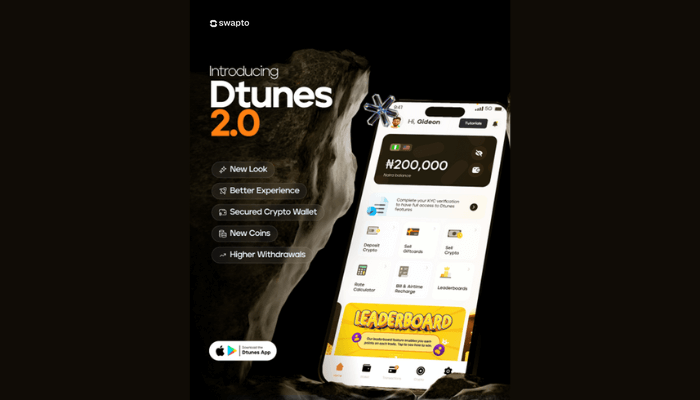
    Hold, Sell, and Manage Crypto Like a Pro with Swapto(Formerly Dtunes) 2.0
    How Much is Dollar to Naira Today?

    How to Check MTN Airtime Balance

  • Access Bank USSD Codes Updated (2025): Check Balance, Transfers, Airtime, and More

    Access Bank USSD Codes Updated (2025): Check Balance, Transfers, Airtime, and More

    Access bank USSD code *901# has made it easier for people across Nigeria to manage their money. With just a few taps, you can reach your account, handle transactions, and stay in control even without mobile data.

    From transfers, airtime, data, and bill payments, every step is outlined to help you transact smarter, wherever you are.

    In this article you will find out everything you need to know about the current Access Bank USSD code in 2025.

    What is the Access Bank USSD code?

    *901# is the shortcut that gives Access users control over their finances. It’s a fast and convenient way to complete important transactions directly from your phone without needing the internet or an app. 

    All you need is just a few steps, and you can send money, check your balance, and even get access to a loan.

    It’s designed for speed, simplicity, and the realities of daily activities in Nigeria.

    What is the Access Bank?

    Access Bank is one of Nigeria’s most established financial institutions. Since its launch in 1989, it has grown from a modest commercial outfit into one of Africa’s leading service providers, supporting individuals, small businesses, and large corporations.

    Its strength lies in how it blends modern tools with everyday activities. From in-branch support  to mobile platforms and USSD, the institution is built to give customers direct, hands-on control of their money.

    With a wide reach, a strong digital footprint, and a clear focus on service delivery,Access continues to shape how Nigerians manage and move their funds.

    Access Bank USSD Code?

    *901# is Access bank’s direct line for handling key financial actions without relying on the internet. You can check balance, send money, pay bills or top-up airtime..

    Once you dial it from your registered line, a prompt will  guide you through each transaction step by step.

    How to Activate the Access bank USSD Code

    1. Dial *901# on your mobile phone.

    2. Choose “Register” or follow the instructions for first-time setup.

    3. Enter account number..

    4. Create a 4-digit PIN to authorize transactions.

    5. Confirm the PIN. Once it’s accepted, you’ll receive a confirmation message.

    Updated List of Access Bank USSD Codes 

    Here’s a list of what you can do with *901# in 2025

    • Transfer Funds To Access or Others:  Dial*901* Amount*Account Number#
    • Buy airtime for self: *901* Amount#
    • Buy airtime for others: *901*Amount*Phone Number#
    • Check balance: *901*00#
    • Bill payments(DSTV,Electricity): *901*3#
    • Open a new account:*910*0#
    • Buy data: *901#
    • Block your account: *901*911#
    • Access loan services: *901*11#

    How to Withdraw Funds with Access Bank USSD Code

    • Dial *903# 
    • Select “Withdraw money”.
    • Choose “Agent Withdrawal”
    • Enter the amount you want to withdraw
    • Input the agent’s code
    • Enter your transaction PIN to confirm.

    How to Create Access Bank Account Using the USSD Code

    • Dial *901*0# 
    • Enter your first and last name.
    • Choose your preferred account type.
    • Provide your date of birth.
    • Confirm your details
    • Once completed, your new account number will be generated instantly, and sent to you via SMS.

    How to Fund Your Access Bank Account with USSD Code

    • Dial the code 
    • Select “Transfer”
    • Choose Access from the list.
    • Input your account number and the amount.
    • Complete the transaction with your 4-digit PIN.

    Access Bank USSD Code for Balance Check

    • Press *901*00# on your registered line.
    • Enter your PIN when prompted.
    • Your balance will be sent to you.

    Access Bank USSD Code for Fund Transfer

    • Dial *901* Amount*Account Number#
    • Select the recipient’s bank from the list
    • Confirm the name that pops up.
    • Enter your 4-digit PIN to approve the transaction.

    Access Bank USSD Code for Data Purchase

    • Dial *901#
    • Choose “Buy Data” from the menu.
    • Select the network provider
    • Enter mobile number
    • Pick a data bundle plan
    • Confirm the purchase with your PIN.

    Access Bank USSD Code for Airtime Purchase

    • For Self: Dial *901*Amount#
    • For others: *901*Amount* number#
    • Confirm the transaction.

    Access Bank USSD Code for Airtel

    • Dial *901*Amount*Airtel Number#
    • Complete purchase with your PIN

    Access Bank USSD Code for Buying Data 

    • Dial *901#
    • Select “Buy Data” from the menu.
    • Choose the network provider
    • Enter number.
    • Pick the data bundle that suits you.
    • Confirm.

    Access Bank USSD Code for Loan

    • Input *901*11# on your phone
    • Follow the options on the screen to select your loan type.
    • Enter the required details.
    • Confirm.

    Access Bank USSD Code for Buying Airtime

    •  For your own line: Dial *901*Amount#
    • For others: Dial *901*Amount*Number#

    Frequently Asked Questions about USSD

    How do I check my Access Bank account balance using USSD?

    Enter *901*00# on your registered line and follow the prompt.

    Can I transfer money with the Access Bank USSD code?

    Yes, with * 901*Amount*Account Number# you can send money and select the receiving bank.

    How do I buy airtime from my Access Bank account?

    *901*Amount# for self or *901*Amount*Phone Number# for others.

    What USSD Code do I use to open a new Access Bank account?

    Simply press 901*0# and follow the instructions to get started.

    Do I need a smartphone to use Access Bank USSD?

    No, you do not need a smartphone to use the code. It can be used on any phone type.

    What is the USSD code to block my Access Bank account

    To block your account, press *901*911# from any phone, then follow the instructions.

    Conclusion

    Access bank USSD codes gives you more than convenience; they put control directly in your hands. From data to loans and withdrawals, everything happens right from your mobile, with no data needed. It’s a system that is clear, secure, and always within reach 24/7.

    Once you get to activate it, managing your fund becomes easy without running to the bank every day.

    No more queuing at an ATM stand just to check your balance or do a transfer. 

    More Articles to Read

    Hold, Sell, and Manage Crypto Like a Pro with Swapto(Formerly Dtunes) 2.0
    How Much is Dollar to Naira Today?

    How to Check MTN Airtime Balance

  • New Prepaid Meter Prices for 2025

    New Prepaid Meter Prices for 2025

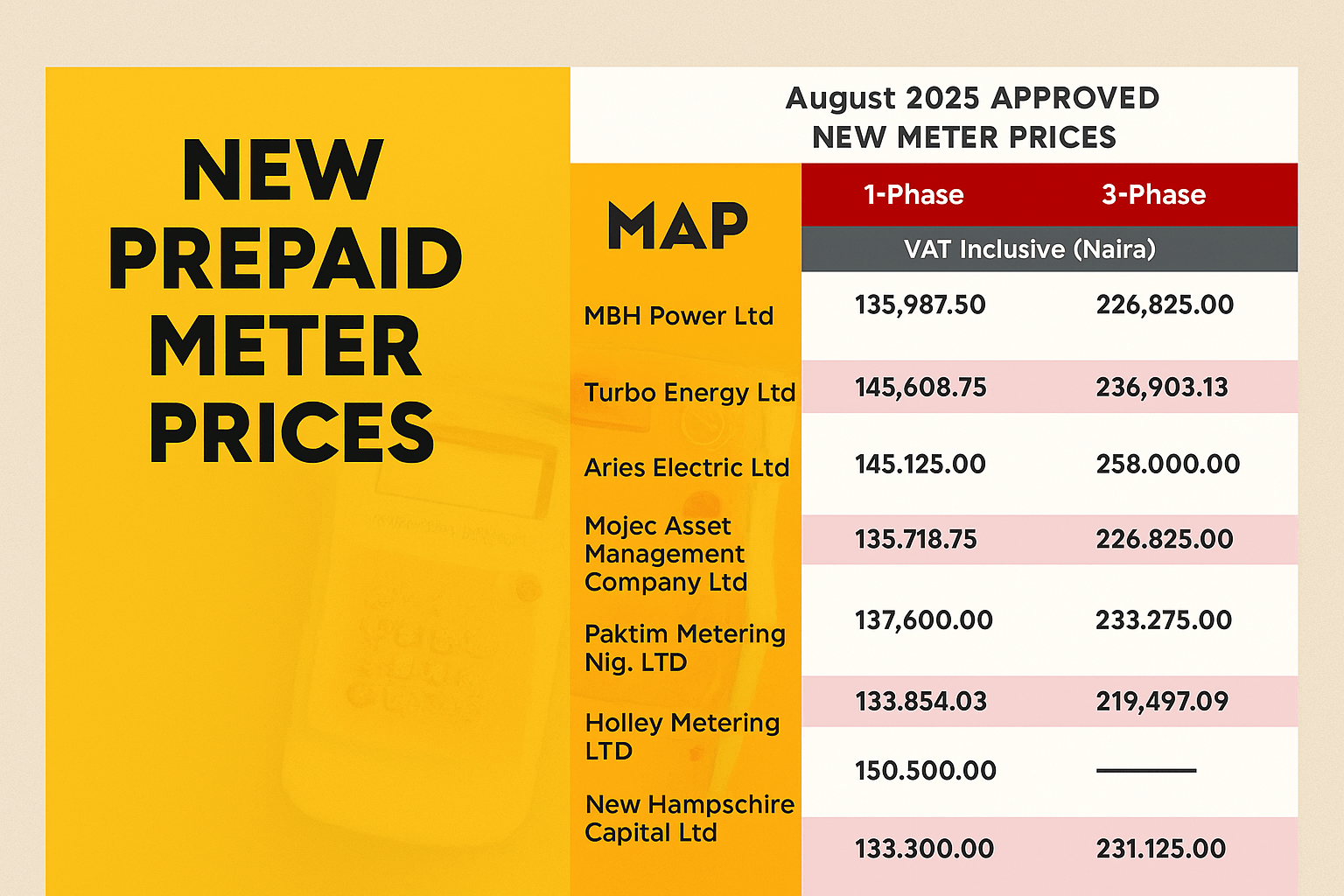
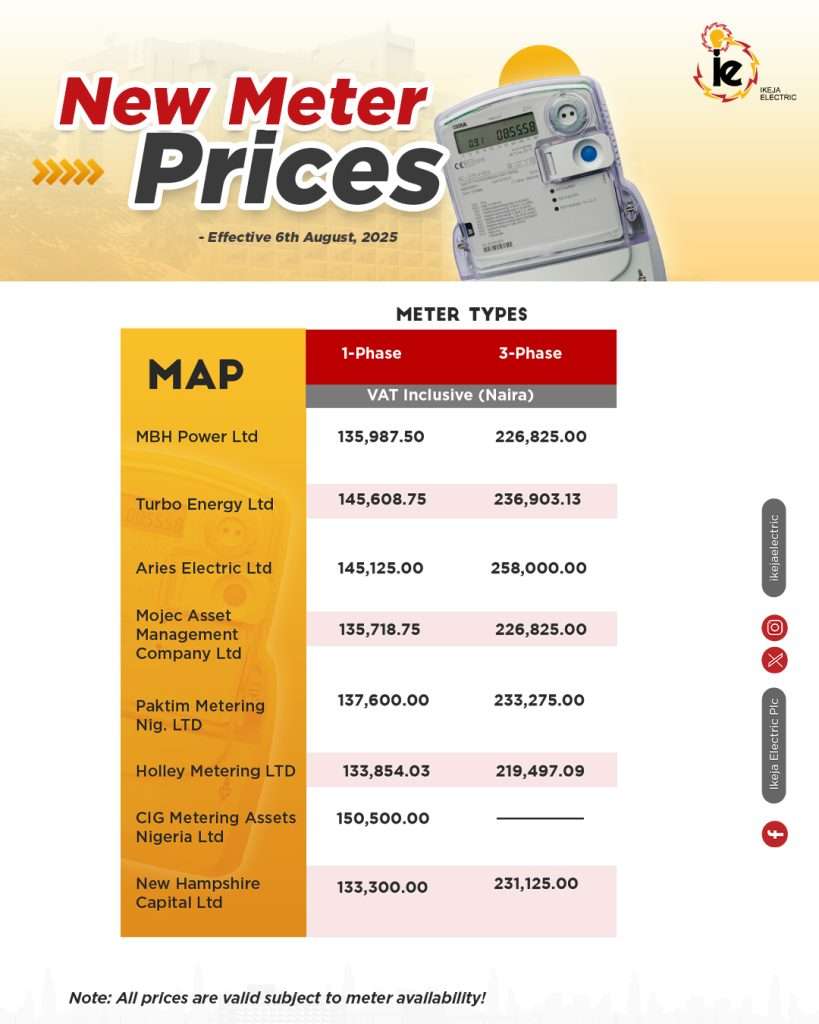
    Ikeja Electric has officially released new prepaid meter prices, effective August 6, 2025, covering both single-phase and three-phase meter types. These new rates, inclusive of VAT, come as part of the company’s effort to keep customers informed about current procurement costs and to ensure transparent access to meter pricing under its Meter Asset Provider (MAP) scheme.

    According to the announcement made on the company’s official X (formerly Twitter) account, the adjustments reflect the latest approved rates for various meter providers and remain valid subject to availability. For customers, these updates are more than just figures—they’re essential for planning and budgeting, especially for households and businesses looking to manage electricity costs efficiently.

    current price of prepaid meter in nigeria

    Current Price of Prepaid meter in Nigeria

    Below is the complete table of new prepaid meter prices for August 2025, inclusive of VAT:

    Meter ProviderSingle-Phase (₦)Three-Phase (₦)
    MBH Power Ltd135,987.50226,825.00
    Turbo Energy Ltd145,608.75236,903.13
    Aries Electric Ltd145,125.00258,000.00
    Mojec Asset Management Company Ltd135,718.75226,825.00
    Paktim Metering Nig. Ltd137,600.00233,275.00
    Holley Metering Ltd133,854.03219,497.09
    CIG Metering Assets Nigeria Ltd150,500.00N/A
    New Hampshire Capital Ltd133,300.00231,125.00

    Note: Prices are inclusive of VAT and may vary depending on meter availability.

    Read Also:
    How to Check Outstanding Debt on Prepaid Meter Online

  • How to Sell Tron (TRX) in Nigeria

    How to Sell Tron (TRX) in Nigeria

    Selling Tron (TRX) in Nigeria is one of the best ways to turn your digital assets into Naira quickly and efficiently, especially when you know how to do it right. Mostly if you’re looking to lock in profits after a rise in the TRX price, cover personal expenses with Naira, or simply take advantage of the ever-evolving market, knowing the best way to sell Tron is crucial for maximizing returns.

    In Nigeria, where cryptocurrency adoption is growing rapidly, Tron (TRX) stands out as a top choice for traders because of its low transaction fees, fast processing times, and broad use in decentralized finance (DeFi) projects. Selling your TRX isn’t just about turning coins into cash—it’s about seizing opportunities in the market and doing so securely.

    With swapto, selling TRX for Naira becomes even easier, with the best rates, low fees, and fast payouts straight to your bank account.

    Let’s walk you through how to sell Tron (TRX) in Nigeria and how to make the process work for you.

    What Exactly is Tron (TRX)?

    Tron (TRX) is a cryptocurrency based on the Tron blockchain, which aims to decentralize the web. Initially created to allow digital content creators to share content without intermediaries, TRX has grown into one of the top cryptocurrencies used for a variety of purposes.

    Here’s why TRX is gaining so much attention:

    • Low transaction fees: Keeping your trading and investment costs low.
    • Fast transaction speeds: Tron transactions are processed quickly, so you can make payments or trades in no time.
    • Widely accepted: TRX is used in decentralized finance (DeFi) apps, exchanges, and more.

    Now that you know what Tron (TRX) is, let’s explore why you might want to sell it for Naira (NGN).

    sell tron to naira in Nigeria today

    Why Sell Tron in Nigeria?

    Selling Tron (TRX) in Nigeria is common for various reasons:

    • You need Naira to pay bills, buy goods, or cover other expenses.
    • You want to lock in profits after the value of TRX increases.
    • You’ve been gifted TRX and prefer to convert it into cash.

    Whatever the reason, selling Tron for Naira has never been easier. Platforms like Swapto(Formerly Dtunes) offer the best rates and secure transactions, so you can convert Tron to Naira effortlessly.

    How to Sell Tron in Nigeria?

    Sell Tron in Nigeria with these simple steps:

    1. Download the Swapto(Formerly Dtunes) App – Get it from Google Play or the Apple App Store.
    2. Create an Account – Sign up with your email, create a secure password, and set up a PIN.
    3. Navigate to “Trade Crypto” – Go to the “Trade Crypto” section and select Tron (TRX) for sale.
    4. Send Your Tron – Copy the wallet address, paste it in your wallet, and send the TRX.
    5. Withdraw Naira – After confirmation, withdraw your Naira to your bank account.

    How to Sell Tron for cash in Nigeria

    Follow these detailed steps to sell TRX and receive Naira on dtunes.ng:

    Step 1: Download the Swapto(Formerly Dtunes) App

    To get started, first, download the Swapto(Formerly Dtunes) app from the Google Play Store or the Apple App Store.

    Once you have it on your phone, you’ll be ready to create your account and start trading Tron for Naira.

    Step 2: Create an Account

    After downloading the app, the next step is to create your account. Here’s what you need to do:

    1. Sign up with a valid email address.
    2. Create a secure password for your account.

    Pro tip: Use a mix of letters, numbers, and symbols for your password to ensure maximum security for your account.

    Step 3: Login and Set Up Your Account

    Once your account is created, log in and set up your profile:

    1. Set up a PIN for easy access.
    2. Add your bank details for fast withdrawals of your Naira once you sell Tron.

    Pro tip: Make sure to double-check your bank account details. Even a small mistake can delay your withdrawal.

    Step 4: Navigate to “Trade Crypto” Section

    Once your account is set up, go to the Trade Crypto section within the app. This is where you’ll convert TRX to Naira.

    Step 5: Select “Trade Crypto”

    On the trading page, select the Trade Crypto option. This will allow you to choose which cryptocurrency you want to sell.

    Select Tron (TRX) from the list of available coins.

    Step 6: Enter the Amount of Tron (TRX) You Want to Sell

    After selecting Tron, you’ll be asked to enter the amount of TRX you wish to sell. You can enter the amount in TRX or USD, and the app will display the Naira equivalent.

    Pro tip: Before finalizing the trade, check the exchange rate. Tron’s price can fluctuate rapidly, so it’s important to get a good rate.

    Step 7: Copy the Wallet Address to Send Your Tron (TRX)

    The app will generate a wallet address for you to send your TRX. Copy the wallet address provided by dtunes and paste it into your Tron wallet (such as Trust Wallet or Binance).

    Once you’ve pasted the address, send the TRX from your wallet to this address.

    Pro tip: Double-check the wallet address before sending. Even one small mistake can result in your TRX being lost permanently.

    Step 8: Wait for Blockchain Confirmation

    After sending your TRX, the transaction will need to be confirmed by the blockchain. This usually takes a few minutes.

    Step 9: Your Naira Will Be Added to Your Wallet

    Once the transaction is confirmed, the Naira equivalent of your TRX will automatically be added to your wallet in the Swapto(Formerly Dtunes) app.

    Step 10: Withdraw Naira to Your Bank Account

    Finally, you can withdraw your Naira to your bank account:

    1. Go to the Withdraw section of the app.
    2. Select Naira (NGN).
    3. Enter the amount you want to withdraw.
    4. Confirm the transaction.

    Your Naira should be transferred to your bank account in a few minutes.

    Why Swapto(Formerly Dtunes).ng is the Best Platform to Sell Tron (TRX) in Nigeria

    There are several platforms where you can sell Tron in Nigeria, but Swapto(Formerly Dtunes) stands out for a number of reasons:

    • Fast transactions: Tron to Naira conversions happen quickly.
    • Best rates: Get competitive exchange rates when you sell TRX for Naira.
    • Secure platform: Swapto(Formerly Dtunes) uses strong encryption and 2FA protection to ensure your crypto transactions are safe.
    • P2P trading: Avoid high fees typically charged by centralized exchanges.

    FAQs (Because People Always Ask)

    Can I sell Tron directly to my bank account?
    Yes, Swapto(Formerly Dtunes) allows you to sell Tron (TRX) and withdraw Naira straight to your bank account.

    What’s the current TRX to Naira rate?
    Rates change frequently. Check the live rate in the app before confirming your trade.

    Do I need a Binance account to sell TRX?
    No, you don’t need a Binance account. As long as you have TRX in your wallet, you’re good to go.

    Can I sell less than 1 TRX?
    Absolutely! You can sell any amount of TRX, even as small as 0.01 TRX.

    Final Words

    Selling Tron (TRX) in Nigeria doesn’t have to be complicated. With Swapto(Formerly Dtunes).ng, you can quickly and securely convert your TRX to Naira and cash out with ease.

    Ready to get started? Download the Swapto(Formerly Dtunes) app, create your account, and start selling Tron for Naira today!

  • How to Check Your Bank Verification Number (BVN)

    How to Check Your Bank Verification Number (BVN)

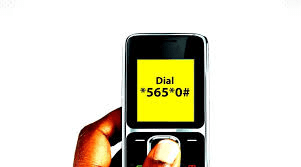
    To check your BVN, dial *565*0# on your phone.

    Your BVN is tied to every bank account you own in Nigeria. It’s one of those numbers you don’t think about until you suddenly need it.

    Maybe you’re trying to open a new bank account, KYC, or recover a blocked account. Then comes the prompt instructing you to enter your BVN, just like that, and you’re lost.

    You start checking your old messages, dig through emails, and scroll through your note app, hoping you saved it somewhere.

    But you can avoid the stress by knowing the simple process it takes to check your Bank Verification Number (BVN).

    Before we jump into it, let’s take a brief look to understand what BVN is and its importance.

    What is a BVN?

    Just in case you’re wondering, your Bank Verification Number is an 11-digit unique identifier linked to your biometric data, which includes your photo and date of birth. Think of it as your digital ID in Nigeria’s financial system.

    Introduced in 2014 by the Central Bank of Nigeria (CBN) in partnership with the Nigeria Inter-Bank Settlement System (NIBSS), the BVN was designed to reduce fraud and improve identity management across all Nigerian banks.

    Once you register at any bank, it becomes tied to every bank account you open, and it’s a one-time identity solution that follows you everywhere in the financial space.

    Why you Need A BVN

    Your BVN isn’t just another number; it’s a critical part of how banking works in Nigeria today. It plays a major role in keeping your financial identity safe, especially as digital transactions become more common.

    Here’s why it is important:

    1. Fraud Prevention: With your BVN linked to your fingerprint and photo, it’s much harder for someone to impersonate you or open multiple bank accounts with fake names. It helps banks verify who you really are and flags suspicious activity faster.
    2. One Identity Across All Banks: Having accounts in one or five different banks doesn’t mean you have a different number for each one , your BVN ties them all together under your name. No need to repeat the registration process; you’re already covered.
    3. Access to Financial Services: From opening new accounts to applying for loans or government aid, your verification number is often the first requirement. It’s what gives you access to services that go beyond everyday banking.
    4. Security for Account Recovery: If you ever get locked out of your account or lose access to your phone number, your BVN becomes your backup for verifying your identity and getting back in.
    5. Meets CBN Regulations: Banks are required to use it as part of Know-Your-Customer (KYC) standards. It keeps the entire financial system more transparent and accountable.

    How to Check Your BVN (Step-by-Step)

    Retrieving it is simple, as long as you have access to the phone number linked to your bank account. Here are the most common and reliable ways to check:

     Using a USSD Code

    The fastest and easiest way is through a USSD code.

    • Dial *565*0# on your phone.
    • Make sure you’re using the phone number registered during enrollment.
    • Follow the instructions (input your DD/MM/YY) to check.
    • Your 11-digit number will appear on your screen within seconds.

     Note: The service works across all major networks—MTN, Glo, Airtel, and 9mobile.

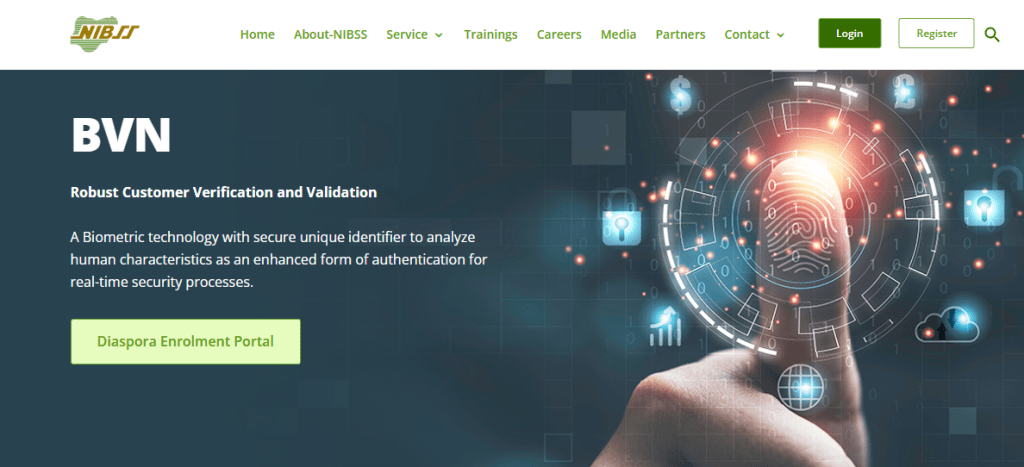
     Through the NIBSS Portal

    If you prefer to check online, the Nigerian Inter-Bank Settlement System (NIBSS) has an official portal:

    • Visit NIBSS website
    • Enter your first name, last name, date of birth, and the phone number linked to your profile.
    • Pay a ₦20 verification fee.
    • Once payment goes through, the number will be displayed.

     Call the Helpdesk

    You can also contact the NIBSS Helpdesk:

    • Call the toll-free number: 0700-CALL-NIBSS (0700-2255-266)
    • Or email: bvn@nibss-plc.com.ng
    • Have the following details ready:

              Full name, date of birth and Registered phone number

    • They’ll guide you through the verification process.

    Alternatively, Visit Your Bank

     Walk into any branch with a valid means of identification. A customer service rep will help you retrieve it after confirming your identity.

    How to Keep Your BVN Safe

    Your BVN is a powerful tool, but in the wrong hands, it could expose you to fraud or identity theft. That’s why safeguarding it is just as important as knowing how to check it.

    1. Don’t share it carelessly: Avoid sending your BVN through WhatsApp, SMS, or email, especially to unknown contacts. If someone isn’t your bank or a verified financial provider, they don’t need your BVN.
    2. Watch out for fake links and websites: scammers often mimic bank websites or send fake forms asking for your BVN. Always double-check URLs, and never submit your details unless you’re sure it’s legit.
    3. Ignore random BVN verification requests: Your bank won’t ask for your BVN out of the blue. If you get a suspicious call, hang up and call your bank directly using the official number.
    4. Secure your phone line: Since your BVN is linked to your phone number, losing your SIM card to fraudsters can give them a doorway into your financial life. Keep your line secure with a PIN and report a stolen SIM immediately.
    5. Don’t write it down in obvious places: As tempting as it is to jot it down somewhere “safe,” don’t store your BVN in your phone notes or in a notebook anyone can access.

    How to Enroll for BVN

    • Walk into any bank branch with a valid form of identification.
    • Request for enrollment slip from the customer service desk.
    • Fill it with all necessary information.
    • Do your biometric data capturing.
    • After that you will be given an acknowledgment slip.
    • Your 11-digit number will be sent to the phone number you registered with after 24 hours.

    Frequently Asked Questions (FAQs)

    Can I check my BVN without the phone number I used to register?

    No, you need access to the registered phone number to check it via USSD. If you’ve lost the number, visit your bank or use the NIBSS online portal.

    Can I register for BVN online?

    No, BVN enrollment must be done in person because it requires biometric data capture (your fingerprint and facial photo).

    Can I get another BVN number?

    No, you’re only allowed to have one BVN for life. If you forget it, dial *565*0# to check or visit your bank to retrieve it.

    In Conclusion

    Your BVN is more than just a number; it’s your identity in the Nigerian banking system. Knowing how to retrieve and protect it saves you stress, time, and potential risk.

    Use any of the available methods to check it when needed, and always keep it secure. Avoid sharing it with untrusted sources.

    As digital banking continues to grow, your BVN will remain a key that unlocks countless financial services. Treat it like your ATM PIN.

    More Articles to Read

  • Hold, Sell, and Manage Crypto Like a Pro with Swapto(Formerly Dtunes) 2.0
    Hold, Sell, and Manage Crypto Like a Pro with Swapto(Formerly Dtunes) 2.0
    We get it — managing your crypto can sometimes feel confusing or overwhelming. You want a simple, safe place to hold your assets, sell when the time’s right, and get your cash without any headaches. That’s exactly why we built Swapto(Formerly Dtunes) 2.0 — to make all of this easier for you.

    Even if you’re just starting out or you’ve been in the crypto game for a while, Swapto(Formerly Dtunes) 2.0 is designed to put you in full control, with clear steps and no surprises.

    Your Crypto, Your Wallets, Your Way

    The biggest change? We’ve created two easy-to-use wallets to keep things clean and straightforward:

    • Your USD Wallet is where your crypto lives when you deposit it. We automatically show you the value in USD, so you always know what you have. When you’re ready, sell any amount or your entire balance — it’s totally up to you — and the money moves right to your Naira wallet. No fuss.
    • Your Naira Wallet is your home for local currency after selling crypto. Want to send it to your bank? Go ahead anytime. You’ll see your balance update live and have a full history of transactions so you know exactly what’s happening.

    Depositing Crypto? We’ve Got You Covered

    We know security and simplicity matter. That’s why when you deposit crypto, you get your own wallet address or QR code, so it’s super easy to send funds in. Once confirmed on the blockchain, it lands safely in your USD wallet — and you’ll get a notification right away to let you know.

    Sell Crypto Your Way, with Confidence

    Selling crypto shouldn’t be stressful or confusing. With Swapto(Formerly Dtunes) 2.0, you decide how much to sell — a little or all of it — and before you confirm, you see exactly the rate, fees, and the final amount you’ll get in Naira. No hidden charges, no last-minute surprises. Once you’re happy, the funds are in your Naira wallet instantly.

    dtunes 2.0 leaderboard ad

    Safe Withdrawals Back to Your Bank

    We care about keeping your money safe, so Swapto(Formerly Dtunes) 2.0 comes with a simple verification process that protects you but doesn’t slow you down. Starting with phone verification, you can link your bank and withdraw your Naira wallet balance quickly and securely. And as you complete more levels of verification, you get higher limits — so Swapto(Formerly Dtunes) grows with you.

    Why You’ll Love Swapto(Formerly Dtunes) 2.0
    • Manage your crypto and cash all in one place — no more switching apps.
    • Convert your crypto to Naira instantly with clear details every step of the way.
    • Feel safe with our easy-to-use verification system that protects your account.
    • Stay in the know with instant notifications for every transaction.
    • A platform that’s made with you in mind — simple, clear, and hassle-free.

    Ready to Take Charge of Your Crypto?

    We built Swapto(Formerly Dtunes) 2.0 because we want you to feel confident and in control. Whether you’re holding crypto for the long run, selling when the moment is right, or accessing your money quickly, Swapto(Formerly Dtunes) 2.0 makes it all possible — simply and safely.
    Jump in today and see how Swapto(Formerly Dtunes) 2.0 can make your crypto experience smoother and smarter.

  • How Much is Dollar to Naira Today?

    How Much is Dollar to Naira Today?

    If you’re wondering how much a dollar is to the Nigerian Naira today, you’re not alone. Exchange rates shift daily, and whether you trade crypto, gift cards, a business owner, traveler, freelancer, or investor, staying updated can help you make smart financial decisions.

    In this article, we’ll break things down in a simple and engaging way, covering both the official exchange rate and the black market rate, why they differ, how to convert dollars to naira, and what factors influence these fluctuations.

    By the time you’re done reading, you’ll not only know the current rates but also understand why they change and how to get the best deal when converting your money.

    How Much is Dollar to Naira Today

    How Much is Dollar to Naira Today?

    Here’s a quick conversion table based on today’s exchange rates.

    Current Dollar to Naira Exchange Rate (March 27, 2025)

    As of March 27, 2025, the exchange rate for 1 USD to NGN varies based on the source and market.

    Official Exchange Rate

    • The Central Bank of Nigeria (CBN) last updated its official rate on February 27, 2025, setting it at ₦1,507.88 per USD.
    • No new rate has been released since then.

    Black Market Rate (Parallel Market)

    • Exchange rates in the black market are often higher than the official figures due to supply and demand.
    • As of March 5, 2025, black market traders in Lagos were:
      • Buying USD at ₦1,540
      • Selling USD at ₦1,580

    Comparison of Exchange Rates

    Exchange Type1 USD to NGN
    CBN Official Rate (March 27, 2025)₦1,507.88
    Black Market Rate (March 27, 2025)₦1,540 – ₦1,580

    USD to NGN Conversion Tables

    To make conversions easier, here’s how much USD to NGN translates at both the official and black market rates.

    Dollar to Naira Official Rate (₦1,507.88 per USD)

    USDNGN Equivalent
    1₦1,507.88
    5₦7,539.40
    10₦15,078.80
    20₦30,157.60
    30₦45,236.40
    50₦75,394.00
    100₦150,788.00
    200₦301,576.00
    400₦603,152.00
    500₦753,940.00
    1,000₦1,507,880.00
    1,200₦1,809,456.00
    5,000₦7,539,400.00

    Dollar to Naira Black Market Rate (₦1,673 per USD)

    USDNGN Equivalent
    1₦1,580
    5₦7,900
    10₦15,800
    20₦31,600
    30₦47,400
    50₦79,000
    100₦158,000
    200₦316,000
    400₦632,000
    500₦790,000
    1,000₦1,580,000
    1,200₦1,896,000
    5,000₦7,900,000

    These rates can change multiple times a day, so it’s best to check trusted sources before making any transactions.

    How much is 1 dollar Bitcoin in Naira

    Understanding the Dollar to Naira Exchange Rate

    At its core, an exchange rate tells you how much one currency is worth compared to another. If you’re holding U.S. dollars and want to convert them to Nigerian Naira, you’ll likely come across two different rates:

    1. Official Rate – This is the rate set by the Central Bank of Nigeria (CBN) and used by banks and authorized dealers.
    2. Black Market Rate – This is the rate used by private currency traders, also known as the parallel market.

    But why are there two rates?

    The official rate is often controlled by government policies, while the black market operates based on supply and demand. When foreign exchange is scarce, people turn to the black market, where rates are usually higher.

    How to Convert US Dollars to Nigerian Naira

    If you need to convert USD to NGN, here are a few ways to do it:

    1. Using the Official Banking System

    • Visit your bank (e.g., GTBank, Zenith, UBA) and exchange dollars at the official rate.
    • This is usually the best option for large transactions or businesses that must comply with regulations.
    • However, banks may have strict limits on how much forex you can access.

    2. Using Black Market Dealers

    • If you’re unable to get dollars through banks, you might resort to black market traders.
    • While the black market rate is usually higher, availability can be unpredictable.
    • Transactions here come with risks, as rates vary widely and there’s little to no buyer protection.

    3. Using Online Currency Exchange Platforms

    • Services like Wise (formerly TransferWise), Payoneer, Western Union, and Bitcoin exchanges provide alternative ways to convert USD to NGN.
    • Some of these services offer better exchange rates than banks but may charge extra fees.

    Why Does the Exchange Rate Fluctuate?

    Now, you might be asking: Why does the value of the dollar keep changing against the naira? Well, several key factors influence the exchange rate:

    1. Supply and Demand

    • If there’s high demand for U.S. dollars (e.g., businesses importing goods, travelers, forex traders), the price increases.
    • If there’s an abundant supply of USD, the rate stabilizes or even drops.

    2. Government Policies & CBN Intervention

    • The Central Bank of Nigeria (CBN) plays a big role in determining the official exchange rate.
    • CBN sometimes injects foreign reserves into the market to stabilize the naira.

    3. Inflation in Nigeria

    • If Nigeria’s inflation rate is high, the naira loses value, making the exchange rate unfavorable.
    • This is why prices of goods and services increase over time.

    4. Global Oil Prices

    • Since Nigeria earns most of its forex from oil exports, low oil prices mean fewer dollars in circulation.
    • When oil prices drop, the naira weakens because the country earns less foreign exchange.

    5. Political and Economic Stability

    • Investors prefer stable economies, so if Nigeria faces political uncertainty or economic crises, foreign investors pull out their dollars, making the exchange rate worse.

    How to Get the Best Exchange Rate

    If you’re looking to get the most value when converting your money, consider these tips:

    • Use a currency converter app (like Wise, XE, or NgnRates) to compare live exchange rates.
    • Avoid exchanging money at airports—they often offer the worst rates.
    • If using the black market, negotiate and check multiple sources before agreeing on a rate.
    • Consider timing your transactions—exchange rates fluctuate daily, and sometimes waiting a few days can mean better rates.

    Historical Performance of USD to NGN

    Let’s take a quick look at how the exchange rate has changed over time:

    YearOfficial Rate (CBN)Black Market Rate
    2020380 NGN450 NGN
    2021410 NGN500 NGN
    2022450 NGN580 NGN
    2023750 NGN900 NGN
    20241,200 NGN1,350 NGN
    20251,509.98 NGN1,570 NGN

    As you can see, the naira has weakened significantly over the years. This trend is expected to continue unless Nigeria takes strong economic measures.

    Frequently Asked Questions (FAQ)

    How much is 200 dollars to naira?

    At the official rate, 200 USD is ₦301,576, while in the black market, it is around ₦316,000.

    How much is 5000 dollars to naira?

    At the official exchange rate, 5,000 USD is ₦7,539,400, while in the black market, it is about ₦7,900,000.

    How much is 50 dollars to naira today in the black market?

    At the black market rate, 50 USD is approximately ₦79,000.

    How much is 1500 dollars to naira?

    At the official exchange rate, 1,500 USD is ₦2,261,820, while in the black market, it is about ₦2,370,000.

    How much is 4000 dollars to naira?

    At the official exchange rate, 4,000 USD is ₦6,031,520, while in the black market, it is around ₦6,320,000.

    How much is 1200 dollars to naira?

    At the official exchange rate, 1,200 USD is ₦1,809,456, while in the black market, it is around ₦1,896,000.

    How much is $1 today in the Naira black market?

    One US dollar is being exchanged for ₦1,580 in the black market.

    How much is $100 dollars in naira today?

    At the official rate, 100 USD is ₦150,788, while in the black market, it is around ₦158,000.

    How much is 1 dollar in CBN today?

    According to the Central Bank of Nigeria (CBN), 1 USD is ₦1,507.88.

    How much is Aboki dollar to Naira today?

    The Aboki black market exchange rate for 1 USD is ₦1,580.

    How much is dollar to Naira today in the bank?

    The bank exchange rate, which follows the CBN rate, is ₦1,507.88 per dollar.

    How much is dollar to Naira today in the black market?

    In the black market, 1 USD is being bought for ₦1,540 and sold for ₦1,580.

    How much is 100 dollars to Naira in the black market today?

    In the black market, 100 USD is exchanged for approximately ₦158,000.

    Final Thoughts: Where is the Dollar to Naira Rate headed?

    The big question is: Will the naira gain strength, or will the exchange rate get worse?

    Short-Term Prediction (2025)

    Given Nigeria’s current economic conditions, it’s unlikely that the naira will gain much strength soon. With foreign reserves dwindling and high inflation, the exchange rate may fluctuate between 1,500 NGN and 1,700 NGN per USD in the coming months.

  • 5 Things to Consider Before Converting Bitcoin to Naira in Nigeria

    5 Things to Consider Before Converting Bitcoin to Naira in Nigeria

    Before you jump into converting Bitcoin to Naira without looking, you could end up:

    • Getting a terrible exchange rate
    • Losing money to hidden platform fees
    • Falling into the trap of fake P2P buyers
    • Waiting hours or days for a transaction that should’ve taken minutes

    In 2025, with all the volatility and fraud in the space, knowing the best way to convert Bitcoin to Naira is a big deal.

    Whether as a new or seasoned trader, this guide will improve your Bitcoin-to-naira experience. It will also walk you through the 5 most important things to consider before converting Bitcoin to Naira.

    Key Takeaways

    • Converting Bitcoin isn’t just about selling; it’s about timing, trust, and tools.
    • Exchange rates can vary wildly by platform and time of day.
    • Choosing a secure platform like Swapto(Formerly Dtunes) protects your crypto and guarantees a payout.
    • Always check transaction speed and blockchain congestion before sending BTC.
    • The best option balances profit, security, and speed, not just the highest rate.

    5 Things to Consider Before Converting Bitcoin to Naira

    The following are top tips to consider before converting Bitcoin to Naira:

    1. Current Exchange rate and Market spread
    2. Platform credibility and track record
    3. Transaction fees and blockchain fees
    4. Hidden charges
    5. Personal timing and urgency

    1. Current Exchange Rate and Market Spread

    Always compare rates before converting Bitcoin to naira. Bitcoin-to-naira exchange rates aren’t fixed. They fluctuate based on

    • Time of day
    • Demand from buyers
    • Market volatility
    • Platform profit margins

    For example, if the parallel market rate is ₦1,500/\$, some P2P platforms could offer lower, like ₦1,470

    The ₦30 difference per dollar adds up fast. You stand to lose or gain more depending on the platform you trade on.

    Always compare rates or use platforms like Swapto(Formerly Dtunes) that reflect real-time market rates. Also, double-check if they charge conversion or withdrawal fees.

    2. Platform Credibility and Track Record

    In Nigeria’s crypto space, scam platforms are on the rise. Telegram vendors, WhatsApp sellers, or unlicensed exchanges often lure users with high rates, then ghost after receiving the BTC.

    You want to make sure the platform you sell your Bitcoin for Naira has real user reviews, offers KYC or identifiable admins, provides trackable support and receipts, and is registered or traceable in Nigeria.

    Stick with verified platforms that have a reputation for reliability, real-time updates, and zero tolerance for scams. Plus, you can easily reach their support team.

    Trade gift cards & Cryptocurrency for instant cash on Swapto(Formerly Dtunes)

    3. Transaction Speed and Blockchain Fees

    Bitcoin doesn’t move instantly. If the blockchain is congested, your transaction could take 10 minutes to 2 hours, and that can seriously affect your rate if it is tied to real-time confirmation.

    Different platforms have differing confirmation methods before processing your payout. According to Blockchain.com, Bitcoin’s average confirmation time in 2025 hovers between 8 and 18 minutes, depending on network load.

    And then there’s the network fee; if you’re sending from a wallet that doesn’t allow custom fee setting, you might be charged more just to move funds.

    Use platforms that confirm quickly and offer guidance on ideal send amounts. Swapto(Formerly Dtunes) displays the exact blockchain fee impact and doesn’t delay your naira payout once confirmation is received.

    4. Hidden Charges

    Many crypto exchange platforms or P2P exchanges might display higher rates than usual but charge more for withdrawals. Some offer a “zero-fee” claim but hide it in bad conversion rates. You might even experience delayed bank transfers and charges for instant cash-out.

    Always calculate your net payout before confirming. Swapto(Formerly Dtunes) is transparent with all deductions. Before you send your BTC, you see what you get.

    5. Personal Timing and Urgency

    For immediate cash, you need a platform with fast payout, not “2–24 hours.” The urgency with which you need cash would determine the platform you use to convert Bitcoin to naira.

    You can also consider waiting for weekend rate spikes, dollar/naira devaluation trends, and time-of-day rate shifts to maximize value.

    Match your platform to your goal. If you have an urgent reason for converting Bitcoin to Naira, use Swapto(Formerly Dtunes). To maximize profit, convert to stablecoins like USDT first, then sell when the naira dips

    How To Convert Bitcoin to Naira Safely with Swapto(Formerly Dtunes)

    Swapto(Formerly Dtunes) homepage

    Here’s how you can convert Bitcoin to Naira safely with Swapto(Formerly Dtunes).

    1. Download the Swapto(Formerly Dtunes) mobile app on Google Play Store or Apple App Store.
    2. Sign in or register using your details.
    3. Tap “Sell Crypto” from the homepage.
    4. Choose Bitcoin or any crypto you want to convert.
    5. Input the amount you want to sell. You’ll see the naira equivalent instantly.
    6. Click “Sell.”
    7. Before you begin, set up: Biometrics (fingerprint or face unlock) and Bank account connection

    Now you are a pro-trader.

    Final Thoughts

    Converting Bitcoin to Naira is easy. Doing it profitably and safely is what takes wisdom.
    Whether you’re cashing out weekly earnings or moving big crypto stacks, take a moment to consider:

    • The platform’s integrity
    • The real-time rate
    • The speed
    • The hidden costs

    When you are ready to convert without compromise, visit Swapto(Formerly Dtunes).ng and get started.

    Frequently Asked Questions (FAQs)

    1. What is the best way to convert Bitcoin to Naira in Nigeria?

    Use Swapto(Formerly Dtunes)

    2. When is the best time to convert BTC to naira?

    Evenings or weekends often have better rates. Also, watch for naira depreciation trends.

    3. How much is 1 Bitcoin in Naira today?

    BTC/NGN rates fluctuate. Use real-time tools on Swapto(Formerly Dtunes) or Binance P2P to check.

    4. Can I lose money while converting BTC?

    Yes, due to bad rates, high fees, or fraud. That’s why platform choice is crucial.

    5. Do I need verification to sell Bitcoin in Nigeria?

    Most platforms require basic KYC, especially for large trades. Swapto(Formerly Dtunes) allows quick onboarding.

    For More Crypto-Related Posts, See

  • USSD Recharge Code To Recharge Airtel Card In Nigeria

    USSD Recharge Code To Recharge Airtel Card In Nigeria

    Code To Recharge Airtel Card: To recharge an Airtel card in Nigeria, you can use the USSD code *311#. This code allows you to recharge your own line or the lines of friends and family and also to buy data bundles. You can also use this code to recharge from your bank account if it’s linked to your Airtel number. 

    We’ve all been there. You’re about to make an urgent call or send an important message, and your phone tells you “insufficient balance.” Your first instinct? Recharge. But wait, which USSD code should you dial again?

    If you’ve ever found yourself stuck in that moment of confusion, you’re not alone. In Nigeria, millions of Airtel users rely on USSD codes to recharge their phones, check balances, and buy data. Whether you’re navigating Lagos’ bustling streets or chilling in a village with limited network coverage, these codes are your ticket to staying connected without the need for internet access.

    So, why should you care about using USSD to load your Airtel card, and what are some common issues you might face along the way? Let’s dive in.

    USSD Recharge Code To Recharge Airtel Card

    It’s not just about loading airtime. It’s about convenience and flexibility. Whether you’re in a busy market or stranded in an area with little to no network coverage, having the right USSD code to recharge can save you a lot of hassle.

    Here’s a real-world scenario: imagine you’re in a rural part of Nigeria where internet connectivity is practically nonexistent, but you need to get your phone working again. You can’t rely on mobile apps or online recharge services—but USSD codes come to the rescue.

    Now, think about all those times you’ve had to search online or ask a friend for the correct USSD code. It’s frustrating, right? You’re not alone. Whether you’ve been a loyal Airtel customer for years or you’re new to the network, you’ve likely faced the confusion of trying to figure out the right code at the right time.

    With that in mind, this guide will walk you through the Airtel USSD recharge codes to make sure you never face that awkward “What’s the code again?” moment.

    What Is the Airtel Card?

    Before diving into the specifics of recharging your Airtel line, let’s first understand what the Airtel card is.

    An Airtel card is essentially a prepaid airtime card that lets you top up your phone. This airtime gives you access to calls, texts, and data on the Airtel network. Think of it as fueling your phone—you can top up your own line or someone else’s, and once you load the card, you’re ready to make calls, browse, or send messages.

    Airtel cards come in different denominations, such as NGN 100, NGN 200, NGN 500, and NGN 1,000, just like gift cards (for example, Google Play gift cards). The value of your card determines the amount of talk time, text messages, and data bundles you can access.

    Benefits of Using the Airtel Card

    There are several reasons why using an Airtel card makes sense for millions of Nigerians:

    1. Exchange for Cash

    Did you know that you can sell your Airtel card for cash? Let’s say you need quick funds to pay for something or settle an emergency. Instead of going through complicated processes, you can sell your airtime for cash through platforms like Prestmit, which offers some of the best rates for airtime-to-cash transactions in Nigeria.

    2. Instant Airtime

    Once you recharge your Airtel card, your phone is ready to go. It’s just like filling up your car with fuel—instant power. Whether you’re making calls or sending texts, your airtime is available immediately after recharge.

    3. Data Subscription

    Recharging your Airtel card gives you access to a variety of data bundles. The amount of data you get depends on the denomination of the card you’re reloading. So, a larger recharge means more internet access for browsing, streaming, or working online.

    How to Recharge Your Airtel Card Using USSD Code

    Recharging your Airtel line doesn’t need to be complicated. Gone are the days of scratch cards and manual PINs. With Airtel’s USSD recharge codes, the process is as easy as dialing a few numbers.

    Code To Recharge Airtel Card

    Method 1: Airtel’s Direct USSD Recharge

    This is the easiest way to recharge your Airtel line.

    1. Dial *311# on your Airtel line.
    2. Choose “Recharge” from the menu.
    3. Enter your airtime PIN when prompted.
    4. You’ll get an instant confirmation once the recharge is successful.

    Already have a PIN and want to skip the menu? Simply dial *311*PIN# and hit send. Quick and hassle-free.

    Method 2: Recharge via Your Bank’s USSD

    If you prefer to recharge directly from your bank account, here are some popular Nigerian bank USSD codes for Airtel top-ups:

    • GTBank – *737*Amount# for self-recharge; *737*Amount*PhoneNumber# for others (737.gtbank.com)
    • Access Bank – *901*Amount# to recharge your line; use *901*Amount*PhoneNumber# for third-party (accessbankplc.com)
    • UBA (Magic Banking) – *919*Amount# for self or *919*PhoneNumber*Amount# for others (ubagroup.com)
    • First Bank – *894*Amount# to recharge yourself; *894*Amount*PhoneNumber# to recharge for someone else (firstbanknigeria.com)

    These methods are fast, secure, and available offline, so you can recharge your Airtel line no matter where you are.

    How to Check Your Airtel Card Balance

    Once you’ve recharged your Airtel card, it’s a good idea to check your balance to ensure everything went through smoothly. Here’s how:

    • Dial *310# to check your balance.
    • Your balance will be displayed on the screen and also sent to you via SMS.

    This code replaced the old *123# after the NCC’s harmonized USSD update, making it the new standard.

    Frequently Asked Questions (FAQs) About Loading Airtel Card

    Can I load airtime without using a voucher PIN?

    Yes! Instead of manually entering the PIN, just dial *311#, select “Recharge,” and enter your PIN when prompted. It’s quick and simple.

    What if I still want to use the old method?

    Airtel has fully switched to the new system. If you dial an old code like *126#, you’ll be redirected to use *311# instead.

    Why does my USSD code sometimes say “Service Unavailable”?

    This can happen if there’s network congestion or low signal strength. Try moving to a better coverage area, then dial again in a few minutes.

    Can banks charge me extra for airtime top-up via USSD?

    Banks may impose a small transaction fee (e.g., ₦6–₦7 per transaction), but Airtel itself doesn’t charge extra for USSD services.

    What if I don’t receive confirmation after recharging?

    If you don’t see your recharge reflected, wait a few minutes and dial *310# to check your balance. If the issue persists, call Airtel customer care at 300 (toll-free from any Airtel line).

    Can I recharge someone else’s Airtel line?

    Yes! You can easily recharge someone else’s line. Just dial *311#, select “Recharge for someone else,” or use your bank’s USSD code and enter the recipient’s number.

    Conclusion

    Airtel’s updated USSD system has made loading airtime easier than ever before. Whether you’re using the *311# code, your bank’s USSD service, or sending airtime to a loved one, recharging has never been more straightforward.

    From calls to data, Airtel recharge gives you full control and flexibility. With additional perks like airtime-to-cash exchanges and balance checks, it’s clear why millions of Nigerians continue to rely on Airtel every day.

    So next time your phone says “low balance,” don’t panic. Just dial, recharge, and get back to living. It’s simple, stress-free, and fully powered.

  • How to Send Bitcoin to Another Wallet (Step-by-Step Guide)

    How to Send Bitcoin to Another Wallet (Step-by-Step Guide)

    Contrary to your fears, it’s easy to send Bitcoin to another wallet. In this guide, we’ll walk through how to send Bitcoin to another wallet, whether you’re using a crypto exchange or a non-custodial wallet.

    Knowing how to send bitcoin to another wallet is key because you don’t want to face the risk of losing your coin. Unlike your local bank transactions, where you can trace lost money, losing bitcoin to an unknown wallet address is final.

    So, you’ve finally got some Bitcoin. Maybe you earned it, bought it on an exchange, or received it as a gift. Now you’re wondering: how do I send Bitcoin to another wallet—safely, quickly, and correctly?

    Let this guide be your saviour. You’ll also see common mistakes to avoid, how fees work, and what to do if your transfer is delayed.

    How to Send Bitcoin to Another Wallet

    How to Send Bitcoin to Another Wallet

    Before you send Bitcoin to another wallet, make sure

    • You have the recipient’s Bitcoin wallet address
    • You have enough BTC in your wallet
    • You understand transaction fees and confirmation times

    Now, follow these steps

    Step 1: Open Your Bitcoin Wallet

    This could be an exchange wallet (e.g., Binance, Swapto(Formerly Dtunes) Wallet) or a crypto app (e.g., Trust Wallet, Electrum, or Blockchain.com).

    Step 2: Go to the “Send” or “Withdraw” Option

    Look for a button that says “Send,” “Transfer,” or “Withdraw.” In most wallets, it’s visible on the homepage or under the “Wallet” section.

    Step 3: Paste the Recipient’s BTC Wallet Address

    Copy the wallet address exactly as it appears. Even one wrong character can send your Bitcoin to the wrong place, and it can’t be reversed.

    Step 4: Enter the Amount of Bitcoin You Want to Send

    You can enter in BTC (e.g., 0.0021 BTC) or sometimes in your local currency, and it’ll convert it automatically.

    Step 5: Check Network Fee & Confirm

    Most wallets will show you the Bitcoin network fee (also called a miner’s fee). This varies depending on traffic.

    Step 6: Final Confirmation

    Confirm all details: wallet address, amount, and fee. Then authorise the transaction (via PIN, fingerprint, 2FA, or password).

    Step 7: Track the Transaction

    Once sent, you’ll get a Transaction ID (TXID). You can copy this and track the status on Blockchain explorer to confirm when it’s complete.

    What Is a Bitcoin Wallet?

    A Bitcoin wallet is a digital tool that lets you store, receive, and send BTC securely. There are two major types:

    • Custodial wallets: Controlled by a third party like an exchange (Binance, Swapto(Formerly Dtunes), Luno)
    • Non-custodial wallets: Only you control the keys (Trust Wallet, Ledger, Electrum)

    Sending BTC works almost the same on both, but with non-custodial wallets, you must manually approve and back up your recovery phrases.

    How Long Does It Take to Send Bitcoin?

    On average, a Bitcoin transfer takes 10 to 60 minutes, depending on

    • Network congestion
    • Fee priority
    • The number of confirmations required by the recipient

    According to Ycharts, the average Bitcoin block time in 2025 is about 9.5 minutes, meaning a new batch of transactions gets confirmed roughly every 10 minutes.

    How Much Does It Cost to Send Bitcoin?

    Fees fluctuate based on network traffic.

    • As of mid-2025, the average Bitcoin transaction fee ranges from $0.50 to $3.50

    Can I Send Bitcoin From Nigeria?

    Even with restrictions on centralized crypto trading by banks, peer-to-peer (P2P) and wallet-based transactions are 100% legal and possible. You can send Bitcoin from:

    • Binance P2P Wallet
    • Trust Wallet
    • Swapto(Formerly Dtunes) Wallet
    • Coinbase Wallet (VPN may be required)
    • Hardware wallets like Ledger

    Swapto(Formerly Dtunes) supports direct BTC wallet transfers with user-friendly tracking.

    Quick Steps to Send Bitcoin To Another Wallet

    1. Log into your crypto wallet
    2. Click “Send” or “Withdraw.”
    3. Paste the recipient’s wallet address
    4. Enter the amount in BTC
    5. Review the network fee
    6. Confirm and authorize the transfer
    7. Track using the TXID on blockchain explorer

    Common Mistakes to Avoid When Sending BTC

    • Sending to the wrong wallet address (always double-check)
    • Using the wrong network (BTC ≠ BEP20 or ERC20)
    • Ignoring fees and getting stuck in long confirmation delays
    • Forgetting to confirm 2FA or authentication step
    • Not saving your Transaction ID for tracking

    Conclusion

    Sending Bitcoin is easy once you understand the flow. Whether you’re paying someone, transferring between your wallets, or using crypto for business, knowing how to send Bitcoin to another wallet safely is key.

    Double-check. Don’t rush. And always save your transaction ID.

    Platforms like Swapto(Formerly Dtunes) are built to simplify your crypto experience in Nigeria, from trading to storing and even converting to naira.

    Frequently Asked Questions (FAQs)

    1. Can I reverse a Bitcoin transaction after sending?

    Bitcoin transfers are irreversible. Always double-check wallet addresses before hitting “Send.”

    2. How long does a Bitcoin transaction take in Nigeria?

    Typically 10 to 60 minutes, depending on the network fee and congestion.

    3. What wallet is best for sending Bitcoin in Nigeria?

    Wallets like Swapto(Formerly Dtunes), Trust Wallet, and Binance are user-friendly and widely used in Nigeria.

    4. What is the best time to send Bitcoin to avoid high fees?

    Late evenings or weekends often have lower network activity and cheaper fees.

    5. Can I send Bitcoin to a different type of crypto wallet?

    Only send BTC to Bitcoin-compatible wallets. Never send to Ethereum, USDT, or other addresses—it may be lost permanently.