Category: Blog

  • P2P vs Exchange-Based Trading Methods: 4 Things to Consider When Selling Bitcoin in Nigeria

    P2P vs Exchange-Based Trading Methods: 4 Things to Consider When Selling Bitcoin in Nigeria

    Understanding the difference between P2P vs exchange-based trading methods is important when selling Bitcoin in Nigeria. Both options have their own advantages and disadvantages.

    Peer-to-peer (P2P) trading can offer higher rates than you would get from crypto-exchange platforms, but it comes with risks such as ghost buyers on WhatsApp or fake payment screenshots.

    On the other hand, crypto exchanges might not give rates as high as P2P traders, but you are assured of instant payout and more transparency. That said, issues like withdrawal delays or locked wallets still occur.

    Our articles on Bitcoin scams in Nigeria and how to get the best price for BTC are helpful guides to help you master safe trading practices, whether buying or selling.

    This article will break down the key differences between P2P and exchange-based methods and share 4 important tips to consider before selling your Bitcoin.

    What’s the Difference Between P2P and Exchange-Based Bitcoin Selling?

    P2P (peer-to-peer) trading means selling your Bitcoin directly to another individual. You both agree on the price, the person sends you money, and you release the Bitcoin manually. Binance P2P, Paxful, and even Telegram/WhatsApp groups are common platforms that offer P2P trading.

    Exchange-based methods use a centralized platform where you sell your Bitcoin directly to the platform. They handle the transaction, and you get paid. The speed of the transaction differs among crypto exchanges.

    Here are four key things to think about before choosing between P2P and exchange-based methods when selling Bitcoin in Nigeria.

    1. Security and scam risk
    2. Transaction speed and convenience
    3. Fees and True Value
    4. Accountability and Customer support

    1. Security & Scam Risk

    With peer-to-peer trading, you are responsible for verifying the buyer, confirming payment, and ensuring you don’t get scammed. Personal verification of buyers is getting increasingly hard, as you might not be privy to recent scam methods.

    Even on platforms like Binance P2P, you’re still open to scam attacks. One mistake and your Bitcoin is gone. Although resolution teams try to rectify the situation, they don’t work as fast as you’d expect them to.

    In contrast, exchange-based methods remove that risk entirely, with you selling directly to the platform, reducing risks of fake receipts or ghost buyers.

    2. Transaction Speed & Convenience

    P2P deals can take anywhere from 20 minutes to 2 hours, depending on how responsive the buyer is. Some buyers ghost mid-deal. Others ask unnecessary questions. Some delay payment intentionally to watch BTC prices fluctuate.

    Meanwhile, exchange platforms are built for speed. You send BTC, it confirms on the blockchain, and your naira hits your bank.

    3. Fees & True Value

    P2P platforms often lure you with high rates, but you won’t be told about the:

    • Withdrawal fees
    • Payment method limitations or
    • Rate volatility

    Exchange-based methods are transparent. What you see is what you get. There’s no hidden spread, and you know exactly how much naira will land in your account. Even with slightly lower rates, you might end up earning more with trusted exchanges.

    4. Accountability & Customer Support

    Most P2P platforms have dispute centers, but cases can drag on for days, and they may not always favoUr you. When you’re dealing with random buyers on WhatsApp or Telegram, there’s no customer support.

    Exchange platforms come with real human support, live chat, WhatsApp response, and Telegram agents. That means if you ever need help or clarification, someone’s got your back.

    In summary, P2P offers hopeful help, while exchange-based platforms are more guaranteed.

    Best Exchange Platform to sell Bitcoin in Nigeria

    At Swapto(Formerly Dtunes), we favor exchange platforms over P2P exchange mainly because of the ease, safety, and security it affords you.

    The best exchange platform to sell Bitcoin in Nigeria is Swapto(Formerly Dtunes). Are we just tooting our horn? Swapto(Formerly Dtunes) rids your trading experience of

    • Waiting on unreliable P2P buyers
    • Falling for screenshots
    • Getting ghosted mid-trade
    • Or being afraid to trade at all

    Here’s what makes Swapto(Formerly Dtunes) different:

    • You sell directly to Swapto(Formerly Dtunes).
    • Instant payout.
    • No hidden fees.
    • Built for Nigerians by Nigerians.
    • Available 24/7 on WhatsApp and Telegram.

    Swapto(Formerly Dtunes) is everything P2P wished they could offer you.

    How to Sell Bitcoin for Naira with Swapto(Formerly Dtunes)

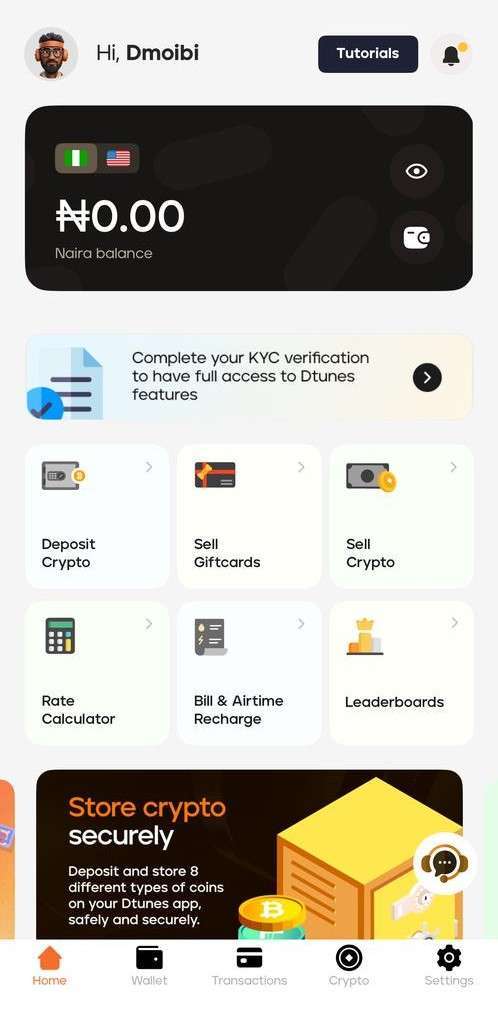
    Swapto(Formerly Dtunes) homepage

    Here’s how to sell Bitcoin for Naira in minutes with Swapto(Formerly Dtunes):

    1. Download the Swapto(Formerly Dtunes) mobile app on Google Play Store or Apple App Store.
    2. Sign in or register using your details.
    3. Tap “Sell Crypto” from the homepage.
    4. Choose Bitcoin or any crypto you want to convert.
    5. Input the amount you want to sell. You’ll see the naira equivalent instantly.
    6. Click “Sell.”
    7. Before you begin, set up biometrics (fingerprint or face unlock) and Bank account connection
    8. Your funds should land in your bank within 5–10 minutes. That’s it. Fast, secure, and all from your phone.

    How to Deposit Crypto to Swapto(Formerly Dtunes) Wallet

    Before you can sell Bitcoin for Naira, you need to send crypto to your Swapto(Formerly Dtunes) wallet:

    1. Log into the Swapto(Formerly Dtunes) app
    2. Tap “Deposit.”
    3. Choose your preferred coin (e.g., BTC)
    4. Copy the wallet address
    5. Paste it in the external wallet you’re sending from (like Binance or Trust Wallet)
    6. Send the crypto

    Once confirmed on the blockchain, your balance on Swapto(Formerly Dtunes) will update.

    Now you can easily sell crypto in Nigeria and get paid directly to your bank account.

    P2P vs Exchange?

    FactorP2PExchange (e.g. Swapto(Formerly Dtunes))
    Scam RiskHighLow
    SpeedSlow to mediumFast (instant payout)
    TransparencyVariesHigh (clear rates, no spread)
    SupportWeak (buyer-dependent)Strong (dedicated human support)
    Best forExperienced risk-takersEveryone who values safety

    Final Thoughts

    Don’t rush your decisions in the crypto world. P2P might seem convenient or offer a sweeter deal upfront, but one mistake can cost you everything. Exchange-based platforms offer you peace of mind, transparency, and speed.

    We’ve already written in-depth about how to avoid scams, the best times to sell Bitcoin in Nigeria, and market trends affecting Bitcoin-to-Naira, but this article ties it all together

    Frequently Asked Questions (FAQs)

    1. Is P2P safer than exchange-based selling?

    Exchange-based methods are safer because you’re selling directly to a verified platform, not a random buyer.

    2. Why do people still use P2P?

    Mainly for slightly better rates, but the risk of scams and delays is high — especially in Nigeria.

    3. What is the fastest way to sell Bitcoin for Naira?

    Using a direct exchange like Swapto(Formerly Dtunes) gives you instant bank payout after BTC confirmation.

    4. Can I lose money on P2P platforms?

    Common scams include fake alerts, ghosting, and reversed payments. Always verify payment before releasing Bitcoin.

    5. Are there hidden charges on Bitcoin exchanges?

    Some have spread fees or withdrawal charges. Swapto(Formerly Dtunes) shows transparent rates with no hidden deductions.

    More Crypto-Related Posts, See

  • How To Pay Your Bills With Crypto

    How To Pay Your Bills With Crypto

    The financial world has gotten incredibly easier. You don’t have to keep cryptocurrency in your crypto wallet and suffer from unpaid bills. You can use Bitcoin, USDT, or Ethereum to settle your bills.

    This article is a straightforward guide on how to easily pay your bills with cryptocurrency.

    Crypto in Nigeria has moved from just “buy low, sell high” to real-world spending. Chainalysis ranks Nigeria second globally in crypto usage in peer-to-peer transactions. That growth has driven innovation and facilitated bill payments with crypto.

    Whether you’re trying to pay for electricity, internet, cable TV, airtime, or data, this article breaks down how to pay your bills with cryptocurrency, or crypto. On the plus side, Swapto(Formerly Dtunes) makes it 10x easier for you.

    By the end of this piece, you’ll know exactly how to pay your bills with cryptocurrency and how it will save you stress, time, and even money.

    Key Takeaways

    • Yes, you can pay your bills directly using cryptocurrency in Nigeria.
    • Platforms like Swapto(Formerly Dtunes) make bill payments seamless, even without converting to naira.
    • You can use crypto to pay for electricity (NEPA/PHCN), airtime, data, cable TV, internet subscriptions, and even school fees or online services.
    • Always use trusted platforms to avoid scams. Confirm the service allows instant confirmations or low fees.
    • Crypto usage for bill payments is growing fast in Nigeria, thanks to its convenience and lower remittance costs.
    • A step-by-step guide is included in this article on how to do it directly using Swapto(Formerly Dtunes).

    How To Pay Your Bills With Cryptocurrency or Crypto

    The following are some of the ways to pay your bills using crypto;

    1. Use Swapto(Formerly Dtunes) for Direct Crypto-to-Bill Payment
    2. Use Crypto Bill Payment Platforms
    3. Use Gift Card-to-Bill Services
    4. Convert Crypto to Naira and Use Bill Payment Apps
    5. Peer-to-Peer Crypto Bill Exchanges

    1. Use Swapto(Formerly Dtunes) for Direct Crypto-to-Bill Payment

    Swapto(Formerly Dtunes) is the safest, fastest, and most reliable method to pay your bills with crypto. Their service is tailored to Nigerian needs, and you don’t need to convert your funds to pay your bills with crypto.

    Paying bills with crypto on Swapto(Formerly Dtunes) starts by first converting your digital assets to naira.

    • Simply log in or sign up at Swapto(Formerly Dtunes),
    • Go to the “Sell Crypto” section, and choose the coin you want to sell—BTC, USDT, or ETH.
    • Once you send the crypto to the provided wallet address or scan the QR code, Swapto(Formerly Dtunes) instantly credits your wallet with the naira equivalent after blockchain confirmation.

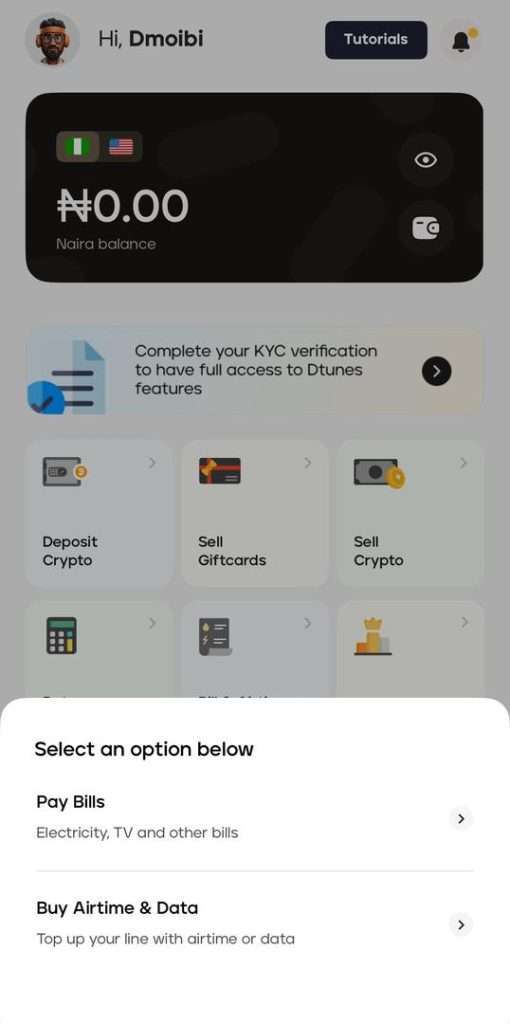
    With your Swapto(Formerly Dtunes) wallet funded, you can now head to the “Bills & Airtime Recharge” tab on your dashboard.

    There will be a pop-up with two options: Pay Bills (electricity, TV, and other bills) and Buy Airtime and Data. Just select the service you want, enter the amount, and pay directly from your balance.

    Your payment is processed in seconds, and a receipt is generated instantly. It’s fast, reliable, and perfect for anyone looking to use crypto in everyday life.

    2. Use Crypto Bill Payment Platforms

    There are dedicated platforms built for this purpose, such as Swapto(Formerly Dtunes), Paychant, Bitrefill, and Coinsbee, which let you settle bills using Bitcoin or USDT. These platforms are integrated with local service providers, enabling you to pay for DSTV, MTN data, Spectranet, or even school fees.

    For example, Swapto(Formerly Dtunes) supports Nigerian services and lets you use your crypto to top up airtime or data. The process is usually

    • Pick your service (e.g., MTN, GOtv)
    • Choose amount
    • Select a crypto wallet to pay
    • Receive confirmation instantly

    3. Use Gift Card-to-Bill Services

    This is a hack used by many crypto users. You first convert crypto to gift cards (like Apple, Amazon, and Steam), then redeem those gift cards on platforms like Swapto(Formerly Dtunes), which allow you to pay bills directly from the value.

    This method is especially helpful for:

    • Buying WAEC/NECO scratch cards
    • Paying tuition or online courses
    • Paying for software services (like Canva, Netflix, Grammarly, etc.)

    If you want proper value for your gift cards, you need verified services like Swapto(Formerly Dtunes), which can instantly convert gift cards and link your balance to bill payments.

    4. Convert Crypto to Naira and Use Bill Payment Apps

    This is one of the popular options you can use.

    1. Sell your crypto on Swapto(Formerly Dtunes).
    2. Receive Naira in your wallet or bank
    3. Use bill payment services like Palmpay, Opay, Flutterwave, or Quickteller to pay bills

    This method is useful when your crypto is in lesser-known coins that aren’t supported for direct payments, like Shiba Inu or Chainlink.

    This system makes you rely on traditional payment infrastructure, which makes it a bit longer.

    5. Peer-to-Peer Crypto Bill Exchanges

    You find someone who wants crypto and is willing to pay your bills in return. Usually done on platforms like

    • WhatsApp P2P communities
    • Binance P2P + separate agreement
    • Telegram crypto forums

    This is a risky option, though, if the person isn’t trusted. You might lose your crypto and never see the payment done. Use this only if you trust the person or escrow is involved.

    How to sell Bitcoin in Nigeria on Swapto(Formerly Dtunes)

    Swapto(Formerly Dtunes) homepage
    1. Download the Swapto(Formerly Dtunes) mobile app on Google Play Store or Apple App Store.
    2. Sign in or register using your details.
    3. Tap “Sell Crypto” from the homepage.
    4. Choose Bitcoin or any crypto you want to convert.
    5. Input the amount you want to sell. You’ll see the Naira equivalent instantly.
    6. Click “Sell.”
    7. Before you begin, set up: Biometrics (fingerprint or face unlock) and Bank account connection

    Your fund should land in your bank within 5–10 minutes. That’s it. Fast, secure, and all from your phone.

    Conclusion: Crypto As Digital Utility

    The rise of crypto bill payments in Nigeria shows we’re adapting to global trends without waiting for government permission. Thanks to platforms like Swapto(Formerly Dtunes), you no longer have to stress about paying your bills.

    Knowing how to pay your bills with cryptocurrency unlocks a smarter lifestyle. The power is at your fingertips.

    Frequently Asked Questions (FAQs)

    1. Can I use Bitcoin to pay bills in Nigeria?

    Yes, platforms like Swapto(Formerly Dtunes) allow you to pay bills directly with Bitcoin, from PHCN to DSTV and mobile airtime.

    2. What bills can I pay with crypto in Nigeria?

    You can pay for electricity (NEPA), internet (Spectranet, Smile), TV subscriptions (DSTV, GOtv), mobile airtime/data on Swapto(Formerly Dtunes)

    3. Is it legal to pay bills with cryptocurrency in Nigeria?

    While the CBN restricts banks from handling crypto, peer-to-peer and crypto utility platforms are not illegal. Users are free to use services like Swapto(Formerly Dtunes).

    4. What is the best platform to use crypto for bill payments in Nigeria?

    Swapto(Formerly Dtunes).ng is one of the most reliable, user-friendly platforms for crypto-to-naira transactions and bill payments.

    5. Do I need to convert to Naira before paying bills with crypto?

    Not necessarily. Some platforms allow you to use your crypto directly for payments without converting first.

  • How to check Airtel airtime balance

    How to check Airtel airtime balance

    Are you still using *123# to check your airtime balance on Airtel? That’s in the past. All network providers in Nigeria have changed the codes to check airtime balance.

    For uniformity’s sake, you can now use the same USSD code to check for your airtime balance across all networks.

    Airtel users can check their airtime balance with the USSD code *310# or download the My Airtel app, It’s easier and faster.

    Below is a detailed breakdown on how to check Airtel airtime balance with FAQS to answer further questions you might have.

    How To Check Airtime Balance on Airtel

    To check your Airtel airtime balance, dial *310# on your phone. Your balance will be displayed on the screen immediately. Alternatively, you can use the Airtel app to view your balance.​

    How to check Airtel airtime balance with USSD

    Airtel users can use the code *310# to check their airtime balance on Airtel using USSD. Formerly, you’d use *123#, which might be the one you remember, but things have changed.

    Once you dial the code correctly, you should receive a pop-up message of your airtime balance.

    How to check Airtel airtime balance with Mobile App

    If you’re using the app for the first time, make sure your Airtel SIM has network service so the OTP can be delivered. Once you’re logged in, checking your balance anytime becomes super easy.

    To check your Airtel airtime balance using the mobile app, just follow these quick steps:

    1. Download the MyAirtel App on Google Play Store or App Store
    2. Open the app and enter your Airtel number. You’ll get a one-time password (OTP) via SMS. Type it in to log in.
    3. Check your dashboard
      As soon as you’re in, your airtime balance will be right there on the home screen, no need to click anything else. You’ll also see your data balance, bonus airtime, and more.

    Now you can check your airtime balance on Airtel easily.

    These will help too…

    Frequently Asked Questions(FAQs)

    1. What’s the easiest way to check my Airtel airtime balance?

    Just dial *310# and your balance will pop up right away. No stress, no long process.

    2. Is there a specific Airtel code for checking the main balance vs bonus?

    Yes. For your main airtime, dial *310#.
    For bonus balances (like promo airtime or bonus data), dial *323#. Airtel usually displays both your main and bonus if you check with the right code.

    3. Can I use the MyAirtel app to check my airtime?

    Absolutely. Once you install the MyAirtel app, log in using your phone number, and your airtime, data, and everything else show right there on the dashboard.

    4. I dialed *310# but nothing happened—why?

    Sometimes the network gets shaky. If the code doesn’t respond, turn your phone to airplane mode for 10 seconds and switch it off again. If this doesn’t work, you can use the MyAirtel app or contact Airtel support on X.

    Conclusion

    If you follow the steps listed in this article, you should have no issue getting your airtime balance on Airtel.

    For more posts on Network provider updates and crypto, Visit Swapto(Formerly Dtunes).

  • How to Check MTN Airtime Balance

    How to Check MTN Airtime Balance

    To check your MTN airtime balance, dial *310# on your phone. Your balance will be displayed on the screen immediately.

    Although these codes change occasionally, especially since the USSD harmonization directive given by the National Communications Commission (NCC), this article discusses the easiest ways to check your MTN airtime balance in 2025.

    Quick Way to Check MTN Airtime Balance

    Here is the fastest way to check MTN airtime balance:

    • Airtime balance check: *310#
    • Data balance check: *323#
    • Recharge airtime: *311* Voucher PIN #
    • Borrow airtime: *303#
    • Buy data: *312#
    • Share airtime and data: *321#
    • Value-added services: *305#
    • Link your NIN to your MTN line: *996#
    • Check your mobile phone number: *123*1*1#

    2 Ways to check your MTN airtime balance in 2025.

    The following are the ways to check your MTN airtime balance today:

    How to check MTN airtime balance

    1. Use USSD Code
    2. Use the MTN app

    How to check MTN Airtime Balance using USSD

    The most popular way to check your MTN airtime balance is through the USSD route. It is quick and straightforward.

    To check your MTN airtime balance using USSD, dial *310#.

    If you do this correctly and your network quality is excellent, you should see your airtime balance in real time.

    The second option is …

    How to check MTN Airtime Balance through the MTN Mobile App

    Apart from using USSD to check your MTN airtime balance, you can use the MTN Mobile App. Its faster and easier.

    How to check MTN Airtime Balance through the MTN Mobile App

    1. Download and Install the MTN Mobile App on the Google Play Store or Apple App Store
    2. Register with your MTN phone number for first-time users.
    3. Enter the OTP (One Time Password) sent to your phone to verify.
    4. Once logged in, you’ll see your airtime balance displayed right on the home screen.
    5. If not, tap on “Airtime Balance” or check under the “Account” section.
    6. That’s it!

    You can also view data balance, bonus offers, and other services in the app. Now you can check your MTN airtime balance using USSD or the mobile app.

    Conclusion

    Checking your airtime balance on MTN is easy. Follow the outlined steps in this guide, and you are good to go.

    If this helped you, these will

    Frequently Asked Questions (FAQs)

    1. What is the new code to check MTN airtime balance in 2025?

    The updated USSD code to check your MTN airtime balance is *310#, following the NCC’s unified code system.

    2. Why is 556# not working to check my MTN balance?

    The old code *556# has been replaced due to USSD harmonisation. Use *310# instead to check your airtime balance.

    3. Can I check my MTN airtime balance without using USSD?

    Yes, you can use the MTN Mobile App. Simply download the app, register with your MTN number, and your airtime balance will show on the home screen.

    4. Is it free to check my airtime balance on MTN?

    Yes, checking your MTN airtime balance via *USSD (310#) or the MTN Mobile App is completely free of charge.

    5. How do I check both airtime and data balance at once on MTN?

    You can dial *310# for airtime and *323# for data, or use the MTN Mobile App to see all balances in one place.

    What is the code to check MTN airtime balance?

    Dial *131#*310# ⁣on your MTN line to check your airtime balance.

    How do I check my MTN balance?

    To check your MTN airtime balance, simply dial ⁣,*310# and your balance will be displayed on your screen.

    How do they check airtime balance?

    Airtime balance is usually checked by dialing a USSD code provided by the network. For MTN, dial *310# to see your current airtime balance.

    What are the codes for MTN?

    Here are some useful MTN codes:

    • Airtime balance: *310#
    • Buy airtime/data: *312#
    • Check data balance: *323#
    • Share airtime (MTN Share): *321#
    • Access MTN services (old code): *123#
    • Borrow airtime/data: *303#
  • How to Share Data on Airtel

    How to Share Data on Airtel

    The fastest way to share data is to dial *312# and select the option for Gifting or Me2U.

    In 2025, Nigeria has seen mobile data consumption reach record highs—over 1.13 million terabytes of mobile data were used in July alone, up from about 1.04 million terabytes in June.

    Meanwhile, Airtel Nigeria has grown its data subscriber base by more than 11% year-on-year to about 29.3 million users, and average monthly data usage per user climbed to around 13.2 GB.

    With so many Nigerians relying on mobile internet for work, education, social life, and entertainment, being able to share or transfer data easily has become not just useful but essential—especially for staying connected with loved ones who might be running low or far from data access.

    Quick steps to Share Data on Airtel

    1. *Dial 312# on your Airtel line to open the menu.
    2. Select 14 (Gifting and Sharing) and then choose 4 (Data Me2U).
    3. If it’s your first time, set a new PIN (the default is 1234).
    4. Enter the recipient’s Airtel number and the amount of data to share.
    5. Confirm the details, and you’ll get a success message!

    That’s it—quick and easy!

    What Is Airtel Data Sharing?

    Airtel offers a data sharing service that allows you to transfer data bundles from one Airtel line to another. This feature, popularly known as Data Me2U, is ideal for sharing data with your loved ones or ensuring that someone else can stay connected as a kind gesture.

    Now, what are the key benefits of Airtel data sharing?

    • Convenience: Easily share data with family and friends using a few easy steps.
    • Flexibility: Transfer a unit of your data bundle instead of buying a new plan for someone else.
    • Stay Connected: Keep others online, even when they run out of data. It’s also a love language….

    How to Share Data on Airtel

    Airtel provides multiple methods for sharing and transferring data. You can use USSD codes, SMS, or the Airtel mobile app. Below is a detailed breakdown of each method:

    The first thing is to make sure you own an Airtel SIM card or number, obviously. Then you also have to make sure that the number you intend to gift data to is also an Airtel number.

    Code to share data on Airtel

    The code for sharing data on Airtel is *312#.

    The default PIN code for sharing data on Airtel is 1234, but you have to change it for better security.

    How to Share Data on Airtel Without Using Codes

    Not everyone loves memorizing USSD codes. If you prefer a different approach, Airtel offers alternatives like SMS and its mobile app.

    How to Share Data on Airtel Using SMS

    Airtel allows you to send data through a simple text message. Here’s how:

    1. Compose an SMS with the format SHARE [Recipient’s Number] [Data Amount].
    2. Send the message to the designated Airtel number for data sharing.
    3. Wait for a confirmation message to complete the process.

    This method is ideal if you prefer texting over using codes.

    How to Share Data on Airtel Mobile App

    If you use Airtel’s mobile app, you can also gift data effortlessly. Steps include:

    1. Download and install the Airtel app on your smartphone.
    2. Log in with your Airtel number.
    3. Navigate to the “Data Gifting” section.
    4. Enter the recipient’s details and select the desired data bundle.
    5. Confirm and complete the process.

    This method is user-friendly and perfect for those familiar with mobile apps.

    How to Gift Data on Airtel

    You’re probably wondering, “What’s the difference between sharing data and gifting data?” Think of sharing data as splitting your own data bundle, while gifting data is more like buying someone a gift card—they get a fresh bundle of their own.

    Steps to Gift Data:

    1. Dial *312# and select 14 for “Gifting and Sharing.”
    2. Choose the “Gift Data” option.
    3. Enter the recipient’s Airtel number.
    4. Pick a data bundle plan from the options.
    5. Confirm the purchase, and you’re done!

    How to Buy Data for Someone Else on Airtel

    If you want to surprise someone with a data plan, Airtel lets you buy data for another number:

    1. Dial *312# and go to the “Buy Data” menu.
    2. Enter the recipient’s number.
    3. Choose a data plan that fits your budget.
    4. Confirm the purchase.

    How to Share Data on Airtel Family Plan

    Are you managing data for the whole family? Airtel’s Family Plan allows you to allocate data to multiple lines under one account.

    Here’s how it works:

    1. Dial *312# and select Family Sharing.
    2. Add family members to your group.
    3. Allocate data to each member based on their needs.

    What to Do If Data Sharing Fails

    Sometimes, things don’t go as planned. Here’s what to check if your data-sharing attempt fails:

    • Make sure you have enough data balance.
    • Double-check the recipient’s number.
    • Reset your PIN if you’ve forgotten it.
    • Still no luck? Contact Airtel customer care for help.

    Changing Your Default PIN for Data Sharing

    For added security, Airtel allows you to reset or change your default PIN. Here’s how:

    1. Dial *312# and navigate to the PIN reset option.
    2. Enter your old PIN (default: 1234) and specify a new one.
    3. Confirm the change.

    Your PIN protects your data allowance and ensures unauthorized transfers are avoided.

    More Tips for Sharing Data on Airtel

    To make the most of Airtel data sharing, consider these tips:

    • Ensure both you and the recipient are active Airtel subscribers.
    • Always check your data balance before initiating a transfer.
    • If gifting data frequently, consider buying a data bundle tailored for gifting.
    • Use the Airtel app for tracking shared data and transaction history.

    Frequently Asked Questions (FAQs)

    1. What Is the Maximum Amount of Data I Can Share on Airtel?

    The maximum amount varies based on your data plan. Contact Airtel customer care for detailed limits.

    2. Can I Share Data With Users on Other Networks Like MTN or 9Mobile?

    No, Airtel’s data-sharing feature works only between Airtel lines.

    3. Are There Additional Charges for Sharing Data?

    No, Airtel does not charge extra for data transfers within its network.

    4. What Should I Do if I Forget My PIN?

    You can reset your PIN by contacting Airtel customer support or following the steps outlined above.

    5. What is the difference between sharing data and gifting data?

    Sharing data uses your current data balance, while gifting data buys a new data bundle for someone using your airtime.

    6. How can I share data from Airtel to Airtel?

    You can share data from your Airtel line to another Airtel line using Airtel’s Data Me2U service. This lets you send a portion of your active data bundle to friends or family who also use Airtel.

    7. Which code do I use to share data?

    The USSD code is: *141#

    • Dial *141# on your Airtel line.
    • Select “Gifting & Sharing”.
    • Then choose “Data Me2U” and follow the prompts.

    8. How to Airtel to Airtel MB transfer?

    In simple terms, Airtel to Airtel MB transfer is done using Data Me2U via *141#. Just pick the “Data Me2U” option, enter the recipient’s Airtel number, and the data will be transferred instantly.

    Note: You can only share data from an existing active bundle, not from borrowed or bonus data.

    Airtel Data Sharing Limits and Restrictions

    To avoid confusion when sharing data, here are Airtel’s typical restrictions:

    • You can only share data from active, paid bundles (not from bonuses or borrowed data).
    • The minimum data amount you can share is usually 10MB, while the maximum may depend on your plan.
    • Each Airtel user can perform up to five data transfers per day.
    • Shared data is valid for the same period as your current data plan — it does not renew separately.

    Airtel Data Me2U vs Data Gifting — Key Differences

    FeatureData Me2UData Gifting
    SourceFrom your existing data balanceYou buy a new data bundle for someone else
    Data validitySame as your own planNew validity period starts for the recipient
    CostFreeDeducts cost from your airtime
    Ideal forSharing extra dataGiving someone a surprise or gift

    How to Check Airtel Data Balance After Sharing

    After transferring data, you can check your balance using:

    • USSD Code: Dial *312# and select “Check Data Balance.”
    • SMS: Send “STATUS” to 312.
    • Airtel App: Open your app dashboard to view real-time data usage and remaining balance.

    This helps ensure you don’t run out unexpectedly after multiple transfers.

    Common Errors When Sharing Airtel Data (and Fixes)

    Error MessageLikely CauseFix
    “Transaction Failed”Insufficient data balanceBuy or renew your bundle
    “Invalid Number”Mistyped recipient numberRecheck and retry
    “PIN Error”Incorrect PINReset via *312# and set a new one
    “Service Unavailable”Temporary Airtel downtimeWait a few minutes and retry

    Airtel Customer Care & Contact Options

    If you ever experience issues with Airtel’s data transfer service, you can reach support through:

    Conclusion

    The internet has become an integral part of our lives, and it is now very important to stay connected no matter where you are.

    Now that you know how to gift data on Airtel, go ahead and start gifting your friends data.

    Did you know that you can buy Airtime and Data on the Swapto(Formerly Dtunes) App?

    Swapto(Formerly Dtunes) is the number one app that allows you to trade your gift cards and cryptocurrencies at juicy rates. Definitely the best rate in town. Yes! That’s how good it is. It is a very seamless way of selling your gift cards and cryptocurrencies in Nigeria. And also buy airtime and data from different network providers like MTN, Glo, Airtel and 9mobile.

    This app is also iOS and Android compatible.

    Keep Reading: How to link NIN to Airtel line

  • Moniepoint USSD Codes Guide(2026): Check Balance, Transfers, Airtime, and More

    Moniepoint USSD Codes Guide(2026): Check Balance, Transfers, Airtime, and More

    The Moniepoint USSD code is *5573#.

    With it, you can check your balance, transfer money, buy airtime and data, and handle other basic banking transactions without using mobile data.

    Moniepoint has grown into a trusted name across Nigeria, especially in places where traditional banking feels out of reach. From roadside kiosks to supermarkets and eateries, their blue POS terminals are everywhere.

    But it’s not just the machines; it’s the sound. That sharp “Kpa” the terminal makes when money drops. It’s the confirmation customers and sellers trust. A simple sound that brings peace of mind and keeps people coming back.

    This article covers everything you need to know about Moniepoint’s updated USSD codes in 2025.

    While Moniepoint offers secured USSD banking for everyday transactions, for a seamless crypto-to-Naira experience, check out Swapto(Formerly Dtunes) to convert your crypto easily and securely. 

    TD:LR
    • Transfer to Another Moniepoint User – *3891*Amount*PhoneNumber#
    • Transfer to Bank Account – *3892*Amount*AccountNumber#
    • Main Menu Access – *389#
    • Balance Inquiry – *3890#
    • Buy Airtime for Yourself – *3893*Amount#
    • Buy Airtime for Others – *3894*Amount*PhoneNumber#
    • Utility Bill Payments – *3896#
    • Block Moniepoint Account – *3897#
    • Download the dtunes app to manage your crypto finances in real-time.
    • Need help with crypto-to-Naira conversions? check out dtunes’ support for a seamless experience.

    Common Moniepoint USSD Codes

    Purpose USSD Format / Menu Option Notes / Example
    Transfer to another Moniepoint user *3891*Amount*PhoneNumber# E.g. *38915000*08012345678# to send ₦5,000 to that Moniepoint user
    Transfer to another bank account *3892*Amount*AccountNumber# E.g. *389210000*0123456789# to send ₦10,000 to a bank account
    Check Balance *3890# After dialing, you’ll be prompted to enter your PIN
    Buy Airtime (Self) *3893*Amount# E.g. *3893500# to recharge ₦500 on your line
    Buy Airtime (Others) *3894*Amount*PhoneNumber# E.g. *3894500*08012345678#
    Pay Utility Bills *3896# Navigate the menu to select electricity, TV subscription, etc.
    Block Account *3897# Use this immediately if your phone is lost or stolen
    Access Main Menu *389# Opens the full USSD menu for all Moniepoint services

    What is the Moniepoint USSD Code?

    moniepoint ussd codes

    The Moniepoint USSD code is *5573#. It gives users a direct, reliable way to carry out essential banking services without needing the internet.

    This code was introduced to make banking even more accessible, especially in areas where mobile data is a challenge. It fits seamlessly into its mission of bringing fast, reliable financial services closer to the people who need them most.

    Before you can use the code, you’ll need to activate the feature through your 

    Personal or business app. Once your phone is linked and the feature is switched on, you’re set.

    What is Moniepoint?

    Moniepoint didn’t just show up one day and become a household name. It’s been in the game since 2015 born from a Nigerian company called TeamApt, built to solve real money problems.

    At first, it powered banking agents, those everyday folks you see with a small table, a blue terminal, and a long queue in front of them. But they didn’t stop there. It kept growing, reaching into every corner where bank branches were too far, too slow, or too complicated.

    Today, Moniepoint does more than just transfers and withdrawals. For small business owners, it’s a lifeline. For that woman running a shop at the junction, or the guy with a barbing salon on your street, it’s their bank. Their safety net and easiest way to keep things moving.

    It’s that kind of fintech bank that was built for people like us.

    Moniepoint USSD Code

    Moniepoint’s USSD is built for simplicity. With just *5573#, you can buy airtime, data, transfer money, and check balances.

    To access these services, your phone number must already be linked to an existing Moniepoint account.

    Here’s how to activate your Moniepoint USSD Code:

    1. Log into your account

    Open the Moniepoint Personal or Business Banking app and sign in to your dashboard.

    2. Go to Settings

    Tap your profile picture at the top left corner. From there, select the Settings menu.

    3. Turn on the USSD feature

    Scroll to find the USSD feature toggle. Switch it on to activate, and that is it.

    Updated list of Moniepoint USSD Codes for 2026

    Below is a categorized list of Moniepoint USSD codes and what each one is used for:

    • Main Menu Access – *389#
      This is the primary code used to access all Moniepoint USSD services. It opens a menu with multiple transaction options.
    • Balance Inquiry – *3890#
      Use this code to quickly check your account balance. You’ll need to enter your PIN to view your balance securely.
    • Transfer to Another Moniepoint User – *3891*Amount*PhoneNumber#
      This allows you to send money to another Moniepoint account using their registered phone number.
    • Transfer to Bank Account – *3892*Amount*AccountNumber#
      With this code, you can transfer funds to any Nigerian bank account. You may be prompted to select the bank and confirm details.
    • Buy Airtime for Yourself – *3893*Amount#
      Easily recharge your own phone line directly from your Moniepoint account.
    • Buy Airtime for Others – *3894*Amount*PhoneNumber#
      Send airtime to friends and family using their phone number.
    • Utility Bill Payments – *3896#
      Pay for services such as electricity, TV subscriptions, and more.
    • Block Moniepoint Account – *3897#
      This code is useful in case your phone is lost or stolen. It helps you quickly secure your account.

    These USSD codes make banking simple, fast, and accessible without needing internet access. Looking to convert your crypto to Naira? Try out Swapto(Formerly Dtunes) for secure and easy crypto-to-Naira transactions.

    How to Withdraw Funds with Moniepoint USSD code

    • Dial *5573# using the phone number linked to your account.
    •  From the menu, select the “Withdraw” option.
    •  Enter all required details and the amount you want to withdraw.
    •  Input your USSD PIN to confirm.
    •  You’ll get a confirmation message once the transaction is successful.

    How to Fund Your Moniepoint Account with USSD Code

    • Dial your bank’s code.
    • Select the option for “Transfer.”
    • Enter your Moniepoint account number
    • Enter the amount and complete the transfer

    Moniepoint USSD Code for Balance Check

    To check your balance:

    • Dial *5573*5#
    • Your account balance will be sent as an SMS after a few seconds.

    Moniepoint USSD Code for Funds Transfer

    Follow this simple steps to send money without internet to other banks:

    • Dial *5573*2# on the phone number linked to your account.
    • Follow the prompts to enter the recipient’s details.
    • Confirm the details and input your PIN to complete the transfer.

    For same bank transfer:

    • Dial *5573*1#
    • Enter the amount
    • And input your PIN.

    Moniepoint USSD Code for Data Purchase

    Topping up your data with Moniepoint is just as easy as buying airtime. Follow this step:

    • Dial *5573# on your line
    • Select the option for “Buy Data” from the menu.
    • Choose the network provider
    • Enter the recipient’s phone number.
    • Select a data bundle.
    • Confirm and enter your PIN to complete the purchase. 

    Moniepoint USSD Code for Airtime Purchase

    With Moniepoint’s USSD code, you can now buy airtime in seconds.

    • Dial *5573# on your registered line.
    • Choose the “Buy Airtime” option.
    • Select “Self” if you’re recharging your own line or “Others” for a different number.
    • Enter the phone number for someone else.
    • Type in the amount you want to recharge.
    • Confirm and enter your PIN.

    Moniepoint USSD Code for Airtel 

    Recharge your Airtel line using Moniepoint USSD:

    • Dial *5573# 
    • Select “Airtime” from the menu.
    • Follow the prompt to enter the amount and confirm.

    Moniepoint USSD Code for Buying Data

    • Dial *5573# on your line.
    • Select “Data purchase” from the menu.
    • Choose the network provider(e.g MTN, Airtel, Glo,9mobile).
    • Select a data bundle from the options.
    • Enter the recipient’s phone number(or your own)
    • Confirm details and enter your PIN to complete the purchase.

    Moniepoint USSD Code to Buy Airtime

    • Dial *5573#
    • Select “Buy Airtime”
    • Enter the amount
    • Confirm the transaction.

    Common Issues with Moniepoint USSD and How to Fix Them

    While Moniepoint USSD banking is reliable, users may occasionally encounter issues such as:

    • Network errors– This can occur due to poor signal strength. In such cases, try moving to an area with better reception or retry after a few minutes.
    • Failed transactions– This may happen due to insufficient funds or incorrect details. Always double-check the amount and recipient information before confirming any transaction.
    • Incorrect code usage– Ensure that you are dialing the correct USSD codes and following the right format for transactions.

    Please note that if your USSD service is not working, confirm that your phone number is properly linked to your Moniepoint account. Also ensure that you activate your moniepoint USSD code on your moniepoint bank app dashboard by going to your settings, then scroll to find the USSD feature toggle. Switch it on to activate, and that is it. You may need to contact customer support if any issue persists.

    If you need help with crypto-to-Naira conversions, check out Swapto(Formerly Dtunes) support for a seamless experience.

    How to Activate Moniepoint USSD Banking

    Activating Moniepoint USSD banking is a simple process that only takes a few minutes:

    • First, ensure that your phone number is linked to your Moniepoint account. This is essential, as USSD services are tied to your registered number.
    • Next, dial *389# and follow the on-screen prompts. You may be required to verify your identity by entering your account details or a one-time password (OTP) sent to your phone. After verification, you will be prompted to create a secure 4-digit PIN.
    • This PIN will be used to authorize all future transactions, so it’s important to choose something memorable but not easily guessed. Once your PIN is set, your USSD banking is fully activated and ready to use.

    Need a quick and secure way to convert your crypto to Naira? Download the Swapto(Formerly Dtunes) app and start your crypto-to-Naira journey today!

    Why Moniepoint USSD is Popular in Nigeria

    Moniepoint USSD banking has gained widespread popularity in Nigeria due to its simplicity and accessibility. Unlike mobile apps that require internet access, USSD banking works on any phone, making it ideal for people in rural areas or regions with limited connectivity. This means you can’t be stranded whenever your data runs out unexpectedly, you can easily make transactions (including data subscription and airtime recharge) like nothing happened. You won’t even need to borrow data or airtime from your network providers when you exhaust yours.

    Additionally, transactions are fast, secure, and easy to perform, even for users with little technical knowledge. This inclusiveness has made Moniepoint a go-to option for millions of Nigerians seeking reliable financial services. The ability to perform essential banking tasks anytime and anywhere further enhances its appeal.

    If you want to try converting your crypto to Naira instantly, explore Swapto(Formerly Dtunes) for a modern, secure experience. 

    Frequently Asked Questions (FAQ)

    What is the Moniepoint USSD code in Nigeria?

    The official USSD code for Moniepoint is *389#. It allows you to access various banking services such as transfers, airtime purchase, and balance checks without internet access.

    How do I check my Moniepoint account balance using USSD?

    To check your balance, dial *3890# on your registered phone number. You’ll be required to enter your PIN, after which your account balance will be displayed instantly.

    How do I transfer money using Moniepoint USSD?

    Dial *389#, select the transfer option, and follow the prompts. Enter the recipient’s details, amount, and confirm with your PIN to complete the transaction.

    How do I deposit money using Moniepoint USSD?

    Moniepoint USSD does not support direct cash deposits. To deposit money, you can visit a nearby Moniepoint agent or transfer funds from another bank account into your Moniepoint account.

    Can I use Moniepoint USSD without internet?

    Yes, Moniepoint USSD works completely offline. You only need a mobile phone and a registered phone number to access the service.

    What should I do if my Moniepoint USSD is not working?

    Ensure you have network coverage, dial the correct code, and confirm your number is linked to your account. If issues persist, contact Moniepoint customer support.

    Which code is *322#?

    *322# is the USSD code for Zenith Bank. It is used for services like transfers, airtime purchase, and balance inquiries for Zenith Bank customers.

    What is *894# used for?

    *894# is the USSD banking code for First Bank of Nigeria. It allows users to perform transactions such as money transfers, bill payments, and airtime purchases.

    What is this code for *894*99#?

    The code *894*99# is used to block your First Bank account or debit card in case your phone is lost or stolen. It helps prevent unauthorized transactions.

    Is Moniepoint USSD safe to use?

    Yes, Moniepoint USSD is secure. All transactions require a PIN, which helps protect your account from unauthorized access. Always keep your PIN confidential.

    Can I buy airtime using Moniepoint USSD?

    Yes, you can buy airtime easily with Moniepoint USSD. Dial *3893*Amount# to recharge your own line, or *3894*Amount*PhoneNumber# to send airtime to others.

    How do I block my Moniepoint account using USSD?

    To secure your account, dial *3897# from any phone. This will help you block your Moniepoint account instantly if your phone is lost or stolen, preventing unauthorized transactions.

    Conclusion

    Understanding how Moniepoint USSD works means you’re not stuck waiting for internet or scrambling to find a nearby ATM. from  checking your balance to transferring funds or buying airtime, *5573# gets the job done.

    It’s built for ease and reliability, so you can focus on the things that matter while staying in control of your money.

    Related Stories

    OPay USSD Codes Updated (2025): Check Balance, Transfers, Airtime, and More

    How To Transfer Money From UBA To All Banks

    How to Check MTN Airtime Balance

  • How to Withdraw Bitcoin on Cash App

    How to Withdraw Bitcoin on Cash App

    So in this guide, I’ll walk you through everything you need to know about withdrawing Bitcoin on Cash App—from the simple step-by-step process to fees, limits, security tips, tax talk, and even what to do if something goes wrong.

    By the end, you’ll not only know how to withdraw confidently, but you’ll also see when Cash App makes sense and when it’s smarter to use Swapto(Formerly Dtunes) (a platform that works seamlessly for Nigerians).

    Can You Withdraw Bitcoin on Cash App?

    Yes, you can. Cash App allows you to withdraw Bitcoin in two ways:

    1. On-chain Bitcoin withdrawal—where your BTC moves to another Bitcoin wallet on the blockchain.
    2. Lightning Network withdrawal — a faster, cheaper method for small amounts (often instant).

    This means if you want to move your BTC into a personal wallet like Trust Wallet or Ledger or even send it to an exchange like Binance for trading, you can. But before you rush, there are some things you must know, especially fees, limits, and safety issues.

    How to Withdraw Bitcoin on Cash App

    Here’s the easiest way to do it on your phone:

    1. Open Cash App and tap the Money tab (₦ sign icon).
    2. Select the Bitcoin tile.
    3. Tap Send Bitcoin.
    4. Paste or scan the Bitcoin address of your destination wallet (e.g., your Binance or Trust Wallet address).
    5. Choose a withdrawal speed: Standard, Rush, or Priority (more on these below).
    6. Confirm the details carefully (double-check the address!), then hit Send.
    7. Save the Transaction ID (TXID) so you can track it on a blockchain explorer like mempool.space.

    That’s it. Your BTC will now move out of Cash App.

    Pro tip: Always do a test withdrawal first (like ₦5k worth of BTC) before sending a large amount.

    Cash APP Withdrawal Speeds and Fees

    Cash App gives you three speed options:

    • Standard – Free, but can take up to 24 hours. Minimum withdrawal ≈ 0.001 BTC.
    • Rush – Faster, about 1–2 hours. Minimum ≈ 0.00005 BTC.
    • Priority – Fastest (often ≲10 minutes). Also, the minimum is ≈ 0.00005 BTC.

    Now let’s talk fees:

    • Cash App service fee: shows up on the confirmation screen (can be fixed or percentage-based).
    • Bitcoin miner fee: this goes directly to the blockchain miners. Recently, the average BTC network fee has been about $0.80–$1.00 per transaction. But in times of congestion (e.g., meme coin hype, Ordinals, etc.), it can shoot up to $10 or even more.

    If you’re just moving ₦20k worth of BTC, paying $10 in fees is painful. That’s where Lightning withdrawals save you — they’re almost free and instant.

    What Are the Withdrawal Limits on Cash App?

    Here’s where many Nigerians get surprised. Cash App has rolling limits (they reset every 24 hours / 7 days).

    • Typical limit: about $2,000 per day and $5,000 per week for Bitcoin withdrawals.
    • To increase your limit, you’ll need to verify your identity (with full name, date of birth, ID, and SSN if you’re using a U.S. account).

    If you’re trying to move a big bag of BTC at once, Cash App might frustrate you.

    That’s why platforms like Swapto(Formerly Dtunes) make more sense — their withdrawal system is designed for African traders, with higher caps and fewer restrictions compared to Cash App’s U.S.-centric model.

    Security: How to Avoid Costly Mistakes

    Bitcoin withdrawals are irreversible. Once you hit send, nobody—not even Cash App support, can pull it back if you typed the wrong address. Here’s how to protect yourself:

    • Always copy-paste or scan QR codes—never type wallet addresses by hand.
    • Double-check the first and last 4 characters of the address.
    • Start with a small test transaction before sending large amounts.
    • Enable 2FA and PIN lock on Cash App for extra protection.
    • If holding long-term, move BTC into a self-custody wallet (hardware wallets like Ledger, Trezor, or a mobile wallet where you hold the keys).

    Remember: “Not your keys, not your coins.” Cash App holds custody until you withdraw.

    Tracking Your Withdrawal

    After sending, you’ll see the transaction in Cash App’s Activity tab. Copy the TXID and paste it into a block explorer like mempool.space.

    This will show:

    • If the transaction is still unconfirmed (waiting for miners).
    • How many confirmations it has.
    • The current fee rate.

    For small transfers, 1–3 confirmations are usually enough. For larger ones, wait for 6.

    Selling vs Withdrawing: Which is Better?

    Here’s the dilemma: should you sell your BTC inside Cash App for USD and cash out to your bank, or withdraw it to another platform?

    • Selling inside Cash App: Easy if you just want cash. You’ll pay a service fee, and it’s a taxable event. Withdrawal to bank can take 1–3 days.
    • Withdrawing BTC to another exchange/wallet: Better if you want to trade at Nigerian-friendly rates or use your BTC elsewhere. Yes, you’ll pay miner fees, but you’ll often save overall if you’re sending to a platform like Swapto(Formerly Dtunes), which gives you better conversion rates than Cash App’s dollar-based pricing.

    Taxes: What You Should Know

    Selling Bitcoin on Cash App is a taxable event. In the U.S., Cash App issues forms like 1099-B/1099-DA. In Nigeria, tax enforcement on crypto is still evolving, but the Finance Act 2023 introduced rules around taxing digital assets.

    Practical advice:

    • Keep records of how much you bought BTC for (cost basis).
    • Save withdrawal TXIDs and receipts.
    • If you trade actively, use a platform like Swapto(Formerly Dtunes), which makes it easier to track your trades locally.

    Why Swapto(Formerly Dtunes) is a Smarter Alternative for Nigerians

    Let’s be honest: Cash App is built for Americans. The verification, SSN requirement, and bank integration aren’t really designed with Nigerians in mind.

    That’s where Swapto(Formerly Dtunes) comes in. Unlike Cash App, Swapto(Formerly Dtunes) is tailored for African traders. Here’s why it’s a better fit:

    • Higher withdrawal limits without unnecessary KYC blocks.
    • Instant transactions designed to work seamlessly with Nigerian banks.
    • Lower fees compared to Cash App’s dollar-based miner and service fees.
    • No VPN stress—fully accessible in Nigeria.
    • Better liquidity in Naira and other African currencies, so you don’t lose value on exchange rates.

    So while Cash App works, if you’re serious about trading Bitcoin regularly in Nigeria, it makes more sense to use a platform built for you.

    Final Thoughts

    If you’re in Nigeria, Cash App might be fine for testing, but long-term, Swapto(Formerly Dtunes) is the better option. It’s built for us, it removes the unnecessary hurdles, and it helps you save on fees and time.

    At the end of the day, your Bitcoin should work for you, not the other way around. So if Cash App feels like too much wahala, you already know the smarter move.

  • How MFA Protects Your DTunes Account

    How MFA Protects Your DTunes Account

    In crypto, your account is gold. And trust me, people are trying every trick in the book to get their hands on it: stolen passwords, phishing links, and even random guessing.

    Here’s the problem: once your coins are gone, they’re gone. No refund, no customer care reversal, nothing.

    That’s why DTunes adds something stronger than a password: Multi-Factor Authentication (MFA). It’s one small extra step that makes sure only you can open your account, no matter how smart the hacker thinks they are.

    What is MFA?

    MFA means your account won’t open with just one thing. You need more than one proof that it’s really you.

    Those proofs can be:

    • Something you know → like a password or PIN.
    • Something you have → like your phone, an authenticator app, or a device key.
    • Something you are → like your fingerprint or face scan.

    Different platforms mix it differently:

    • Some send codes by SMS or email.
    • Some ask you to approve a login with a push notification.
    • Some use biometrics like Face ID.
    • And then there are authenticator apps. Apps that generate a 6-digit code on your phone every 30 seconds.

    That’s the one DTunes uses. Why? Because it’s offline, it’s faster, and scammers can’t intercept it the way they do with SMS.

    How to Set Up MFA

    Here’s how to lock your account in minutes:

    1. Download Google Authenticator from the Play Store (Android) or App Store (iPhone).
    2. Open DTunes → go to your security settings. You’ll see a QR code and a manual key.
    3. Link DTunes to Authenticator → open the Authenticator app, tap the “+” button, and either scan the QR code or type in the key.
    4. Get your code → you’ll now see DTunes in your Authenticator with a 6-digit code.
    5. Confirm → enter that code in DTunes.

    That’s it. Locked and loaded.

    When Will DTunes Ask for MFA?

    Not every login needs it. MFA shows up when it matters most:

    • When you log in from a new phone, tablet, or laptop.
    • When you reset your password.

    Think of it as a checkpoint. Quick for you, but a dead end for anyone else.

    Can I withdraw funds directly from my USD wallet?

    Lost Your Phone? Don’t Panic

    Phones get stolen, spoiled, or swapped all the time. Your crypto doesn’t have to go with it.

    Here’s what to do:

    1. Download Google Authenticator again on your new phone.
    2. Re-link it to your DTunes account.
    3. Enter your new 6-digit code and you’re back in.

    Pro tip: if your phone allows backup for Authenticator, turn it on. That way, moving to a new device won’t stress you.

    MFA isn’t stress. It’s protection. Your password is the first lock. Your code is the second. Together, they make your account untouchable.

    Don’t wait. Open your DTunes app and turn on MFA today. Because in crypto, safety doesn’t come after. It starts now.

  • Best Crypto Exchanges in Nigeria

    Best Crypto Exchanges in Nigeria

    With the rise of peer-to-peer (P2P) platforms, cryptocurrency trading in Nigeria has seen significant growth. Let’s look at the top 5 P2P trading platforms in Nigeria in 2025.

    Peer-to-peer (P2P) platforms allow direct transactions between buyers and sellers, offering a decentralized approach to crypto trading.

    In this guide, we’ll explore the top P2P crypto exchanges in Nigeria and the criteria for selecting a reliable P2P platform in Nigeria.

    What is a crypto exchange platform?

    A crypto exchange platform is an online marketplace that allows people to trade directly with one another without the need for banks or centralized exchanges.

    Instead of a company acting as an intermediary, the platform simply connects buyers and sellers, enabling them to negotiate prices and choose their preferred payment methods.

    One of the key security features of P2P platforms is the escrow system. When a trade is initiated, the asset is temporarily held by the platform in escrow. This prevents fraud by ensuring that the seller cannot take back the asset after receiving payment.

    Once the buyer confirms that payment has been made, the escrow releases the asset to them. If there’s a dispute, the platform provides a resolution process to protect both parties.

    Unlike traditional exchanges that process trades instantly through an order book system, P2P platforms give users more control. Buyers can browse available listings, compare prices, and choose sellers with good reputations.

    Many platforms also have a rating and review system where users can leave feedback based on their trading experience. This helps build trust and reduces the risk of scams.

    Another advantage of P2P trading is the variety of payment methods. Unlike centralized exchanges that mainly support bank transfers or credit cards, P2P platforms allow users to pay through various options, including mobile money, PayPal, cash deposits, and even gift cards.

    This flexibility makes it easier for people in different countries to trade without restrictions.

    How to Select a Reliable crypto exchange platform

    When choosing a P2P crypto exchange, it’s essential to evaluate key factors that ensure security, ease of use, and efficiency. Here are the most important aspects to consider:

    1. Strong Security Measures

    Choose a platform that prioritizes user safety with two-factor authentication (2FA), encryption, and an escrow system to protect funds and prevent fraud.

    2. User-Friendly Interface

    A well-designed, intuitive platform enhances the trading experience, making it easy for both beginners and experienced traders to navigate and complete transactions smoothly.

    3. Transparent Fees

    Look for platforms with clear, reasonable, and competitive transaction fees to ensure you’re not losing a significant portion of your profits to hidden charges.

    4. Diverse Payment Methods

    A reliable P2P exchange should support multiple payment options, including bank transfers, mobile money, PayPal, and region-specific alternatives, to provide flexibility for global users.

    5. Efficient Customer Support

    Go for platforms with 24/7 support, live chat, or dedicated help centers to resolve disputes and technical issues promptly.

    6. Proven Reputation & User Reviews

    Before committing to a platform, research its track record. Check user reviews, community feedback, and independent ratings to ensure it has a solid reputation for reliability, security, and fair trading practices.

    Selecting the right P2P platform ensures a safe and seamless trading experience.

    Top Crypto Exchanges in Nigeria

    Based on the above criteria, here are some of the leading P2P crypto exchanges in Nigeria:

    1. Swapto(Formerly Dtunes)

    Swapto(Formerly Dtunes) homepage

    Swapto(Formerly Dtunes) has emerged as the best P2P platform for selling Bitcoin and other cryptocurrencies in Nigeria. It has a user-friendly interface designed for both beginners and experienced traders, the platform simplifies the trading process.

    Users can quickly convert Bitcoin,Tether, Ethereum, BNB, Litecoin,Tron and more to Naira, with funds reflecting promptly in their accounts. Swapto(Formerly Dtunes) offers some of the best exchange rates in the market, ensuring users get value for their assets.

    It also has a robust security setup employing advanced security measures, ensuring that user funds and data are well-protected. You can download the DTunes App on Google Play or App store.

    2. Paxful

    Paxful is a globally recognized P2P platform that has gained popularity in Nigeria. It offers a wide range of payment options and supports various cryptocurrencies. The platform’s escrow service ensures that transactions are secure, protecting both buyers and sellers.

    3. Remitano

    Remitano provides a seamless P2P trading experience with an emphasis on security and user support. The platform offers an escrow service and supports multiple cryptocurrencies, making it a versatile choice for traders.

    4. Cryptolocally

    Cryptolocally stands out as the first P2P exchange with decentralized governance, giving users a role in decision-making. The platform supports multiple cryptocurrencies, including BTC, ETH, USDT, and DOGE, and offers over 50 payment methods, making transactions flexible and accessible.

    5. Binance P2P

    Binance, one of the world’s largest cryptocurrency exchanges, offers a P2P platform that connects buyers and sellers directly. Users benefit from Binance’s robust security measures and a wide selection of cryptocurrencies.

    Conclusion

    P2P platforms have made Crypto trading in Nigeria easier. You can now buy and sell crypto without relying on traditional banks. Whether you’re after fast transactions, better rates, or more payment options, choosing the right platform makes all the difference.

    At the end of the day, it all comes down to what works best for you, so always check reviews, compare fees, and make sure security is tight before trading.

    With the right P2P exchange, you’re not just trading, you’re setting yourself up for smarter, safer, and more profitable crypto deals.

    Frequently Asked Questions (FAQs)

    1. Which is the best P2P crypto exchange in Nigeria?

    The best P2P crypto exchange in Nigeria depends on security, fees, and payment options. Swapto(Formerly Dtunes) offers fast transactions and great exchange rates, Binance P2P provides strong security, and Paxful, Remitano, and Cryptolocally support multiple payment methods.

    2. How does a crypto exchange work?

    A P2P crypto exchange allows buyers and sellers to trade directly. The platform uses an escrow system to hold funds until payment is confirmed, ensuring a secure and fraud-free transaction.

    3. Is crypto trading safe in Nigeria?

    P2P crypto trading is safe if done on secure platforms like Swapto(Formerly Dtunes), Binance P2P, and Paxful, which offer escrow protection, two-factor authentication (2FA), and user ratings to minimize fraud.

    4. Which crypto exchange has the lowest fees in Nigeria?

    Swapto(Formerly Dtunes) and Binance P2P are among the cheapest P2P exchanges in Nigeria, offering low or zero trading fees. Other platforms may charge a percentage per transaction, so always check the fee structure.

    5. What are the best payment methods for P2P crypto trading in Nigeria?

    The best payment methods for P2P crypto trading in Nigeria include bank transfers, mobile money, PayPal, cash deposits, and gift cards. Choosing the right method depends on transaction speed, availability, and fees.

  • Updated List of New USSD Codes for Mobile Operators in Nigeria

    Updated List of New USSD Codes for Mobile Operators in Nigeria

    The way you access mobile services in Nigeria has changed. Dialing *556# to check your MTN balance or *123# for Glo might no longer respond as expected.

    This change came after the NCC decided to scrap network-specific codes and introduce one simplified set that works no matter the SIM you’re using. To buy airtime, check data, or borrow, you’ll now need one code either on MTN, Airtel, Glo, or 9mobile. 

    In Lagos traffic, you’ll see people dialing *310# with one hand while flagging down a bus with the other; that’s how essential USSD is.

    But using outdated shortcuts can lead to failed attempts. This updated list of new USSD codes saves you time and confusion by showing the exact codes that now work.

    Why USSD Codes Changed 

    The first goal was to make mobile services easier for everyone to use.

    The Nigerian Communications Commission (NCC) replaced the disparate shortcuts used by several networks with one system back in March 2023, though the implementation commenced on May 17th 2023. Back then, checking your balance meant memorizing a different code for every SIM you owned. 

    However, as more individuals depended on mobile services for daily necessities and used several lines, the NCC realized it was time to simplify the process.

    Besides simplifying things, these new codes now work the same way on every network.

    And for millions of users who rely on their phones daily, it’s a big relief that adds ease and better experience.

    Updated USSD Codes for All Mobile Operators in Nigeria

    ussd codes

    Here’s the most recent list of USSD codes as introduced by the NCC, now structured by each network for easier reference:

    MTN Nigeria

    mtn network
    • To Recharge Airtime dial *311* Pin#
    • Buy Data: *312#
    • Check your Airtime Balance: *310#
    • Borrow airtime or Data the new code is *303#
    • For Airtime and data transfer: *321#
    • Check data balance: *323#
    •  Linking your NIN to your sim dial *996#
    • Access value added services: *305#
    • Customer care number dial 300 on your phone.
    • To check your NIN dial *346#  

    Read: How to Buy Data And Airtime With BTC In Nigeria

    Glo Nigeria

    glo network
    • To Recharge Airtime on glo dial *311* Pin#
    • Buy Data: *312#
    • Check your Airtime Balance: *310#
    • Borrow airtime or Data the new code is *303#
    • For Airtime and data transfer: *321#
    • Check data balance: *323#
    • To link your NIN to your sim: *996#
    • Access value added services: *305#
    • Customer care number dial 300 on your phone.
    • To check your NIN dial *346#  

    Airtel Line

    Airtel network
    •  Recharge Airtime dial *311* Pin#
    • Buy Data: *312#
    • Check your Airtime Balance: *310#
    • Borrow airtime or Data the new code is *303#
    • For Airtime and data transfer: *321#
    • Check data balance: *323#
    • To link your NIN to your sim: *996#
    • Access value added services: *305#
    • Customer care number dial 300 on your phone.
    • To check your NIN dial *346#  

    New codes for 9mobile

    9mobile
    •  Recharge Airtime dial *311* Pin#
    • Buy Data: *312#
    • Check your Airtime Balance: *310#
    • Borrow airtime or Data the new code is *303#
    • For Airtime and data transfer: *321#
    • Check data balance: *323#
    • To link your NIN to your sim: *996#
    • Access value added services: *305#
    • Customer care number dial 300 on your phone.
    • To check your NIN dial *346#  

    Frequently Asked Questions About USSD codes in Nigeria

    How do I check my Glo airtime balance?

    1. Just dial *310# on your phone. It works for Glo and other networks too.

      What is the new code to borrow airtime?

      2. Use *303# on any SIM-MTN,GLO,Airtel, or 9mobile. That’s the universal code for data purchases across all mobile operators.

        What code do I use to link NIN to my SIM?

        3. Use *996# and select linking options. It works for MTN, Glo, Airtel, and 9mobile.

          What if the USSD code doesn’t work on my phone?

          4. Check for network signals, make sure your SIM is active, and try again. If it still fails, contact your network provider through 300

            Conclusion

            Staying on top of mobile services in Nigeria just got easier, all thanks to the unified USSD system. Instead of memorizing different codes for every network, you now have a consistent set that works across the board for checking airtime, buying data, or linking your NIN.

            This update isn’t just a policy shift; it’s a real improvement in how we use mobile services no matter the device or provider.

            Save the ones that matter, share with others who need it, and stay ready for whatever updates come next. The new codes are here to make things easier.

            Related Articles

            USSD Recharge Code To Recharge Airtel Card In Nigeria

            How to Share Data on Airtel with Your Loved Ones in Nigeria (2025)

             How to link NIN to Airtel line