Category: Blog

  • 5 Things to Consider Before Converting Bitcoin to Naira in Nigeria

    5 Things to Consider Before Converting Bitcoin to Naira in Nigeria

    Before you jump into converting Bitcoin to Naira without looking, you could end up:

    • Getting a terrible exchange rate
    • Losing money to hidden platform fees
    • Falling into the trap of fake P2P buyers
    • Waiting hours or days for a transaction that should’ve taken minutes

    In 2025, with all the volatility and fraud in the space, knowing the best way to convert Bitcoin to Naira is a big deal.

    Whether as a new or seasoned trader, this guide will improve your Bitcoin-to-naira experience. It will also walk you through the 5 most important things to consider before converting Bitcoin to Naira.

    Key Takeaways

    • Converting Bitcoin isn’t just about selling; it’s about timing, trust, and tools.
    • Exchange rates can vary wildly by platform and time of day.
    • Choosing a secure platform like Swapto(Formerly Dtunes) protects your crypto and guarantees a payout.
    • Always check transaction speed and blockchain congestion before sending BTC.
    • The best option balances profit, security, and speed, not just the highest rate.

    5 Things to Consider Before Converting Bitcoin to Naira

    The following are top tips to consider before converting Bitcoin to Naira:

    1. Current Exchange rate and Market spread
    2. Platform credibility and track record
    3. Transaction fees and blockchain fees
    4. Hidden charges
    5. Personal timing and urgency

    1. Current Exchange Rate and Market Spread

    Always compare rates before converting Bitcoin to naira. Bitcoin-to-naira exchange rates aren’t fixed. They fluctuate based on

    • Time of day
    • Demand from buyers
    • Market volatility
    • Platform profit margins

    For example, if the parallel market rate is ₦1,500/\$, some P2P platforms could offer lower, like ₦1,470

    The ₦30 difference per dollar adds up fast. You stand to lose or gain more depending on the platform you trade on.

    Always compare rates or use platforms like Swapto(Formerly Dtunes) that reflect real-time market rates. Also, double-check if they charge conversion or withdrawal fees.

    2. Platform Credibility and Track Record

    In Nigeria’s crypto space, scam platforms are on the rise. Telegram vendors, WhatsApp sellers, or unlicensed exchanges often lure users with high rates, then ghost after receiving the BTC.

    You want to make sure the platform you sell your Bitcoin for Naira has real user reviews, offers KYC or identifiable admins, provides trackable support and receipts, and is registered or traceable in Nigeria.

    Stick with verified platforms that have a reputation for reliability, real-time updates, and zero tolerance for scams. Plus, you can easily reach their support team.

    Trade gift cards & Cryptocurrency for instant cash on Swapto(Formerly Dtunes)

    3. Transaction Speed and Blockchain Fees

    Bitcoin doesn’t move instantly. If the blockchain is congested, your transaction could take 10 minutes to 2 hours, and that can seriously affect your rate if it is tied to real-time confirmation.

    Different platforms have differing confirmation methods before processing your payout. According to Blockchain.com, Bitcoin’s average confirmation time in 2025 hovers between 8 and 18 minutes, depending on network load.

    And then there’s the network fee; if you’re sending from a wallet that doesn’t allow custom fee setting, you might be charged more just to move funds.

    Use platforms that confirm quickly and offer guidance on ideal send amounts. Swapto(Formerly Dtunes) displays the exact blockchain fee impact and doesn’t delay your naira payout once confirmation is received.

    4. Hidden Charges

    Many crypto exchange platforms or P2P exchanges might display higher rates than usual but charge more for withdrawals. Some offer a “zero-fee” claim but hide it in bad conversion rates. You might even experience delayed bank transfers and charges for instant cash-out.

    Always calculate your net payout before confirming. Swapto(Formerly Dtunes) is transparent with all deductions. Before you send your BTC, you see what you get.

    5. Personal Timing and Urgency

    For immediate cash, you need a platform with fast payout, not “2–24 hours.” The urgency with which you need cash would determine the platform you use to convert Bitcoin to naira.

    You can also consider waiting for weekend rate spikes, dollar/naira devaluation trends, and time-of-day rate shifts to maximize value.

    Match your platform to your goal. If you have an urgent reason for converting Bitcoin to Naira, use Swapto(Formerly Dtunes). To maximize profit, convert to stablecoins like USDT first, then sell when the naira dips

    How To Convert Bitcoin to Naira Safely with Swapto(Formerly Dtunes)

    Swapto(Formerly Dtunes) homepage

    Here’s how you can convert Bitcoin to Naira safely with Swapto(Formerly Dtunes).

    1. Download the Swapto(Formerly Dtunes) mobile app on Google Play Store or Apple App Store.
    2. Sign in or register using your details.
    3. Tap “Sell Crypto” from the homepage.
    4. Choose Bitcoin or any crypto you want to convert.
    5. Input the amount you want to sell. You’ll see the naira equivalent instantly.
    6. Click “Sell.”
    7. Before you begin, set up: Biometrics (fingerprint or face unlock) and Bank account connection

    Now you are a pro-trader.

    Final Thoughts

    Converting Bitcoin to Naira is easy. Doing it profitably and safely is what takes wisdom.
    Whether you’re cashing out weekly earnings or moving big crypto stacks, take a moment to consider:

    • The platform’s integrity
    • The real-time rate
    • The speed
    • The hidden costs

    When you are ready to convert without compromise, visit Swapto(Formerly Dtunes).ng and get started.

    Frequently Asked Questions (FAQs)

    1. What is the best way to convert Bitcoin to Naira in Nigeria?

    Use Swapto(Formerly Dtunes)

    2. When is the best time to convert BTC to naira?

    Evenings or weekends often have better rates. Also, watch for naira depreciation trends.

    3. How much is 1 Bitcoin in Naira today?

    BTC/NGN rates fluctuate. Use real-time tools on Swapto(Formerly Dtunes) or Binance P2P to check.

    4. Can I lose money while converting BTC?

    Yes, due to bad rates, high fees, or fraud. That’s why platform choice is crucial.

    5. Do I need verification to sell Bitcoin in Nigeria?

    Most platforms require basic KYC, especially for large trades. Swapto(Formerly Dtunes) allows quick onboarding.

    For More Crypto-Related Posts, See

  • How to link NIN to Airtel Line or Phone Number

    How to link NIN to Airtel Line or Phone Number

    Why You Need to Link Your NIN to Your Airtel Line

    The Nigerian government mandates linking NIN to SIM cards to enhance national security, prevent fraud, and ensure everyone has a verifiable identity. For Airtel users, linking your NIN is a quick and straightforward process that ensures your line stays active and fully functional. If you fail to complete this, your line could be blocked or suspended.

    This article provides a step-by-step guide on all methods to link your NIN to your Airtel number.

    What Is the NIN Code for Airtel?

    The main USSD code for linking NIN to Airtel is *785#.
    Alternatively, you can use *121*1# to access Airtel’s NIN registration menu.

    These codes are the fastest way to connect your NIN with your Airtel line without visiting an Airtel store.

    How to Link Your NIN to Airtel

    Here are the steps to link your NIN to your Airtel line:

    1. Dial *121*1# on your Airtel phone.
    2. Enter your 11-digit NIN when asked.
    3. You’ll see a message: “Thank you for entering your NIN.”
    4. Choose to link another Airtel number or end the process.
    5. Wait for a confirmation SMS once your NIN is validated.
    6. That’s it! Congratulaations!

    Methods to link NIN to Airtel line

    How to link your NIN to your Airtel line:

    Now, let’s look into the step-by-step process of linking your NIN to your Airtel line. There are three methods you can choose from: the online method, the USSD method, and the Airtel customer care method. Choose the method that suits you best.

    Step-by-Step Guide: How to Link NIN to Airtel Line Using USSD

    Follow these steps:

    1. Dial *785# on the Airtel line you want to link.
    2. When prompted, enter your 11-digit NIN.
    3. Confirm the entry by following the on-screen prompts.
    4. You’ll receive a confirmation message: “Thank you for submitting your NIN. Please wait for verification.”

    Once verified, your line will be successfully linked to your NIN.

    How to Link Your NIN to Airtel Online

    If you prefer the convenience of online registration, here’s how to do it:

    1. Visit the Airtel NIN portal.
    2. Locate and click on the “Link NIN” option on the homepage.
    3. Enter your Airtel number and click “Send OTP”.
    4. Check your SMS inbox for the OTP and enter it on the website.
    5. Input your 11-digit NIN and click “Submit.”
    6. A confirmation message will appear on the screen, and you will receive an SMS once your NIN is successfully linked.

    How to Link Your Airtel Line to NIN via Customer Care

    If you’re unable to use the USSD or online methods, you can contact Airtel’s customer care service:

    1. Dial 111 on your Airtel line.
    2. Explain to the customer care agent that you want to link your NIN to your Airtel line.
    3. Provide your Airtel phone number and 11-digit NIN when requested.
    4. The agent will guide you through the process and confirm once your NIN is successfully linked.

    How to Link Your NIN to Airtel via the MyAirtel App

    Airtel’s mobile app provides another user-friendly way to link your NIN:

    1. Download and install the MyAirtel App from Google Play or the App Store.
    2. Log in with your Airtel number.
    3. Navigate to the “Profile” or “NIN Linking” section.
    4. Enter your NIN and follow the prompts.
    5. Submit the information and wait for confirmation via SMS.

    How to Check If Your NIN Is Linked to Your Airtel Line

    If you’re unsure whether your NIN is already linked, here’s how to confirm:

    1. Dial *346# on your Airtel line.
    2. Choose the option to check your NIN linkage status.
    3. You’ll receive a message confirming whether your NIN is linked or not.

    Alternatively, you can visit the Airtel website or use the MyAirtel App to verify your linkage status.

    What to Do If Your NIN Link Fails or Is Rejected

    If you receive an error message or your NIN linking fails:

    • Double-check that you entered your 11-digit NIN correctly.
    • Ensure your NIN is valid and registered with the National Identity Management Commission (NIMC).
    • If the issue persists, visit an Airtel store or call 111 to resolve it with customer support.

    How to Link NIN to Airtel for Multiple SIMs

    To link your NIN to more than one Airtel line:

    1. Dial *785# on each Airtel line.
    2. Enter your 11-digit NIN when prompted.
    3. Follow the instructions to complete the process for each number.

    Note: A single NIN can be linked to multiple Airtel numbers.

    How to link NIN to Airtel after being blocked online?

    To link your NIN to Airtel after being blocked online, dial *121*1# and follow the prompts.

    Frequently Asked Questions (FAQs)

    1. What Is the Code to Submit My NIN to Airtel?

    The code to submit your NIN is *785# or *121*1#.

    2. Can I Link My NIN to My Airtel Line Online?

    Yes, you can use Airtel’s official website or the MyAirtel App to link your NIN online.

    3. How Long Does It Take to Link My NIN to Airtel?

    The process is instant, but NIMC verification may take a few hours to a day. You’ll receive a confirmation SMS once completed.

    4. What Should I Do If I Forget My NIN?

    Dial *346# to retrieve your NIN from NIMC. Ensure you use the phone number registered with your NIN.

    5. Can I Update My NIN on Airtel?

    Yes, if there’s an error, you can update your NIN by repeating the USSD or online process.

    How to recharge data with gift cards

    Linking your NIN to your Airtel line is a simple yet important process that ensures compliance with the Nigerian government’s regulations. Here at Swapto(Formerly Dtunes), we make sure you do not run out of data at any time. You can recharge data with your gift card on the Swapto(Formerly Dtunes) app for iPhone and Android. Click here to learn more on the Swapto(Formerly Dtunes) website.

    By following the step-by-step guide provided in this blog post, you can easily link your NIN to your Airtel line using the online method, USSD method, or by contacting Airtel customer care. Remember, it is crucial to complete this process to avoid any inconvenience or potential suspension of your phone number. Stay connected and stay compliant!

    We hope this blog post has helped guide you to link NIN to Airtel line. If you have any further questions or need additional assistance, feel free to reach out to Airtel customer care or visit their official website for more information. Stay tuned for more informative blog posts from us!

    Disclaimer:

    The information provided in this blog post is based on the latest available information at the time of writing. Please note that procedures and requirements may vary, so it is always advisable to refer to official sources or contact Airtel directly for the most accurate and up-to-date information.

  • USSD Recharge Code To Recharge Airtel Card In Nigeria

    USSD Recharge Code To Recharge Airtel Card In Nigeria

    Code To Recharge Airtel Card: To recharge an Airtel card in Nigeria, you can use the USSD code *311#. This code allows you to recharge your own line or the lines of friends and family and also to buy data bundles. You can also use this code to recharge from your bank account if it’s linked to your Airtel number. 

    We’ve all been there. You’re about to make an urgent call or send an important message, and your phone tells you “insufficient balance.” Your first instinct? Recharge. But wait, which USSD code should you dial again?

    If you’ve ever found yourself stuck in that moment of confusion, you’re not alone. In Nigeria, millions of Airtel users rely on USSD codes to recharge their phones, check balances, and buy data. Whether you’re navigating Lagos’ bustling streets or chilling in a village with limited network coverage, these codes are your ticket to staying connected without the need for internet access.

    So, why should you care about using USSD to load your Airtel card, and what are some common issues you might face along the way? Let’s dive in.

    USSD Recharge Code To Recharge Airtel Card

    It’s not just about loading airtime. It’s about convenience and flexibility. Whether you’re in a busy market or stranded in an area with little to no network coverage, having the right USSD code to recharge can save you a lot of hassle.

    Here’s a real-world scenario: imagine you’re in a rural part of Nigeria where internet connectivity is practically nonexistent, but you need to get your phone working again. You can’t rely on mobile apps or online recharge services—but USSD codes come to the rescue.

    Now, think about all those times you’ve had to search online or ask a friend for the correct USSD code. It’s frustrating, right? You’re not alone. Whether you’ve been a loyal Airtel customer for years or you’re new to the network, you’ve likely faced the confusion of trying to figure out the right code at the right time.

    With that in mind, this guide will walk you through the Airtel USSD recharge codes to make sure you never face that awkward “What’s the code again?” moment.

    What Is the Airtel Card?

    Before diving into the specifics of recharging your Airtel line, let’s first understand what the Airtel card is.

    An Airtel card is essentially a prepaid airtime card that lets you top up your phone. This airtime gives you access to calls, texts, and data on the Airtel network. Think of it as fueling your phone—you can top up your own line or someone else’s, and once you load the card, you’re ready to make calls, browse, or send messages.

    Airtel cards come in different denominations, such as NGN 100, NGN 200, NGN 500, and NGN 1,000, just like gift cards (for example, Google Play gift cards). The value of your card determines the amount of talk time, text messages, and data bundles you can access.

    Benefits of Using the Airtel Card

    There are several reasons why using an Airtel card makes sense for millions of Nigerians:

    1. Exchange for Cash

    Did you know that you can sell your Airtel card for cash? Let’s say you need quick funds to pay for something or settle an emergency. Instead of going through complicated processes, you can sell your airtime for cash through platforms like Prestmit, which offers some of the best rates for airtime-to-cash transactions in Nigeria.

    2. Instant Airtime

    Once you recharge your Airtel card, your phone is ready to go. It’s just like filling up your car with fuel—instant power. Whether you’re making calls or sending texts, your airtime is available immediately after recharge.

    3. Data Subscription

    Recharging your Airtel card gives you access to a variety of data bundles. The amount of data you get depends on the denomination of the card you’re reloading. So, a larger recharge means more internet access for browsing, streaming, or working online.

    How to Recharge Your Airtel Card Using USSD Code

    Recharging your Airtel line doesn’t need to be complicated. Gone are the days of scratch cards and manual PINs. With Airtel’s USSD recharge codes, the process is as easy as dialing a few numbers.

    Code To Recharge Airtel Card

    Method 1: Airtel’s Direct USSD Recharge

    This is the easiest way to recharge your Airtel line.

    1. Dial *311# on your Airtel line.
    2. Choose “Recharge” from the menu.
    3. Enter your airtime PIN when prompted.
    4. You’ll get an instant confirmation once the recharge is successful.

    Already have a PIN and want to skip the menu? Simply dial *311*PIN# and hit send. Quick and hassle-free.

    Method 2: Recharge via Your Bank’s USSD

    If you prefer to recharge directly from your bank account, here are some popular Nigerian bank USSD codes for Airtel top-ups:

    • GTBank – *737*Amount# for self-recharge; *737*Amount*PhoneNumber# for others (737.gtbank.com)
    • Access Bank – *901*Amount# to recharge your line; use *901*Amount*PhoneNumber# for third-party (accessbankplc.com)
    • UBA (Magic Banking) – *919*Amount# for self or *919*PhoneNumber*Amount# for others (ubagroup.com)
    • First Bank – *894*Amount# to recharge yourself; *894*Amount*PhoneNumber# to recharge for someone else (firstbanknigeria.com)

    These methods are fast, secure, and available offline, so you can recharge your Airtel line no matter where you are.

    How to Check Your Airtel Card Balance

    Once you’ve recharged your Airtel card, it’s a good idea to check your balance to ensure everything went through smoothly. Here’s how:

    • Dial *310# to check your balance.
    • Your balance will be displayed on the screen and also sent to you via SMS.

    This code replaced the old *123# after the NCC’s harmonized USSD update, making it the new standard.

    Frequently Asked Questions (FAQs) About Loading Airtel Card

    Can I load airtime without using a voucher PIN?

    Yes! Instead of manually entering the PIN, just dial *311#, select “Recharge,” and enter your PIN when prompted. It’s quick and simple.

    What if I still want to use the old method?

    Airtel has fully switched to the new system. If you dial an old code like *126#, you’ll be redirected to use *311# instead.

    Why does my USSD code sometimes say “Service Unavailable”?

    This can happen if there’s network congestion or low signal strength. Try moving to a better coverage area, then dial again in a few minutes.

    Can banks charge me extra for airtime top-up via USSD?

    Banks may impose a small transaction fee (e.g., ₦6–₦7 per transaction), but Airtel itself doesn’t charge extra for USSD services.

    What if I don’t receive confirmation after recharging?

    If you don’t see your recharge reflected, wait a few minutes and dial *310# to check your balance. If the issue persists, call Airtel customer care at 300 (toll-free from any Airtel line).

    Can I recharge someone else’s Airtel line?

    Yes! You can easily recharge someone else’s line. Just dial *311#, select “Recharge for someone else,” or use your bank’s USSD code and enter the recipient’s number.

    Conclusion

    Airtel’s updated USSD system has made loading airtime easier than ever before. Whether you’re using the *311# code, your bank’s USSD service, or sending airtime to a loved one, recharging has never been more straightforward.

    From calls to data, Airtel recharge gives you full control and flexibility. With additional perks like airtime-to-cash exchanges and balance checks, it’s clear why millions of Nigerians continue to rely on Airtel every day.

    So next time your phone says “low balance,” don’t panic. Just dial, recharge, and get back to living. It’s simple, stress-free, and fully powered.

  • How to Send Bitcoin to Another Wallet (Step-by-Step Guide)

    How to Send Bitcoin to Another Wallet (Step-by-Step Guide)

    Contrary to your fears, it’s easy to send Bitcoin to another wallet. In this guide, we’ll walk through how to send Bitcoin to another wallet, whether you’re using a crypto exchange or a non-custodial wallet.

    Knowing how to send bitcoin to another wallet is key because you don’t want to face the risk of losing your coin. Unlike your local bank transactions, where you can trace lost money, losing bitcoin to an unknown wallet address is final.

    So, you’ve finally got some Bitcoin. Maybe you earned it, bought it on an exchange, or received it as a gift. Now you’re wondering: how do I send Bitcoin to another wallet—safely, quickly, and correctly?

    Let this guide be your saviour. You’ll also see common mistakes to avoid, how fees work, and what to do if your transfer is delayed.

    How to Send Bitcoin to Another Wallet

    How to Send Bitcoin to Another Wallet

    Before you send Bitcoin to another wallet, make sure

    • You have the recipient’s Bitcoin wallet address
    • You have enough BTC in your wallet
    • You understand transaction fees and confirmation times

    Now, follow these steps

    Step 1: Open Your Bitcoin Wallet

    This could be an exchange wallet (e.g., Binance, Swapto(Formerly Dtunes) Wallet) or a crypto app (e.g., Trust Wallet, Electrum, or Blockchain.com).

    Step 2: Go to the “Send” or “Withdraw” Option

    Look for a button that says “Send,” “Transfer,” or “Withdraw.” In most wallets, it’s visible on the homepage or under the “Wallet” section.

    Step 3: Paste the Recipient’s BTC Wallet Address

    Copy the wallet address exactly as it appears. Even one wrong character can send your Bitcoin to the wrong place, and it can’t be reversed.

    Step 4: Enter the Amount of Bitcoin You Want to Send

    You can enter in BTC (e.g., 0.0021 BTC) or sometimes in your local currency, and it’ll convert it automatically.

    Step 5: Check Network Fee & Confirm

    Most wallets will show you the Bitcoin network fee (also called a miner’s fee). This varies depending on traffic.

    Step 6: Final Confirmation

    Confirm all details: wallet address, amount, and fee. Then authorise the transaction (via PIN, fingerprint, 2FA, or password).

    Step 7: Track the Transaction

    Once sent, you’ll get a Transaction ID (TXID). You can copy this and track the status on Blockchain explorer to confirm when it’s complete.

    What Is a Bitcoin Wallet?

    A Bitcoin wallet is a digital tool that lets you store, receive, and send BTC securely. There are two major types:

    • Custodial wallets: Controlled by a third party like an exchange (Binance, Swapto(Formerly Dtunes), Luno)
    • Non-custodial wallets: Only you control the keys (Trust Wallet, Ledger, Electrum)

    Sending BTC works almost the same on both, but with non-custodial wallets, you must manually approve and back up your recovery phrases.

    How Long Does It Take to Send Bitcoin?

    On average, a Bitcoin transfer takes 10 to 60 minutes, depending on

    • Network congestion
    • Fee priority
    • The number of confirmations required by the recipient

    According to Ycharts, the average Bitcoin block time in 2025 is about 9.5 minutes, meaning a new batch of transactions gets confirmed roughly every 10 minutes.

    How Much Does It Cost to Send Bitcoin?

    Fees fluctuate based on network traffic.

    • As of mid-2025, the average Bitcoin transaction fee ranges from $0.50 to $3.50

    Can I Send Bitcoin From Nigeria?

    Even with restrictions on centralized crypto trading by banks, peer-to-peer (P2P) and wallet-based transactions are 100% legal and possible. You can send Bitcoin from:

    • Binance P2P Wallet
    • Trust Wallet
    • Swapto(Formerly Dtunes) Wallet
    • Coinbase Wallet (VPN may be required)
    • Hardware wallets like Ledger

    Swapto(Formerly Dtunes) supports direct BTC wallet transfers with user-friendly tracking.

    Quick Steps to Send Bitcoin To Another Wallet

    1. Log into your crypto wallet
    2. Click “Send” or “Withdraw.”
    3. Paste the recipient’s wallet address
    4. Enter the amount in BTC
    5. Review the network fee
    6. Confirm and authorize the transfer
    7. Track using the TXID on blockchain explorer

    Common Mistakes to Avoid When Sending BTC

    • Sending to the wrong wallet address (always double-check)
    • Using the wrong network (BTC ≠ BEP20 or ERC20)
    • Ignoring fees and getting stuck in long confirmation delays
    • Forgetting to confirm 2FA or authentication step
    • Not saving your Transaction ID for tracking

    Conclusion

    Sending Bitcoin is easy once you understand the flow. Whether you’re paying someone, transferring between your wallets, or using crypto for business, knowing how to send Bitcoin to another wallet safely is key.

    Double-check. Don’t rush. And always save your transaction ID.

    Platforms like Swapto(Formerly Dtunes) are built to simplify your crypto experience in Nigeria, from trading to storing and even converting to naira.

    Frequently Asked Questions (FAQs)

    1. Can I reverse a Bitcoin transaction after sending?

    Bitcoin transfers are irreversible. Always double-check wallet addresses before hitting “Send.”

    2. How long does a Bitcoin transaction take in Nigeria?

    Typically 10 to 60 minutes, depending on the network fee and congestion.

    3. What wallet is best for sending Bitcoin in Nigeria?

    Wallets like Swapto(Formerly Dtunes), Trust Wallet, and Binance are user-friendly and widely used in Nigeria.

    4. What is the best time to send Bitcoin to avoid high fees?

    Late evenings or weekends often have lower network activity and cheaper fees.

    5. Can I send Bitcoin to a different type of crypto wallet?

    Only send BTC to Bitcoin-compatible wallets. Never send to Ethereum, USDT, or other addresses—it may be lost permanently.

  • How to Link NIN to GLO line in 2025 – Updated Guide

    How to Link NIN to GLO line in 2025 – Updated Guide

    Most reminders to link NIN to GLO line come with zero explanation. In this guide, I’m going to walk you through exactly how to link your NIN to your Glo SIM card using your phone, a web browser, or an app.

    Why Do You Need to Link Your NIN to Your SIM?

    “Link your NIN to your SIM.” It’s probably not the first time you’ve heard that. If you use a Glo line, this message has popped up more times than you can count.

    The Nigerian Communications Commission (NCC) made it mandatory for every phone user in Nigeria to link their SIM cards to their NIN, not for fun. It’s to:

    Why Do You Need to Link Your NIN to Your SIM?

    • Stop fraud and identity theft
    • Track criminal activity
    • Create a central digital identity system

    If you don’t link your NIN, your Glo line could get barred, and you won’t be able to make calls, browse, or even send texts.

    How to Link Your NIN to Your Glo Line?

    There are different ways to do it. You can choose the one that’s easiest for you. Whether you like codes, text messages, websites, or mobile apps.

    How to Link Your NIN to Your GLO Line Using USSD

    USSD works instantly and doesn’t need internet.

    How to Link Your NIN to Your GLO Line Using USSD

    1. Open your phone’s dialer.
    2. Dial this code: *109#
    3. Follow the on-screen instructions.
    4. When asked, type in your 11-digit NIN.
    5. Submit and wait for confirmation.

    Shortcut to Link Your NIN to Your GLO Line Using USSD

    If you already know your NIN, you can go straight to the point. Just dial *109*NINumber#

    You should get a success message shortly after. If it says “failed” or “invalid NIN,” don’t panic. Try again after a few minutes, or try another method.

    How to Link Your NIN to Your GLO Line via SMS

    If you trust SMS, that’s fine.

    How to Link Your NIN via SMS

    1. Go to your SMS or Messages app.
    2. Type this message: “UPDATENIN NIN FirstName and LastName,” e.g., “UPDATENIN 124356879 DAMILARE MOIBI.”
    3. Send that message to 109

    Give it a moment, and you’ll get a text confirming whether your linking was successful or not. Always type your name exactly as it appears on your NIN slip.

    How to Link Your NIN to Your Glo Line Through the NIMC Mobile App

    To manage your NIN across multiple numbers or need an extra layer of confirmation, this is a preferred method

    How to Link Your NIN to Your Glo Line Through the NIMC Mobile App

    1. Either on Google Play or the App Store, download the NIMC Mobile App.
    2. Open the app and input your NIN manually or scan the QR code found on your NIN slip.
    3. When prompted, set up a 6-digit PIN to keep your app secure.
    4. Once you’re on the app dashboard, tap on “My Devices,” then select “Add Mobile Number.”
    5. Enter your Glo phone number and proceed with the submission. You’ll receive a one-time password (OTP) via SMS.
    6. Type in the OTP to verify and complete the process.

    The app can also show you which numbers are already linked to your NIN.

    How to Confirm Your Glo Line is Linked to Your NIN?

    After following the steps, how do you know if it worked?

    How to Confirm Your Glo Line is Linked to Your NIN?

    • Dial *109# again and check your status.
    • Or dial *996#, then select the option that says “NIN Status”.
    • You can also reattempt the linking and see if it tells you “Already linked.”

    What to do when you run into problems?

    Sometimes, the process doesn’t go smoothly. Here are common issues and how to handle them:

    • NIN not recognised: Make sure it’s the correct 11-digit number from your NIN slip. Avoid spacing or typing errors.
    • Glo doesn’t confirm it: Wait for a few hours and retry. The network can be jammed.
    • Verification still pending: This can take up to 48 hours. If it takes longer, call Glo or visit a Glo shop with your ID.

    Don’t Wait Until Your Line Gets Blocked

    Don’t postpone linking your NIN to your GLO line, because Glo can bar your line without warning. You have four simple, different ways to do it.

    Do it now and do it right. If you ever change your number or details, repeat the process to stay safe and connected.

    There’s More on Swapto(Formerly Dtunes)

    Frequently Asked Questions (FAQs)

    1. Can I update my NIN myself?

    To start your NIN modification process, visit the NIMC Self-Service Portal on Google Play or the App Store. This is the official platform where all updates to your NIN can be made.

    2. How do I update my NIN on Glo Line?

    Dial *109# or *109*your NIN# directly. You can also call 109 to update your NIN via voice call. ” If you do not have NIN, dial *346# to retrieve the number if you have already registered with the National Identity Management Commission (NIMC).

    3. How do I know if my Glo NIN is linked?

    To check if your NIN is linked to your Glo line, dial *996#, select option 1, “Check NIN Status,” and Glo will send you an SMS telling you whether or not your NIN is linked to your number.

    4. What is the code to link NIN to Glo?

    *109#

    Dial *109*YOUR NIN#.

  • How To Transfer Money From GT Bank To All Banks

    How To Transfer Money From GT Bank To All Banks

    Fund transfer from your GT Bank account to other banks in Nigeria is very easy. With the USSD code and mobile banking, you are good to go.

    This article discusses all the ways to transfer money from GT Bank to all banks.

    Top 2 Ways to Transfer Money From GT Bank To All Banks

    To transfer money from GT Bank to other banks, you can

    1. Dial USSD code “*737*1*Amount*Account Number#” for GT to GT or *737*2*Amount*Account Number# for GT to other banks. 
    2. Use the GT Bank Mobile Application (GT World)

    Let’s delve deep so you can understand these options better.

    How To Transfer Money From GT Bank To Other Banks through USSD

    Sending money from GT Bank to other banks with USSD is a very easy channel to send money. It takes less than a minute.

    To transfer money from GT Bank to other banks through USSD,

    • Dial *737*2*Amount*Account Number# (e.g. *737*2*10000*0123456723#)
    • Ensure you dial this from the phone number you registered with GTBank
    • Follow the prompts on your screen
    • Proceed with the transfer with your 737 PIN created
    • Success.

    What if you are transferring money to a GT bank account, too?

    How To Transfer Money From GT Bank To GT Bank through USSD

    There’s a different code to transfer money from GT Bank to GT Bank.

    • Dial *737*1*Amount*Account Number# (e.g. *737*1*10000*0123456723#)
    • Ensure you dial this from the phone number you registered with GTBank
    • Follow the prompts on your screen
    • Proceed with the transfer with your 737 PIN created
    • Success.

    If you don’t have your GT Bank 737 pin, you can learn how to create one below.

    How to Generate your 737 PIN for Funds Transfer

    These are the following steps to create your transaction PIN for GT Bank,

    • Dial *737*5#
    • Input the last 6 digits of your Debit Card
    • Input your 4-digit PIN
    • Success!

    How To Transfer Money From GT Bank To All Banks through GT World Mobile Banking

    The GT world mobile banking allows you to perform a number of functions apart from transferring money. You can fund your account, buy airtime, buy data, link other accounts and more.

    Follow these steps to transfer money from GT Bank to all banks with GT World mobile banking;

    How to Transfer Money from GTBank to Other Banks Using the GTWorld App

    1. Get the GT world app from Google Play Store or App Store and launch it.
    2. Log In: Activate with your ATM card or OTP, then enter your password.
    3. Tap “Transfers” on the home screen, then select “To Other Banks.”
    4. Choose the recipient’s bank, input the account number and amount, and add a note (optional).
    5. Confirm Name: The app will auto-display the recipient’s name.
    6. Select Account: Pick the GTBank account to debit.
    7. Review the summary and enter your PIN or token.
    8. A success screen appears with receipt options.

    Note: The GT World app can only work with your phone number registered with GT Bank. Sometimes, a bad network can also affect the quality of service.

    See More on Swapto(Formerly Dtunes)

    Conclusion

    You can use USSD or the GTWorld app to transfer money from GTBank to any Nigerian bank. Under the best network, it’s quick, secure, and available 24/7.

    Follow the steps, confirm your details, and you’re done in seconds.

    Frequently Asked Questions(FAQs)

    1. How do I transfer money from GTBank to other banks using the GTWorld app?

    Open the GTWorld app, log in, tap “Transfers,” select “To Other Banks,” enter account details, confirm recipient’s name, then authorise with your PIN or token.

    2. What is the USSD code to transfer money from GTBank to other banks?

    Dial *737*2*Amount*AccountNumber# (e.g “737*2*5000*0123456789#) from your registered number and follow the prompts.

    3. How can I create my GTBank 737 PIN?

    Dial *737*#, enter the last 6 digits of your GTBank debit card, choose a 4-digit PIN, and confirm.

    4. Why is my GTWorld app transfer not going through?

    Check your internet connection, ensure account details are correct, and retry. If it fails, contact GTBank support or visit a nearby branch.

  • How To Check Airtime Balance on GLO

    How To Check Airtime Balance on GLO

    The steps on how to check Glo airtime balance are easier than ever since all network providers now use the same USSD codes to check for airtime balance.

    Another viable option is Glo’s mobile application, the “Glo café app.” It’s easier to check your airtime balance on your app’s dashboard, whether you’re a first-time user or not.

    This article simply explains the two easiest steps to check your airtime balance on Glo, with a few FAQs to answer more questions you might have.

    How To Check Airtime Balance on GLO

    To check your Glo airtime balance, dial *310# on your phone. Your balance will be displayed on the screen immediately. Alternatively, you can use the Glo Cafe app to view your balance.

    To check airtime balance on Glo, you can

    1. Dial USSD Code *310# or
    2. Use the Glo café app

    These two steps are easy, user-friendly, and easy to remember.

    How to Check GLO Airtime Balance using USSD

    Globacom users can use the code *310# to check their airtime balance on Glo using USSD. Formerly, you’d use *121#, which might be the one you remember, but things have changed.

    Once you dial the code correctly, you should receive a pop-up message of your airtime balance.

    How to Check GLO Airtime Balance using the Glo café app

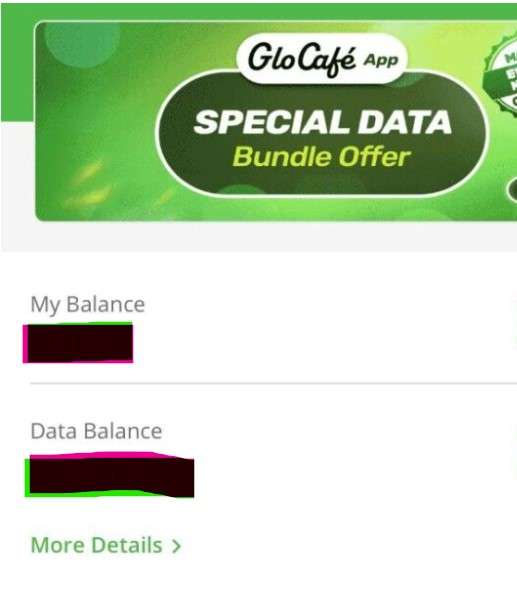
    To check your GLO airtime balance using the Glo Café app, download the app, log in with your GLO number, and your airtime balance will be displayed on the home screen or under the ‘My Balance’ section.

    You can also recharge, buy data, or transfer airtime from the same app. The app is free, user-friendly, and saves you from memorizing USSD codes.

    Step-by-Step Guide to Check Airtime Balance on GLO Using the Glo Café App

    To check your GLO airtime balance using the Glo Café app:

    1. Download and install the app on the Google Play Store or App Store.
    2. Launch the app and log in using your GLO phone number. An OTP (One-Time Password) will be sent to your number for quick verification.
    3. Once you’re logged in, your airtime balance is usually displayed on the home screen.
    4. If it’s not on the homepage, tap the “Account” or “My Balance” section for a detailed breakdown of your airtime, data, and other services.

    Now you can check your airtime balance on Glo easily. Another option is to use the Glo self-care portal. You’ll be asked to download the Glo mobile app there, though, so just use option 2.

    Did this help? See More

    Conclusion

    To check your airtime balance on Glo, Dial *310# or use the Glo café app.

    Frequently Asked Questions(FAQs)

    1. How do I check my Glo airtime balance in Nigeria?

    Just dial *310# on your Glo line and hit the call button. You’ll see your airtime balance pop up on your screen within seconds. It’s free and works on all Glo SIMs.

    2. Is there another way to check Glo balance apart from *310#?

    Yes, you can also use the Glo Café app. Download it from the Google Play Store or Apple App Store, log in with your Glo number, and you’ll see your airtime, data balance, and more on the dashboard.

    3. Why is my Glo balance not showing after dialing *310#?

    If it doesn’t show, your network might be unstable. Try switching your phone to airplane mode for a few seconds and turn it back on. Still not working? Restart your phone or try checking through the Glo Café app.

    4. How can I check my Glo bonus balance?

    To check bonus airtime or data balance, dial *323#. It shows your available bonus data and sometimes other bonuses you’ve received from Glo promos or recharges.

    5. How do I check my Glo airtime balance from another phone?

    You can’t directly check your balance from another phone, but you can link your Glo line to the Glo Café app on another device. Just download the app, log in with your Glo number, and use the OTP sent to your line to gain access.

  • How To Transfer Airtime on Airtel in 2025

    How To Transfer Airtime on Airtel in 2025

    Are you struggling to remember how to transfer airtime on Airtel in 2025? That’s normal; you’ve probably forgotten again and need a little nudge.

    What’s the use of transferring airtime when you could just buy? You may overload airtime on Airtel. This “share data plan” update can help you share with others and get paid in return, or…

    You could just be feeling generous, and transferring airtime from Airtel to Airtel can be a good gift or compensation.

    Save or bookmark this article for a continuous reminder on the top 2 ways to share airtime on Airtel in 2025 (you could forget again).

    How To Transfer Airtime on Airtel

    Here are quick steps to transfer airtime on Airtel:

    • Dial *321# on your Airtel phone.
    • Choose option 1 for “Airtel to Airtel”.
    • Select the airtime transfer option.
    • Enter the recipient’s Airtel number and the amount to transfer.
    • Confirm the transaction by entering your PIN.

    2 Ways to Share Airtime on Airtel in 2025.

    You can transfer airtime from Airtel to Airtel line through:

    1. USSD
    2. the MyAirtel app.

    The processes are user-friendly. Here is a step-by-step guide on how to transfer airtime on Airtel in 2025.

    How To Transfer Airtime on Airtel with USSD

    Here  are the steps to transfer airtime on Airtel through USSD

    1. Dial *321# on your Airtel line and select option 1, “Airtel to Airtel”.
    2. Enter the recipient’s Airtel number.
    3. Enter the Amount You wish to transfer
    4. Enter PIN or Default PIN to confirm the transaction

    1. Dial *321# on your Airtel Line

    Once you dial *321# on your Airtel line, you will receive a pop-up message with different possible actions.

    If you want to transfer airtime on Airtel, Press 1.

    2. Enter the Recipient’s Airtel Number

    Now, you should enter the number of the person you wish to transfer airtime to. After typing the number, ensure to re-check to ensure you don’t transfer to another lucky person.

    3. Enter the Amount You wish to transfer

    As you wish…

    4. Enter PIN or Default PIN to confirm the transaction

    To confirm your action to transfer airtime on Airtel, you need to input your PIN. If this is the first time you are performing this action, you can use the default PIN provided by Airtel (1234).

    For security and privacy reasons, it’s best to change your PIN to your Unique 4-digit number that only you can use.

    To change your PIN on Airtel,

    1. Dial *321#
    2. Choose option 3, “PIN management”
    3. Choosethe  Change PIN option
    4. Enter Old or Default PIN
    5. Enter New PIN
    6. Success.

    This is the last step to successfully transfer airtime on Airtel in 2025. On a side note, there’s a limit to how much you can send. Any amount below 50 naira and you’ll receive a message like this…

    Now, let’s discuss the second option.

    How To Transfer Airtime on Airtel through MyAirtel App

    These applications of Network providers are central areas where you can perform many functions from one place.

    The MyAirtel app is no different. You can recharge airtime, buy data bundles and even get specific in-app promos.

    To send airtime to another Airtel number using the MyAirtel App, follow the following steps;

    How to Share Airtime Using the MyAirtel App

    1. First, download and install the MyAirtel app from your device’s app store.
    2. Open the app and log in with your Airtel number. If you’re new, just follow the steps to create an account.
    3. On the home screen, go to the “Quick Actions” section and tap “View All” to see more features.
    4. Scroll down and select “ME2U – Share Airtime.”
    5. Enter the Airtel number of the person you want to send airtime to, along with the amount you want to share.
    6. Double-check the details, then enter your PIN to confirm and complete the transfer.

    Now you can transfer Airtime on Airtel using USSD or MyAirtel App. You can also link your NIN to Airtel Line or Phone Number.

    Conclusion

    Transferring Airtime on Airtel is easy and user-friendly. However, you might forget the code if you are not using the mobile app.

    Remember to save this article because there will be updates to any Airtel changes.

    If this helped you, these will

    Frequently Asked Questions(FAQs)

    1. How can I transfer airtime from Airtel to Airtel without using the internet?

    You can transfer airtime from one Airtel number to another without needing internet access by using the USSD code. Simply dial *321# on your Airtel line and follow the prompts:

    • Select Option 1: “Airtel to Airtel”
    • Enter the recipient’s Airtel number
    • Enter the amount you want to send
    • Enter your PIN (or the default PIN: 1234)

    This method works on any type of phone, even if it’s not a smartphone, and does not require any mobile data.

    2. What is the default PIN for Airtel airtime transfer and how do I change it?

    The default PIN for transferring airtime on Airtel is 1234. You can change this PIN for security reasons. Here’s how:

    • Dial *321#
    • Select Option 3: “PIN Management”
    • Choose “Change PIN”
    • Enter the default PIN (1234)
    • Enter your new 4-digit PIN

    Make sure to choose a PIN that’s easy for you to remember but hard for others to guess.

    3. Why is my Airtel airtime transfer not working and how do I fix it in 2025?

    If your Airtel airtime transfer isn’t working, here are some common reasons and how to fix them:

    • Incorrect PIN: Make sure you’re using the correct 4-digit PIN. If it’s your first time, try 1234 or reset it.
    • Wrong number: Double-check the recipient’s Airtel number. Transfers only work to other Airtel lines.
    • Low balance: Ensure you have enough airtime plus a small extra amount for service charges.
    • Transfer limit exceeded: You may have hit the daily transfer limit. Try again the next day.
    • USSD error: If USSD isn’t working, switch to the MyAirtel app or check your network connection.

    4. How much airtime can I send on Airtel per day using USSD or the MyAirtel app?

    Airtel usually allows users to transfer up to ₦5,000 per day, spread across multiple transactions. However, individual transactions must be ₦50 or above. Any amount below ₦50 will not go through, and you’ll receive an error message.

    5. Can I transfer airtime from Airtel to another network in Nigeria?

    No, Airtel airtime transfers only work within the Airtel network. You cannot transfer airtime from Airtel to MTN, Glo, 9mobile, or any other network.

    If you’re looking to help someone on a different network, consider:

    • Sending money through bank app or mobile wallet
    • Buying airtime directly for them using bank USSD codes or mobile banking platforms

  • Where can I convert my Bitcoin for cash in Nigeria?
    Where can I convert my Bitcoin for cash in Nigeria?

    So, you’ve got some Bitcoin (BTC), and you’re looking to convert it for cash? Maybe you want to use the Naira (NGN) for everyday expenses, or perhaps you’re just looking to exit the volatile world of cryptocurrency and secure your profits. Whatever the reason, you’re not alone! Many Nigerians are turning to digital currencies like Bitcoin for a variety of reasons, and with that comes the question: Where can I convert my Bitcoin for cash in Nigeria?

    In this post, we’re going to guide you through everything you need to know to convert your Bitcoin safely and easily. Whether you’re a newbie or a seasoned crypto trader, we’ve got you covered with the best platforms, security tips, and a step-by-step guide to cashing out your Bitcoin for Naira.

    Why Would You Want to Convert Bitcoin for Cash?

    First off, let’s talk about why you might want to convert your Bitcoin. If you’ve been holding onto Bitcoin for a while, you’re probably aware of how volatile the market can be. While cryptocurrencies like BTC can skyrocket in value, they can also drop just as quickly. This is why many people choose to convert Bitcoin into cash, especially if they want to lock in profits, pay bills, or make a purchase in traditional currency.

    You may be thinking, “But Bitcoin has huge potential!” That’s true! But when the market gets shaky or when you need to access cash for personal use, knowing how and where to convert Bitcoin for cash is key.

    Legal Considerations for converting Bitcoin in Nigeria

    Now, let’s get a bit serious for a moment. converting Bitcoin and other cryptocurrencies in Nigeria has faced some regulatory hurdles. The Central Bank of Nigeria (CBN) placed restrictions on cryptocurrency transactions in 2021, but that hasn’t stopped Nigerians from using peer-to-peer (P2P) platforms to buy and convert Bitcoin. These platforms allow people to convert their Bitcoin directly to others without needing to go through banks.

    Despite all this, it’s important to stay informed about the latest regulations and always follow local laws. Just as you would with any financial transaction, make sure you understand the legal implications when converting Bitcoin and always use secure methods to protect yourself.

    convert My Bitcoin for Cash in Nigeria

    The Best Platforms to convert Bitcoin for Cash in Nigeria

    Alright, enough about regulations! Let’s dive into the fun part: where to actually convert your Bitcoin for cash. Even if you’re new to crypto or have been around the block, choosing the right platform is crucial. Here are the best platforms that Nigerians use to convert Bitcoin for cash:

    1. Swapto(Formerly Dtunes):

    The number one app on our list is Swapto(Formerly Dtunes). 

    Swapto(Formerly Dtunes) is the best and most reliable platform for selling Bitcoin in Nigeria because of its high exchange rates, instant payments, and secure transactions. This makes it a favorite among freelancers, traders, and investors.

    The Swapto(Formerly Dtunes) App is built for speed, security, and convenience. Some of the key features of the Swapto(Formerly Dtunes) App include:

    • Instant Transactions: You can sell BTC and receive Naira in minutes.
    • Transparent Pricing: There are no hidden fees or surprise deductions.
    • Strong Security: End-to-end encryption and fraud prevention tools.
    • User-Friendly App: Simple, clean, and easy to navigate.

    If you’ve ever had a delayed payout on other platforms, you’ll love how Swapto(Formerly Dtunes) processes payments within minutes.

    Other apps you can use include:

    2. Paxful

    Paxful connects you directly with buyers and allows you to convert Bitcoin securely.

    • Payment Methods: From bank transfers to gift cards and mobile wallets, you’ve got over 400 payment options to choose from.
    • Competitive Rates: Paxful allows you to compare offers and pick the best rates when converting Bitcoin.
    • Escrow Protection: One of the best features of Paxful is its escrow service. This means that once you agree to a trade, your Bitcoin is held safely in escrow until the buyer confirms they’ve sent the payment. This provides you with extra protection.

    To get started, simply create an account, choose a payment method, and start listing your Bitcoin for sale. If you’re new to crypto, don’t worry—Paxful makes it super easy to navigate.

    2. Binance P2P

    Binance is also has an excellent P2P platform that makes converting Bitcoin super simple.

    • Payment Methods: You can use bank transfers or mobile wallets, making it a flexible choice for converting Bitcoin in Nigeria.
    • Security: Binance provides escrow services, ensuring that both you and the buyer are protected during the transaction.
    • Low Fees: Binance’s low transaction fees make it one of the most affordable platforms to convert Bitcoin on.

    If you’re looking for a platform with competitive exchange rates and a large user base, Binance P2P is a solid option.

    3. Luno

    If you’re not a fan of peer-to-peer trading, Luno might be more your speed. It’s a centralized cryptocurrency exchange where you can convert Bitcoin directly for Naira.

    • Payment Methods: The main payment method is bank transfer, which makes withdrawing your NGN easy.
    • Security: Luno is known for its strong security features, so your crypto transaction will be safe and protected.
    • Competitive Rates: While it’s not a P2P platform, Luno still offers competitive conversion rates for BTC to NGN.

    How to convert Bitcoin for Cash with Swapto(Formerly Dtunes)

    Here’s a simple step-by-step guide to get you started with Swapto(Formerly Dtunes):

    Sell Bitcoin to Naira:

    1. Create an Account: To get started, Download the Swapto(Formerly Dtunes) App and create an account. Search for Swapto(Formerly Dtunes) on your mobile app store to install it, or click here to download. Provide the necessary information and complete the registration process. Make sure to choose a strong password and enter a functioning email address to enable verification. Click here to visit the Swapto(Formerly Dtunes) website for more details.
    2. Verify Your Account: To comply with regulatory requirements and ensure the safety of the platform, Swapto(Formerly Dtunes) require you to verify your account. This typically involves clicking a link that would be sent to the registered email address after registration. Follow the instructions provided by Swapto(Formerly Dtunes) in the email to complete the verification process.
    3. Log in, set PIN and bank details: Immediately after you log in after the account verification, the app will prompt you to set a PIN and bank details. The PIN is your transaction PIN for all transactions, and the bank details are your withdrawal bank account.
    4. Sell Bitcoin: Select “Trade Crypto” on the dashboard and choose Bitcoin as the type you want to sell. Specify the amount of Bitcoin you wish to sell and choose the desired payment method. Swapto(Formerly Dtunes) will provide you with the current exchange rate and the amount of Naira you will receive. Confirm the transaction and proceed.
    5. Send Bitcoin: Copy the wallet address or scan the code to initiate the transaction. Payment will be reflected in your App Wallet after two (2) confirmations.
    6. Receive Naira: Once the transaction is completed, initiate withdrawal from the arrow beside the wallet balance, and Swapto(Formerly Dtunes) will transfer the agreed-upon amount of Naira to your designated bank account or the preferred payment method. The funds will be available in your account within minutes, allowing you to access your money quickly and conveniently.

    Converting Bitcoin for Cash Made Simple

    Converting Bitcoin for cash in Nigeria has never been easier, thanks to a platform like Swapto(Formerly Dtunes).

    Have questions or want to share your experience with converting Bitcoin? Drop a comment below. We’d love to hear from you!

  • How to Recover Bitcoin Wallet Access: A Comprehensive Step-by-Step Guide

    How to Recover Bitcoin Wallet Access: A Comprehensive Step-by-Step Guide

    Lost access to your Bitcoin wallet? If you’ve forgotten your password, misplaced your recovery phrase, or experienced a device failure, this step-by-step guide will help you regain control of your crypto funds.

    Losing access to your Bitcoin wallet can be a tiring experience, especially if you’re new to cryptocurrency. However, with the right guidance, you can regain control of your assets.

    This comprehensive guide will walk you through the process of recovering access to your Bitcoin wallet, ensuring you leave with a clear solution.

    Understanding Bitcoin Wallets

    HOW TO RECOVER BITCOIN WALLET ACCESS

    A Bitcoin wallet is a digital tool that allows you to store, send, and receive Bitcoin. There are several types of wallets, each with its own method of access and security features:

    1. Software Wallets: Applications installed on computers or smartphones.
    2. Hardware Wallets: Physical devices that store private keys offline.
    3. Paper Wallets: Physical documents containing your private and public keys.

    Understanding the type of wallet you have is crucial for the recovery process.

    Common Reasons for Losing Bitcoin Wallet Access

    There could be several reasons behind you losing your Bitcoin wallet access. Before diving into recovery methods, it’s essential to identify the cause of the lost access:

    1. Forgotten Passwords: Misplacing or forgetting the password to your wallet.
    2. Lost Recovery Phrases: Losing the seed phrase required to restore the wallet.
    3. Device Malfunctions: Hardware failures or loss of the device where the wallet is stored.
    4. Software Issues: corrupted wallet files or software glitches.

    Identifying the specific issue will guide you towards the appropriate recovery method.

    Recover Bitcoin Wallet Access

    What do I do If I Lose my Bitcoin Wallet Access?

    When you realize you’ve lost your Bitcoin access, do the following:

    1. Stay Calm: Panicking can lead to hasty decisions that might worsen the situation.
    2. Avoid Repeated Access Attempts: Multiple failed attempts can lock you out permanently.
    3. Gather Information: Collect any related data, such as wallet type, associated email addresses, and any backups you might have.

    All hope is not lost; the following are steps you can take to recover your Bitcoin wallet access.

    How to Recover Bitcoin Wallet Access: A Step-by-Step Guide

    Whether you’re using a software wallet, hardware wallet, or paper wallet, this guide will help you recover your funds securely.

    Follow these proven methods to regain control of your crypto wallet and avoid permanent loss.

    1. How to Recover a Software Wallet (Trust Wallet, Electrum, Exodus, etc.)

    If you use a Bitcoin software wallet, follow these steps to restore access:

    1. Use Your Recovery Phrase (12-24 Words)

    Most wallets provide a 12–24 word recovery phrase during setup. This phrase is your master key.

    • Open your wallet app and select Restore Wallet or Recover Wallet.
    • Enter your recovery phrase in the exact order provided.
    • Once verified, your wallet and funds will be restored.

    2. Check for Wallet Backup Files

    If you backed up your wallet, search for wallet backup files on your device.

    • Look for files like wallet.dat or encrypted key backups.
    • Use the wallet’s Import Backup feature to restore access.

    3. Contact Wallet Customer Support

    If you still can’t access your wallet at this point? Reach out to official wallet support for troubleshooting.

    Warning: Never share your recovery phrase or private key with anyone!

    2. How to Recover a Hardware Wallet (Ledger, Trezor, KeepKey, etc.)

    A Bitcoin hardware wallet is secure, but losing access doesn’t mean losing your funds. Here’s how to recover your crypto wallet:

    1. Use Your Recovery Seed (24 Words)

    During setup, you received a 24-word seed phrase. Use it to restore your wallet.

    • On a new or reset device, select Restore from Recovery Seed.
    • Enter the 24-word seed in the correct order.
    • Your wallet and Bitcoin balance should reappear.

    2. Replace a Lost or Broken Hardware Wallet

    If your device is lost or damaged:

    • Buy a new hardware wallet from the same manufacturer.
    • Enter your recovery seed to restore access.

    3. Contact Official Manufacturer Support

    Having issues? Contact Ledger Support, Trezor Support, or your wallet provider’s official help center.

    3. How to Recover a Bitcoin Paper Wallet

    A paper wallet contains your private key and Bitcoin address printed on paper. If you need access:

    1. Import Your Private Key into a Bitcoin Wallet

    To transfer funds from a Bitcoin paper wallet:

    • Choose a trusted Bitcoin wallet app (e.g., Electrum, Blockchain.com).
    • Use the Import Private Key feature.
    • Enter or scan the private key from your paper wallet.
    • Your Bitcoin balance should now be available in the software wallet.

    2. Secure Your Device to Prevent Bitcoin Theft

    Before importing your private key, ensure your computer or phone is safe.

    • Run antivirus scans to remove malware and keyloggers.
    • Use a fresh OS install or an offline device for maximum security.
    • Avoid public Wi-Fi to prevent hackers from intercepting data.

    Once imported, transfer your Bitcoin to a secure hardware or software wallet—paper wallets are easy to lose and vulnerable to damage.

    By following these steps, you can successfully recover your lost Bitcoin wallet and keep your crypto assets safe.

    How to Retrieve Wallet Access Without a Recovery Phrase

    Depending on your wallet type and previous access history, there are still ways to recover your crypto wallet without a recovery phrase. Follow these steps to regain access.

    1. Check for Auto-Logins or Saved Sessions

    Many crypto wallets, especially mobile and desktop wallets, may keep you logged in or store session data. If you’ve previously accessed your wallet on a trusted device:

    • Open the wallet application and check if you’re still logged in.
    • If logged in, immediately back up your private key or generate a new recovery phrase for future access.

    2. Look for a Wallet Backup File

    Some wallets create encrypted backup files stored on your device. To check:

    Search your computer or mobile storage for files like:

    • wallet.dat (for wallets like Bitcoin Core)
    • JSON backup files (common for some browser-based wallets)

    If found, reinstall your wallet software and import the backup file to restore access.

    3. Recover Access Through Linked Email or Account-Based Wallets

    Certain custodial wallets (e.g., Binance, Coinbase, Blockchain.com) allow account-based login with an email or phone number.

    • Visit the wallet provider’s official website.
    • Click on “Forgot Password” or “Account Recovery.”.
    • Reset your password using your registered email or phone number.

    Without your recovery phrase or private key, it’s almost impossible to recover your bitcoin. However, these steps can guide you.

    How To Secure Your Bitcoin Wallet Access

    To avoid future access issues:

    • Periodically back up your wallet and store the backups securely.
    • Write down your recovery phrase and store it in a safe location.
    • Consider using hardware wallets for enhanced security.
    • Keep your wallet software and devices updated to protect against vulnerabilities.

    For More Crypto Related Articles:

    Conclusion

    By understanding your wallet, identifying the cause of lost access, and implementing preventive measures, you can secure your assets and prevent future issues.

    Remember, staying informed and vigilant is key to navigating the world of cryptocurrency safely.

    FAQs on Bitcoin Wallet Recovery

    1. Can I recover my Bitcoin wallet without a recovery phrase?

    Unfortunately, without your recovery phrase or private key, it’s almost impossible to recover your bitcoin. However, check for backups or reach out to wallet support for guidance.

    2. What if I lose my hardware wallet?

    Your funds are safe as long as you have your 24-word recovery seed. Buy a new wallet and restore access using the seed.

    3. How can I prevent losing access to my Bitcoin wallet?

    Store your recovery phrase securely, create multiple backups, and avoid saving it digitally to prevent hacks.